

A hospital can have a PACS and still lack a connected imaging environment. Enterprise imaging solutions for hospitals bring images, reports, and patient data together across clinical workflows. PACS focuses on managing medical imaging, while a vendor-neutral archive primarily stores and archives images. The key distinction is integration: enterprise imaging connects imaging information with broader clinical context.
That distinction matters when images and related information are spread across systems or departments. A coordinated approach can help clinicians find the context they need within their workflows while preserving existing imaging tools that remain clinically valuable.
This article explains what enterprise imaging includes, how it supports workflow and data integration, and how it compares with PACS and VNA. It also covers planning considerations, from interoperability and governance to choosing technology that fits your hospital’s needs.
Key Takeaways
- Understand what cloud-native architecture can mean for an imaging environment and which planning considerations shape its fit.
- Identify workflow steps where better coordination can reduce friction for imaging teams.
- See why standards, metadata quality, patient matching, and exception handling matter when connecting clinical information.
- Distinguish the roles of PACS and VNA, and consider how valuable existing tools can remain part of a broader strategy.
What Is Enterprise Imaging?
Enterprise imaging connects medical images and clinical context across healthcare workflows. A hospital platform may link radiology images, reports, and patient records while supporting existing applications.
Cloud-Native Imaging Platforms
Cloud-native imaging platforms are designed to run in cloud environments, rather than simply moving a local system to hosted infrastructure. A cloud-enabled platform may keep software or storage on premises while connecting to remote services. With software as a service, a vendor manages the platform in the cloud. Hospitals can weigh access, storage growth, and integration needs against patient-care workflows. For example, physicians may need to access images and reports across locations.
Cloud, On-Premises, and Hybrid Delivery
On-premises delivery keeps core systems within hospital-managed infrastructure; cloud delivery uses hosted infrastructure; hybrid combines both. Hybrid-to-cloud projects may migrate selected workloads before broader archives. Implementation typically moves through workflow assessment, architecture decisions, integration, migration, validation, and phased deployment. Timing depends on data volume, interfaces, and migration scope. Licensing and implementation pricing depends on deployment model, storage volume, integration needs, and migration scope; a quote request determines the price.
Platform Features and Interoperability
Platforms differ in viewer and workflow features, specialty support, scaling approach, and integration options. Compare DICOM imaging objects and DICOMweb web services. Then assess HL7 and FHIR exchange for orders, results, patient identity, and encounter context. Risks include poor metadata, patient-matching errors, optional standards features, and exceptions that disrupt exchange. Validation should test these areas against real hospital workflows.
Security and Regulatory Requirements
In the United States, HIPAA governs the privacy and security of patient information. Hospital imaging systems should use access controls, encryption, and audit trails to protect patient data. Governance should define who can view, share, and administer images. For example, audit trails help teams review access to a patient’s study. Security design should also address data integrity and exception handling across connected systems.
Imaging workflow efficiency
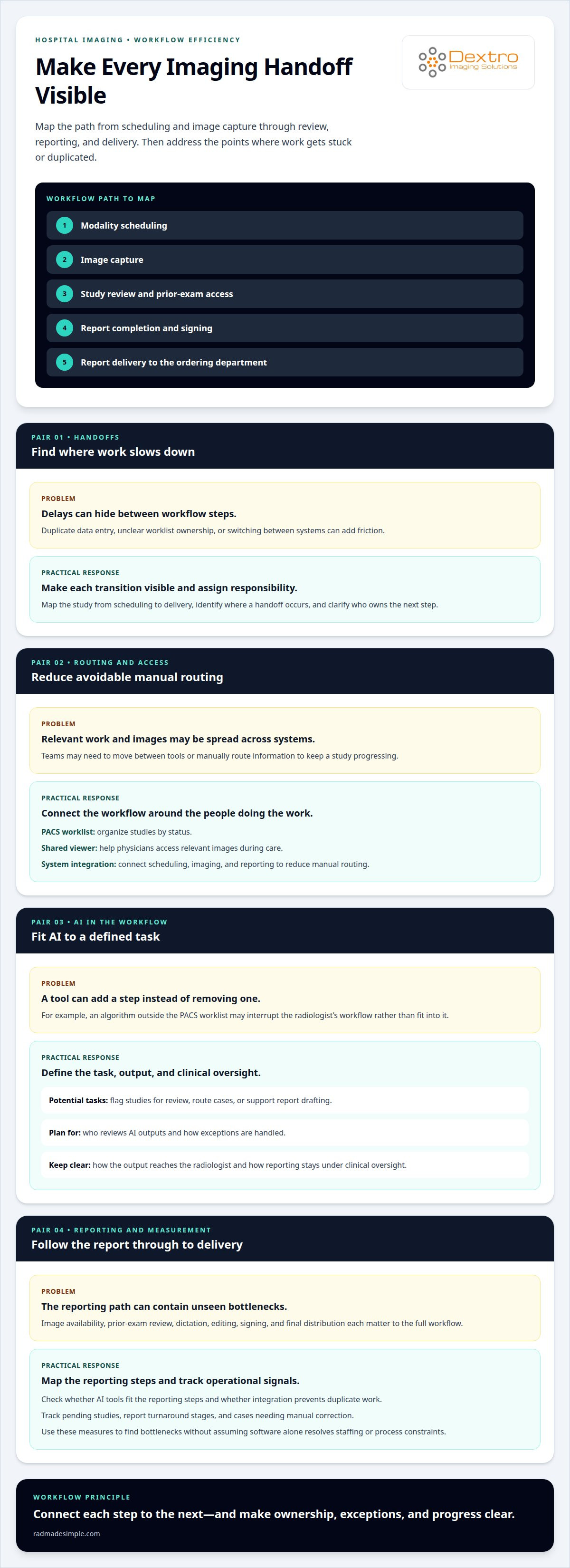
Efficient imaging workflows move a study from acquisition through interpretation and reporting with fewer avoidable handoffs. Map each step, from modality scheduling and image capture to review, report completion, and delivery to the ordering department. This can reveal delays caused by duplicate data entry, unclear worklist ownership, or switching between systems. Make each transition visible and assign responsibility.
Resource utilization depends on matching work to available staff and tools. For example, a radiology PACS worklist can organize studies by status, while a shared viewer can help physicians access relevant images during care. Integrating scheduling, imaging, and reporting systems can reduce manual routing. Portable radiology workstations can also support reading workflows when radiologists work across locations, depending on the hospital’s deployment design.
AI-enabled workflows can assist with defined tasks, such as flagging studies for review, routing cases, or supporting report drafting. Their value depends on where the tool fits and how its output reaches the radiologist. An advanced algorithm outside the PACS worklist may add a step rather than remove one. Define who reviews AI outputs, how exceptions are handled, and how reporting stays under clinical oversight.
For radiology reporting, map the path from image availability to final report distribution. Identify where a physician opens the study, reviews prior exams, dictates and edits findings, and signs the report. Then assess whether AI tools fit these steps and whether integration prevents duplicate work. Track operational measures such as pending studies, report turnaround stages, and cases needing manual correction. These measures help teams find bottlenecks without assuming software alone will resolve staffing or process constraints.
Hospitals refining image-review access can consider portable radiology workstations as part of their workflow planning.
Integration of images, reports, and patient data
An enterprise imaging platform connects diagnostic images with reports and patient context across clinical systems. Effective integration helps care teams locate relevant imaging data and understand its role in a patient’s treatment.
Image Analysis and Visualization
Analysis and advanced visualization tools help clinicians inspect imaging data for specific clinical questions. Their usefulness depends on the image format, diagnostic task, and how results enter the care workflow. For example, a radiologist reviewing a complex study may need image-processing tools alongside the original images. Integration should preserve access to source images and make analysis results clear to authorized users.
Image Comparison and Manipulation
Comparison tools can display current and prior images side by side, helping clinicians assess changes over time. Image manipulation features may support actions such as adjusting window and level or zooming in on an area of interest. These operations should not obscure the original image or its diagnostic context. During system design, teams can test a representative examination, compare prior studies, and confirm that reports remain linked to the correct patient record.
Image Sharing and Access
Enterprise-wide sharing connects imaging across departments and care settings, rather than leaving each department with isolated access. Malaffi, Abu Dhabi’s health information exchange, provides access to radiology images from more than 60 sites through a vendor-neutral image exchange platform. Within a hospital, a care-team member may need images and reports from another department; patient access can also support continuity between appointments. Define access by role, connect images to the correct patient identity, and provide context with each shared study. That sequence helps prevent a file from being viewed without its associated report or clinical details. A well-governed exchange makes the image available where care decisions happen, without treating image transfer as the entire integration task.
Enterprise imaging compared with PACS and VNA
PACS, a vendor-neutral archive, and enterprise imaging serve related but distinct roles. A radiology PACS supports imaging workflows, including study review and interpretation. A VNA primarily stores and archives medical images in a vendor-neutral format. Enterprise imaging connects images with broader clinical information and workflows across an organization. In practical terms, their scope differs: image storage, department-level imaging, or coordinated access to images and clinical context.
These systems don’t have to replace one another. A hospital may retain a PACS, viewer, archive, or specialty application that remains clinically valuable, then connect it within a broader strategy. For example, radiology can continue using its established PACS while other departments access relevant images through shared workflows. This can preserve familiar tools while supporting collaboration across care teams.
Format also shapes the comparison. DICOM is commonly used for medical imaging, but nearly three-quarters of medical images are in non-DICOM formats. A strategy focused only on traditional radiology studies may therefore leave other clinical images outside the archive or workflow. Consider whether the system can manage the image types and departmental use cases your organization needs, and how each image connects to its patient record.
To assess fit, map each system to its main job: PACS for radiology operations, VNA for vendor-neutral image archiving, and enterprise imaging for broader clinical integration. Then identify where images are created, who needs access, and which applications must remain in place. This clarifies whether the priority is archive consolidation, radiology workflow support, or cross-department collaboration. Choose an architecture based on clinical requirements, not the system label alone.
Review your radiology workstation needs alongside this architecture by exploring radiology imaging options.
Dextro Imaging Solutions
Dextro Imaging Solutions offers products for specific needs within a hospital’s radiology environment. Start by identifying the practical gap: reading access, PACS, or a compact imaging setup. Dextro Reading Stations and Portable Radiology Workstations support workstation needs, while PACS Harmony and aycan PACS are PACS offerings. Radcom Compact is another option. The right fit depends on the workflows and systems your hospital plans to support.
If you’re reviewing imaging infrastructure or planning a change, contact Dextro Imaging Solutions to discuss your requirements and the options that fit them.
Plan the Next Step for Your Imaging Environment
Before changing an imaging environment, define the clinical and operational outcome that matters most. Your next step may be improving reading access, reviewing display needs, or planning how current systems fit into a broader strategy. Clear priorities help your team focus on the workflows and technology decisions that need attention first.
As you assess enterprise imaging solutions for hospitals, consider Dextro Imaging Solutions options such as Radcom Compact, Dextro Reading Stations, and specialized diagnostic displays. These products address different parts of imaging work, so start with the requirement most relevant to your hospital’s plans.
Bring your priorities and questions into a conversation with Dextro Imaging Solutions. Contact Dextro Imaging Solutions to discuss your imaging needs and possible next steps. A focused plan can help your team move forward with greater clarity and confidence.
Frequently Asked Questions
What is PACS?
PACS, or Picture Archiving and Communication System, is software used to store, retrieve, and view medical images. In a radiology department, a technologist can send a completed study to PACS, where a radiologist opens it for review. PACS can also connect image access with reporting workflows, helping teams manage examinations as part of their imaging operations.
Why are solutions needed to manage point-of-care images?
Point-of-care images need an organized process for capture and access because they may be created outside radiology, such as during a bedside ultrasound examination. Without a defined process, an image can be difficult to find alongside the patient’s other clinical information. Establish how images are identified, stored, and made available to authorized care teams.
What are enterprise imaging solutions for hospitals, and what capabilities do they include?
Enterprise imaging solutions for hospitals connect image capture, management, and access across clinical settings. Depending on the platform, capabilities may include image viewing, archive management, workflow routing, and links to patient context. For example, a hospital can plan how an image from a specialty department becomes available to a clinician who needs it during a later encounter.
Which enterprise imaging vendors and platforms are commonly used by U.S. hospitals?
There isn’t a single vendor list that fits every U.S. hospital; platform selection depends on existing systems, clinical workflows, and integration needs. Dextro Imaging Solutions offers PACS Harmony and aycan PACS. These are options in its imaging portfolio, not measures of national adoption. Hospitals can assess whether a platform fits their operational requirements and intended use.
How do enterprise imaging systems integrate with EHRs, PACS, VNA, and clinical workflows?
Integration links imaging systems with the records and processes clinicians already use. For example, an EHR can provide patient and encounter context, while PACS supports radiology image workflows and a VNA handles image archiving. Map how a study moves from capture to review, then confirm that the right patient, report, and image stay associated. Organizations needing custom connectors or workflow tools often collaborate with software development partners like sydeso.com to build and maintain tailored solutions.
What standards support enterprise imaging interoperability, such as DICOM and HL7 FHIR?
DICOM supports medical imaging objects and related workflows, while DICOMweb provides web-based services for searching, retrieving, and storing imaging data. HL7 and FHIR can exchange clinical context, including orders, results, patient identity, and encounters. For a practical interoperability test, trace one study from an order through image retrieval and result delivery, checking data mapping and exception handling.


