

A home reading display doesn’t automatically need an integrated calibration sensor. DICOM calibration for monitors depends on measuring luminance and aligning grayscale output with the DICOM Part 14 Grayscale Standard Display Function (GSDF), not on whether the sensor is built into the panel. An integrated sensor is one way to support measurement; a separate calibrated photometer can provide another.
When setting up a remote reading workstation, it’s reasonable to focus on the sensor, but the sensor alone cannot keep displays consistent. DICOM calibration for monitors also depends on reliable measurements, suitable software, and a process for tracking performance across workstations.
This guide explains what GSDF calibration does, how grayscale consistency is assessed, and what to consider when managing compliance remotely. You’ll learn how to decide whether an integrated sensor fits your setup and how diagnostic displays and reading workflows can support dependable image review.
Key Takeaways
- Understand how GSDF calibration aligns grayscale output and why test patterns and measurements across the display’s range matter.
- Build remote quality assurance around conformance testing and consistent calibration processes, rather than relying on a sensor alone.
- See how just noticeable differences help describe visible grayscale steps and why display measurement is central to assessing them.
- Plan monitor testing around display performance and changes over time; the article explains the factors that shape an appropriate schedule.
What is DICOM GSDF calibration and why does it matter?
DICOM Part 14 defines the Grayscale Standard Display Function (GSDF), using the Barten model to relate display driving levels to luminance. DICOM calibration for monitors aligns grayscale output with this perceptual curve for consistent image review.
DICOM Test Patterns and Full-Range Measurements
DICOM test patterns are visual checks used alongside measurements to assess how a display reproduces grayscale and image detail. Full-range measurement characterizes luminance from the darkest output to the brightest, rather than testing only a few mid-gray levels. A photometer measures the display, and characterization provides the data needed to assess its response against GSDF.
This matters because a screen can show acceptable midtones while losing detail near black or white. Measure at the display center: bezel crimping and backlight non-uniformity make edge readings a poor substitute. For a primary general radiology diagnostic display, the minimum luminance is 350 cd/m². A full-range assessment helps identify where measured output departs from the intended grayscale response.
AAPM TG18 and TG270 Patterns
AAPM TG18 and TG270 patterns provide structured visual checks for medical displays. TG18 patterns help reveal issues such as visible grayscale steps, geometric distortion, and artifacts. TG270 addresses display quality assurance and offers a framework for evaluating display performance in clinical use.
Use patterns as part of a broader assessment, not as a replacement for luminance measurement. For example, a TG18 grayscale pattern can help show whether dark and bright details remain visible, while a photometer provides measured luminance values. Together, these checks give reviewers a clearer picture of whether the display’s visual output and measured response support clinical review.
DICOM and Display Calibration Differences
DICOM calibration aligns a display’s grayscale luminance response with GSDF. Display calibration is the broader process of adjusting and assessing a monitor for its intended use. For clinical review monitors, the distinction matters: a general brightness adjustment alone does not establish GSDF conformity.
Display calibration can involve settings such as luminance and contrast, while DICOM calibration focuses on the grayscale relationship defined in Part 14. A monitor may appear bright yet still reproduce grayscale steps inconsistently. Assess its measured response, inspect test patterns, and compare results with the intended clinical use. This separates a basic visual adjustment from a measured calibration process.
How do I manage display calibration compliance for a radiologist working from home?
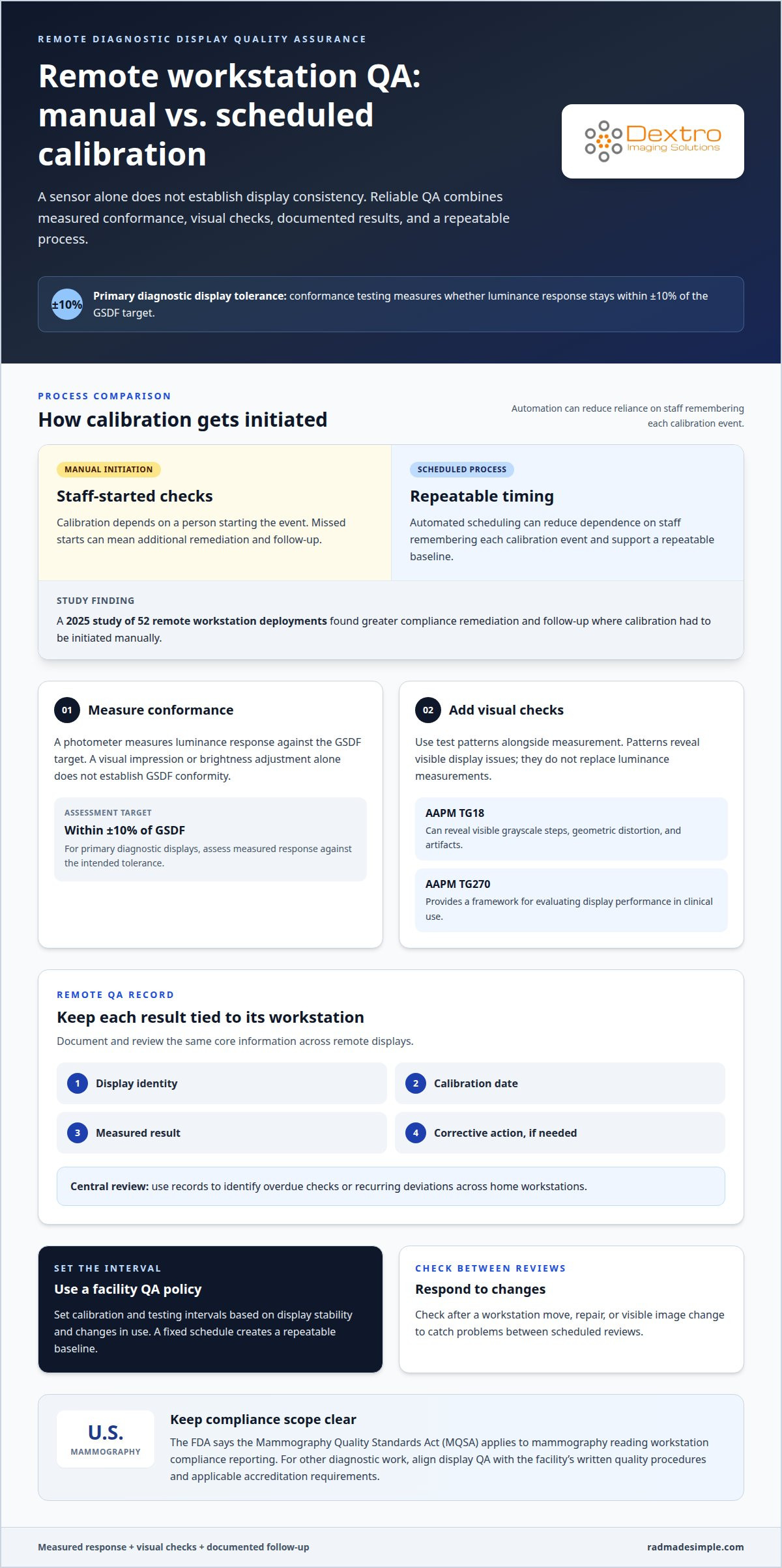
Remote compliance depends on documenting each display’s conformance, test results, and corrective actions. In the U.S., the FDA says the Mammography Quality Standards Act (MQSA) applies to mammography reading workstation compliance reporting.
Display Conformance Testing and QA
Display conformance testing measures whether a workstation’s luminance response stays within the intended GSDF tolerance. For primary diagnostic displays, the tolerance is ±10% from the GSDF target. This gives a measurable criterion for assessing performance rather than relying on visual impressions alone.
Build quality assurance around recorded measurements, visual checks, and follow-up when a display falls outside tolerance. Keep results tied to the specific workstation, so remote staff and quality leads can review the same record. A 2025 study of 52 remote workstation deployments found greater compliance remediation and follow-up where calibration had to be initiated manually. Automated scheduling can reduce dependence on staff remembering each calibration event.
Calibration and Testing Frequency
Set calibration and testing intervals through the facility’s QA policy, accounting for display stability and changes in use. A fixed schedule creates a repeatable baseline, while checks after a workstation move, repair, or visible image change can catch problems between scheduled reviews.
For a remote reader, document the calibration date, measured result, display identity, and any corrective action. Review those records centrally to identify overdue checks or recurring deviations across home workstations. The 2025 study’s finding about manual initiation highlights why a clearly assigned process matters: missed starts can create additional remediation and follow-up.
Applicable Regulations and Accreditation Standards
According to the U.S. Food and Drug Administration, MQSA applies to compliance reporting for mammography reading workstations. Documented workstation performance is therefore especially important for mammography quality records.
For other diagnostic work, align display QA with the facility’s written quality procedures and applicable accreditation requirements. Keep the protocol clear about measurement, review, escalation, and record retention. DICOM GSDF conformance provides a technical basis for evaluating grayscale performance, while applicable facility requirements determine how results are governed and documented. Keep mammography reporting distinct from broader workstation QA rather than applying one scope indiscriminately.
Display grayscale and just noticeable differences
Just noticeable differences (JNDs) describe perceptible grayscale steps and help quantify how a display renders subtle image detail.
Auto-Calibration and Display Characterization
Display characterization measures luminance output, while auto-calibration uses those measurements to adjust grayscale response toward DICOM GSDF. The distinction matters: adjustment without measurement cannot show whether the display’s actual output follows its target.
A peer-reviewed AJR study found that a 3MP medical-grade display rendered 600 JNDs, compared with 496 for a consumer LCD and 393 for a laptop LED. These results illustrate why display type and measured performance matter. Recharacterize after a display’s settings change or its grayscale response shifts.
GSDF Calibration Workflow and Tools
To calibrate a medical monitor, measure its luminance with a photometer, characterize its output, adjust it to the GSDF target using calibration software, then measure again to verify the result. This sequence shows whether adjustments bring measured grayscale output closer to the intended curve.
The essential tools are a photometer and software that supports display characterization and calibration. Record the display identity and results, then investigate failed measurements before returning the monitor to clinical use. Changes in settings, measurement problems, or display aging can disrupt conformance; repeat measurement and recalibration can address those causes.
Calibration equipment and software costs depend on the display configuration and service scope. Pricing is provided after a quote request and depends on the equipment and work involved.
For troubleshooting, check the measurement setup, calibration settings, and display condition. If a photometer reading conflicts with visual test patterns, repeat measurement and characterization before changing the target.
Monitor maintenance also affects grayscale performance. The typical economic lifetime for a monitor is 5-7 years, so track measured changes and plan replacement when performance no longer meets clinical needs.
For mammography primary interpretation workstations, minimum luminance is 420 cd/m², and minimum black-level luminance is 1.2 cd/m². The U.S. Food and Drug Administration says MQSA applies to mammography reading workstation compliance reporting, making documented display QA relevant to those records.
How often should diagnostic monitors be calibrated and tested?
Set calibration and testing frequency in the imaging service’s quality assurance protocol. DICOM GSDF performance can change as a display ages, its settings shift, or its environment changes. A repeatable schedule gives each workstation a clear review point, while event-based checks catch changes between planned assessments.
Use baseline measurements to decide how closely each monitor needs monitoring. Record the display identity, measurement results, calibration date, and any corrective action. Compare later readings with that baseline. A stable display and a workstation with frequent changes may need different levels of attention within the same QA program.
- Test after a monitor is installed or moved to a new workstation.
- Reassess after repair, setting changes, or a change in the display signal path.
- Investigate visual changes, such as grayscale steps becoming harder to distinguish.
- Document each result so the next review can compare performance consistently.
For remote reading, apply the same recordkeeping approach to every home workstation. Assign responsibility for initiating checks, reviewing results, and following up on failed measurements. A 2025 study of 52 remote workstation deployments found greater compliance remediation and follow-up where calibration required manual initiation. An automated, centrally tracked process can help prevent missed checks.
Testing frequency should also reflect the display’s role. A primary diagnostic monitor used for interpretation needs a planned QA cadence, while a non-diagnostic review screen may follow a different protocol. For mammography, keep workstation compliance reporting aligned with MQSA requirements. The U.S. Food and Drug Administration identifies MQSA as applicable to mammography reading workstation compliance reporting.
Use the resulting records to adjust the QA schedule when measurements show drift or recurring issues. Create a consistent display QA process by assigning owners, recording results, and documenting follow-up for each diagnostic monitor.
Dextro Imaging Solutions: Radcom Compact
Dextro Imaging Solutions offers Radcom Compact for imaging teams planning their diagnostic workstation environment. Once you’ve defined how displays will be calibrated, tested, and documented, consider how the workstation setup fits that quality process.
Dextro Imaging Solutions also offers Dextro Reading Stations and PACS Harmony. These products provide options for organizing diagnostic displays and reading workflows, including remote reading environments. The right configuration depends on the equipment and workflow your team needs to support.
Contact Dextro Imaging Solutions to discuss Radcom Compact and a reading setup suited to your imaging workflow.
Make Display Quality Part of Your Remote Workflow
The next step is to match your display and workstation decisions to the way your team reads and manages imaging. Dextro Imaging Solutions can help you explore the available options in that context. Contact Dextro Imaging Solutions to discuss your diagnostic imaging workflow and plan the next step with confidence.
Frequently Asked Questions
Does a home reading display need an integrated calibration sensor?
No. An integrated sensor is convenient, but it is not the only way to measure a display. A separate photometer can collect readings for calibration and verification. For example, a remote workstation without a built-in sensor can still be assessed if its quality process includes suitable measurement equipment, calibration software, and retained results. The key is to decide how measurements will be collected and reviewed consistently.
How do I know if my display is DICOM compliant?
Look for measured conformance results, not just a product description or visual impression. The record should identify the display and show that its measurements were compared with the intended GSDF response. For a practical review, match the report to the workstation in use and note the date, results, and any corrective action. A display that looks uniform may still need measurement to establish its grayscale performance.
What happens if a radiology monitor is not DICOM calibrated?
Grayscale levels may appear differently from the intended response, making subtle contrast distinctions less consistent across displays. A radiologist comparing the same study on two workstations may encounter different visible grayscale behavior. The practical response is to measure the display, document the result, and address the cause of any deviation rather than relying on visual appearance alone.
What is a just noticeable difference (JND) in the context of medical displays?
A just noticeable difference is the smallest change in luminance that a viewer can perceive under defined viewing conditions. DICOM GSDF uses perceptual steps to make grayscale changes more even to human vision. The DICOM standard defines 1,023 JNDs across its stated luminance range. This concept helps explain why equal digital value increments don’t necessarily look equally different on an uncharacterized display.
What is the difference between DICOM Part 14 and DICOM GSDF?
DICOM Part 14 is the standard section that defines grayscale display behavior, while GSDF is the function specified within it. Put simply, Part 14 is the reference framework; GSDF describes the relationship used to align luminance steps with human visual perception. This distinction helps teams describe both the standard guiding assessment and the specific grayscale target used when evaluating a medical display.
What is DICOM GSDF calibration for medical monitors?
DICOM GSDF calibration adjusts and evaluates a medical monitor so its grayscale luminance response follows the Grayscale Standard Display Function. Measurement results guide adjustment, and further testing checks the display’s response. The process concerns grayscale presentation, not image interpretation or diagnosis. It gives a radiology team a defined basis for assessing whether a monitor presents grayscale changes consistently for clinical image review.


