

A data migration strategy for PACS replacement should treat the move as a controlled clinical transition, not a file-copy exercise. It should inventory the archive, pilot the transfer before full execution, reconcile patient and study identifiers, and validate migrated images, reports, and links before go-live. A representative test migration should cover 30–60 days of data.
That discipline matters because replacement involves more than image files. Non-DICOM documents, diagnostic reports, and links among images, orders, encounters, and the EHR can all affect whether a prior study is usable in context. Legacy data may also contain duplicates, malformed studies, and inconsistent identifiers, so migrating everything unchanged can carry existing quality issues into the new environment.
This guide explains what medical imaging data migration involves and how to plan for legacy RIS/PACS data. You’ll learn how to assess source quality, map and reconcile patient identifiers, track expected and migrated objects, and test completeness, integrity, and clinical usability before cutover. It also covers migration sequencing, system coexistence, and continued access to prior studies as the new PACS takes over.
Key Takeaways
- Use DICOM conformance details to identify where source and destination systems may handle tags or objects differently.
- Track migration progress from expected and extracted objects through validation and acceptance, then investigate mismatches by modality, department, and date range.
- Set exception-handling rules so problematic records are reviewed and resolved rather than silently carried into the new archive.
- Plan how new studies will stay synchronized during the transition and define when the previous PACS can be deactivated.
- Build migration timing around archive condition, transfer method, and available bandwidth, with backup and continued access considered before cutover.
1. What Is a PACS Migration?
A PACS migration transfers imaging studies and supporting information from an existing system to a replacement. It also changes how staff retrieve images, reports, and patient context in the new application. A practical data migration strategy for PACS replacement plans the transfer alongside daily workflows, so the archive remains useful throughout the transition.
The key phases are inventory and assessment, mapping and preparation, pilot transfer, full migration, reconciliation, user testing, and cutover. Before transferring data, document the source archive, destination requirements, connected systems, and acceptance criteria. Run a pilot, review exceptions, refine mappings, and repeat the process at scale. Complete staff training and go-live planning before the new system handles patient data.
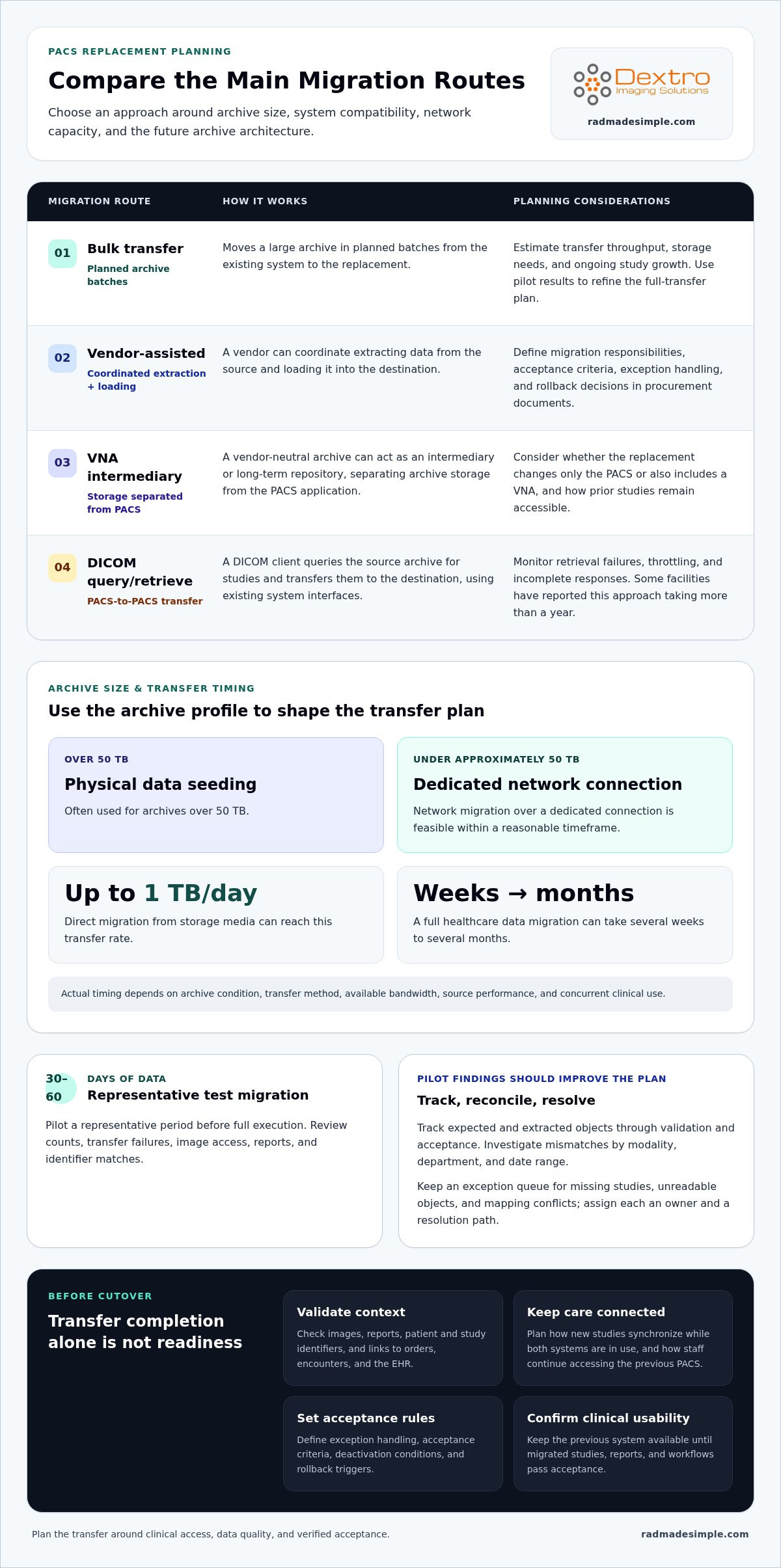
Image migration options include bulk transfer, vendor-assisted migration, and using a vendor-neutral archive (VNA) as an intermediary or long-term repository. Bulk transfer moves a large archive in planned batches; vendor assistance can coordinate extraction and loading; a VNA can separate archive storage from the PACS application. The right approach depends on archive size, system compatibility, network capacity, and the planned future architecture.
Use pilot results to shape the full transfer. Select representative studies, then monitor counts, transfer failures, image access, reports, and identifier matches. Maintain an exception queue for missing studies, unreadable objects, and mapping conflicts. Assign each exception an owner and resolution path, such as retrying the transfer or investigating the source record. A pilot is useful only when its findings improve the migration plan.
Downtime planning starts with a clear view of clinical dependencies. Some PACS users expect 24/7 system access and tolerate no downtime during migration. Trickle migration moves smaller amounts of data at a time and can reduce downtime. Define how new studies will synchronize while both systems remain in use, when staff will switch applications, and how temporary access to the previous PACS will continue during transition.
In the United States, migration pricing depends on the project and is provided after a quote request. Cost factors include archive volume, data condition, interfaces, transfer method, validation, and cutover support. Procurement documents should assign migration responsibilities, acceptance criteria, exception handling, and rollback decisions. Including PACS migration tasks in the request for proposal can make migration the future system vendor’s responsibility.
For capacity and timing, inventory the archive and estimate transfer throughput, storage needs, and ongoing study growth before selecting a method. A full healthcare data migration can take several weeks to several months. Direct migration from storage media can reach up to a terabyte of data per day. For archives over 50 TB, physical data seeding is often used; under approximately 50 TB, network migration over a dedicated connection is feasible within a reasonable timeframe.
Replacement planning should consider whether the project changes only the PACS or also includes a VNA. Keep the previous system available until migrated studies, reports, and clinical workflows pass acceptance. Document deactivation conditions and rollback triggers, while keeping those decisions under the health system’s control. This creates a defined route from pilot to go-live without treating transfer completion alone as proof of readiness.
2. What Is Medical Imaging Data Migration?
Medical imaging data migration moves images and their clinical context between systems. The migration inventory should cover DICOM studies and non-DICOM content, including PDFs, JPEGs, videos, audio, waveforms, scanned documents, and specialty formats. Include diagnostic reports and links among images, orders, encounters, and the electronic health record. Without these relationships, an image may transfer successfully but lose the context needed to retrieve it.
Begin interoperability review with the DICOM conformance statements for both PACS systems. Compare supported information object definitions, transfer syntaxes, services, and storage behavior. Confirm that the destination can receive and retrieve the source system’s study types. DICOM’s third version is its latest version, and migration can upgrade files from versions 1.0 and 2.0. Test representative objects in the destination rather than relying on a document comparison alone.
A DICOM client-based PACS-to-PACS migration uses query/retrieve to find studies in the source archive and transfer them to the destination. This approach can use existing system interfaces, but the migration team must monitor retrieval failures, throttling, and incomplete responses. Some facilities have reported that migrating PACS data using DICOM query/retrieve took more than a year. Archive volume, source performance, network capacity, and concurrent clinical use all affect throughput.
Private tags require a deliberate audit. DICOM identifies private tags through odd-numbered tag group numbers in the header. These fields may carry local attributes, such as information needed by a workflow or device. Identify which private tags matter, then test their preservation and interpretation in the target PACS. If coercion changes a value or removes a field, record the transformation and validate its effect before applying it across the archive.
Map identifiers through a documented crosswalk. Match patient IDs, accession numbers, study instance identifiers, and relevant metadata between source and destination. Preserve traceability to original values, and test cases with duplicate IDs, corrected demographics, or merged records. Patient and order context may travel through DICOM attributes, HL7 messages, FHIR resources, or source-system mappings. Validate that the resulting links connect the correct patient, order, report, and study.
Organizations should plan how access, audit records, and retention will be handled during migration. Each moved study should generate an audit-log entry; chain-of-custody logs are described as a HIPAA compliance requirement. Define how retention rules apply to source and destination records before decommissioning the old archive.
Finally, test migrated studies on the diagnostic display workflow used by staff. Confirm that images open and remain readable, and that reports and patient context appear with the correct study. A diagnostic display workflow belongs in end-to-end testing, alongside DICOM transfer and retrieval checks.
3. Validating migration completeness, integrity, and clinical usability
Validate migrated images by reconciling source and destination counts, checking metadata, and opening studies in the target PACS. Track each object through expected, extracted, migrated, validated, and accepted states. Compare studies, series, instances, reports, and related objects to expose gaps. This gives hospitals evidence beyond a general statement that migration is complete.
Start with a statistically representative test migration covering 30–60 days. Include different modalities, departments, date ranges, and object types. Compare source and destination counts across those categories, then investigate each variance. A mismatch in one modality may reveal a mapping or transfer issue hidden by an overall archive total.
To check image integrity, confirm that destination studies open, display, and retrieve as intended. Compare key DICOM metadata, including patient identifiers, accession numbers, and study relationships. Review representative images against their source records, and test diagnostic workflows that depend on reports or linked orders. A file’s presence alone is not enough if staff cannot locate or use it clinically.
Set explicit acceptance measures before full migration. The target PACS migration validation pass rate is greater than 99%. For migrated CT studies, the target integrity rate for radiation dose data in private tags is 100%. Treat these measures as acceptance criteria, not substitutes for examining exceptions or confirming clinical usability.
Handle duplicates, corrupted studies, incomplete transfers, and non-DICOM files through separate exception pathways. Flag suspected duplicates for identity and study-level review instead of automatically deleting or merging them. Quarantine unreadable or malformed objects for investigation, retry incomplete transfers, and record the outcome. Inventory PDFs, JPEGs, videos, audio, waveforms, and scanned documents, then test each supported type in its destination workflow.
Validation should also confirm that patient and order context remains connected. Test cases involving corrected identifiers, linked reports, and relevant encounters. Confirm that staff can retrieve the intended prior study through the replacement PACS. Record each mismatch, its impact, and the corrective action before acceptance.
Keep failed checks visible until they are resolved or formally accepted through the health system’s process. Retest corrected objects and update the reconciliation record; don’t count a retry as successful until validation passes. Review outstanding exceptions before cutover, then apply the same criteria to any final synchronization. Migration is complete only when results are documented and clinical access is confirmed, not simply when the transfer status says complete.
4. Assessing data quality and reconciling patient identifiers
Inventory every patient-data system feeding the legacy PACS, including the RIS, modality worklists, and identity sources. Record archive dates, modalities, formats, study counts, known errors, and proprietary fields. Then decide which data must migrate and which should remain archived. This inventory gives the team and vendor a usable baseline for scope and planning.
Assess data quality before transfer by profiling patient IDs, accession numbers, dates, study descriptions, and DICOM tags. Identify missing values, duplicates, inconsistent formats, and studies linked to outdated identifiers. Clean source data by correcting errors, resolving duplicates, and removing unnecessary data where appropriate. Monitor error patterns by modality and department, not just across the entire archive.
A PACS study error rate above 5% indicates a systemic DICOM tag or identity reconciliation problem that should be resolved before migration continues. Treat that threshold as a stop-and-investigate signal. For example, repeated mismatches between accession numbers and patient IDs may point to a source mapping problem, while isolated unreadable studies may need separate exception handling.
Patient identity matching should follow an agreed hierarchy of identifiers and documented rules for conflicts. Compare patient ID, assigning authority, demographics, accession number, and study date; don’t merge records based on a single matching field. Route ambiguous matches to a defined exception queue. For each reviewed case, record the source values, proposed match, decision, and resulting destination identifier.
Use HL7 ADT A40 merge history to trace patient-identity changes when that event history is available. Map the former and surviving patient identifiers to the destination record, then test linked studies and reports. A merged patient record should not leave older radiology exams stranded under the retired ID. Keep the original identifiers in migration records to support traceability and investigation.
Review vendor-specific and proprietary DICOM tags before selecting conversion rules. Identify fields used by modalities, reporting links, or local workflows, and test whether the replacement PACS preserves or transforms them. A changed value can affect study lookup even when images remain intact. Document each transformation and monitor its effect on patient matching during the pilot.
Estimate migration effort based on archive volume, data condition, identity conflicts, and the number of source systems. These factors shape cleanup work, exception review, and conversion steps more than a simple study count. Keep acceptance and rollback decisions with the health system. Resume migration only after systemic tag or identity errors have been corrected and retested.
5. Legacy RIS/PACS data migration
Legacy RIS/PACS migration starts with an inventory of every healthcare system holding patient data. Record archive size, date ranges, modalities, formats, and links between studies and reports. Then identify which records must move and which should remain accessible in an archive. This scope shapes the migration method, conversion work, storage plan, and department readiness.
Set a schedule using archive age as one planning input, not the only one. One rule of thumb estimates migration time at one-third of the time taken to acquire the archive. Under that rule, an archive containing six years of data would take two years to migrate. A full healthcare data migration can also take several weeks to several months, depending on archive condition, transfer method, and available capacity.
Assess legacy records before selecting a transfer route. A page on the topic states that 10 to 15% of a legacy PACS archive typically contains studies that are corrupted, malformed, or unreadable. Classify these records separately, preserve their source details, and assign a review path. This prevents exceptions from disappearing inside an overall completion estimate.
Choose transfer methods based on volume, bandwidth, and the ability to run systems in parallel. For PACS archives over 50 TB, physical data seeding is often used to move the core archive rather than uploading it over a network connection. For archives under approximately 50 TB, network migration over a dedicated connection is feasible within a reasonable timeframe. Direct migration from storage media can reach up to a terabyte of data per day.
When source and target systems are far apart and the WAN lacks sufficient bandwidth, a tape-based P2T2P-DBridge approach can transfer DICOM datasets. It writes patient data from the source PACS to magnetic tapes, then loads those datasets into the destination PACS. This method also applies when unloading and loading cannot happen in parallel.
Keep both PACS systems in normal use during replacement migration, and define how new studies will synchronize. Back up data before migration, retain temporary access to the previous system when needed, and document when it can be deactivated. Each moved study should generate an audit-log entry, with chain-of-custody logs described as a HIPAA compliance requirement. Health systems should retain control of acceptance, rollback, and decommissioning decisions.
Make the operational handoff part of the plan. For example, a radiology department can rehearse retrieving prior studies from the new PACS while new exams continue arriving. Assign owners for transfer monitoring, exceptions, and access decisions, then record each outcome. Plan your PACS migration workflow around archive condition, system coexistence, and clinical access.
Dextro Imaging Solutions: Radcom Compact
Dextro Imaging Solutions offers Radcom Compact for organizations reviewing their radiology technology alongside a PACS replacement. A migration plan determines how the archive moves; reviewing the imaging environment also helps teams consider the equipment used in daily workflows.
For broader workflow planning, Dextro Reading Stations, PACS Harmony, and aycan PACS are also available. These offerings give imaging teams options as they assess their PACS environment and future requirements. They complement the planning process but don’t replace migration inventory, identifier reconciliation, or validation of transferred records.
If you’re reviewing imaging technology as part of a PACS transition, contact Dextro Imaging Solutions to discuss your needs.
Build a Stronger Imaging Future
After go-live, keep migration decisions connected to everyday operations. Assign clear ownership for archive access, record corrections, and future system changes. A data migration strategy for PACS replacement can also guide how your organization evaluates new imaging requirements, so future updates support established workflows instead of creating disconnected processes. Treat the transition as a foundation for ongoing planning, not simply a completed technical project.
As you plan the next stage, consider how the wider imaging environment fits together. Dextro Imaging Solutions offers Radcom Compact, Dextro Reading Stations, and Jusha Diagnostic Monitors for organizations assessing their imaging technology alongside PACS decisions. These offerings can be part of a broader discussion about your operational priorities and equipment needs. Contact Dextro Imaging Solutions to discuss the next steps for your imaging environment. A thoughtful plan today can help your team move forward with clarity and purpose.
Frequently Asked Questions
What Is Medical Imaging Data Migration?
Medical imaging data migration moves imaging records from one environment to another while preserving their clinical relationships. It can involve images, reports, patient and order details, and non-DICOM items such as scanned documents or waveforms. For example, a transferred image should remain findable through the intended patient and study record. Define what users need to retrieve, not just which files need to move.
Is It Necessary to Migrate the Entire Radiology History?
No. The migration scope should reflect clinical access needs, archive condition, retention policies, and operational requirements. An organization may move frequently accessed studies while keeping other records available through a separate archive. Before deciding, map which departments need which history and how staff will retrieve records left behind. The key is to ensure a scope decision does not make relevant prior imaging inaccessible during care.
What Is a PACS Migration?
A PACS migration is the transition of imaging data and related workflows from one picture archiving and communication system to another. It involves more than transferring image files: users also need dependable study lookup, patient context, and connected reporting workflows. For instance, a study may be present in the new archive but difficult to use if its accession number or report association does not carry over correctly.
Why Is a Data Migration Strategy Important?
A planned strategy gives teams a shared basis for deciding what moves, how progress is measured, and who resolves exceptions. It also helps the organization protect daily operations while old and new systems overlap. Define acceptance criteria before transfer begins, then connect each criterion to an owner and a test. This turns broad goals such as “complete migration” into specific, reviewable decisions.
Why Might an Institution Need to Change Its PACS?
An institution may replace PACS when the current system no longer supports its workflow, integration, storage, or operational needs. A PACS that is more than five years old may be too slow for a facility’s current workflow or may have other limitations. A change can also follow broader system modernization. The assessment should identify the specific constraints the replacement must address.
What are the main PACS migration risks, downtime concerns, and rollback strategies?
Key risks include missing studies, identity mismatches, unexpected format handling, and interrupted access during cutover. Reduce exposure by defining rollback triggers before go-live, such as failed access to required studies or unresolved synchronization issues. Keep the previous PACS available during transition when needed, and document who can authorize a rollback. Plan how new studies will be captured and reconciled if teams switch systems back.
How should clinical users test and sign off on migrated PACS data before go-live?
Clinical users should test realistic tasks in the destination system, including finding a prior study, opening images, reviewing associated reports, and confirming patient context. Include users from departments and modalities represented in the archive. Record each test result, issue, and resolution, then have designated clinical and operational owners review the evidence against agreed acceptance criteria. Sign-off should reflect successful use, not merely completed transfer jobs.
What is a practical PACS migration cutover plan for keeping imaging workflows operational?
A practical cutover plan names the system-switch sequence, staff responsibilities, communication steps, and decision points for pausing or reversing the transition. Schedule final synchronization of new studies, confirm destination access, and tell relevant departments where to retrieve current and historical images. Maintain a route to the previous PACS during transition when needed. After switching, monitor access issues and route exceptions to assigned owners.


