

The initial implementation quote is only one part of the PACS budget. The final cost depends on the deployment model, system scale, integrations, data migration, and training.
It’s easy to focus on setup costs when comparing options. But a lower upfront cost doesn’t necessarily mean lower spending over time: cloud subscriptions and on-premise hardware, maintenance, and staffing affect the five-year total in different ways.
This guide explains the expenses that shape implementation, compares cloud and on-premise PACS, and outlines what to include in a five-year ownership estimate. Study volume, storage needs, migration, and connectivity can all affect the budget, so consider the full financial picture before choosing an approach.
Key Takeaways
- Separate setup expenses from ongoing ownership costs to see what your PACS budget needs to cover.
- Compare cloud and on-premise models across the full five-year horizon, not just by their initial price.
- Assess how archive size, data migration, EHR integration, and bandwidth needs can shape implementation complexity.
- Match subscription or licensing structures to study volume and user access patterns.
- Explore how PACS Harmony and aycan PACS fit into your imaging workflow and system requirements.
How Much Does the PACS System Cost?
The total depends on hardware, licensing, infrastructure, and the deployment model.
HIPAA-related security, cybersecurity controls, and data-retention needs affect costs through storage, access management, backups, and recovery infrastructure.
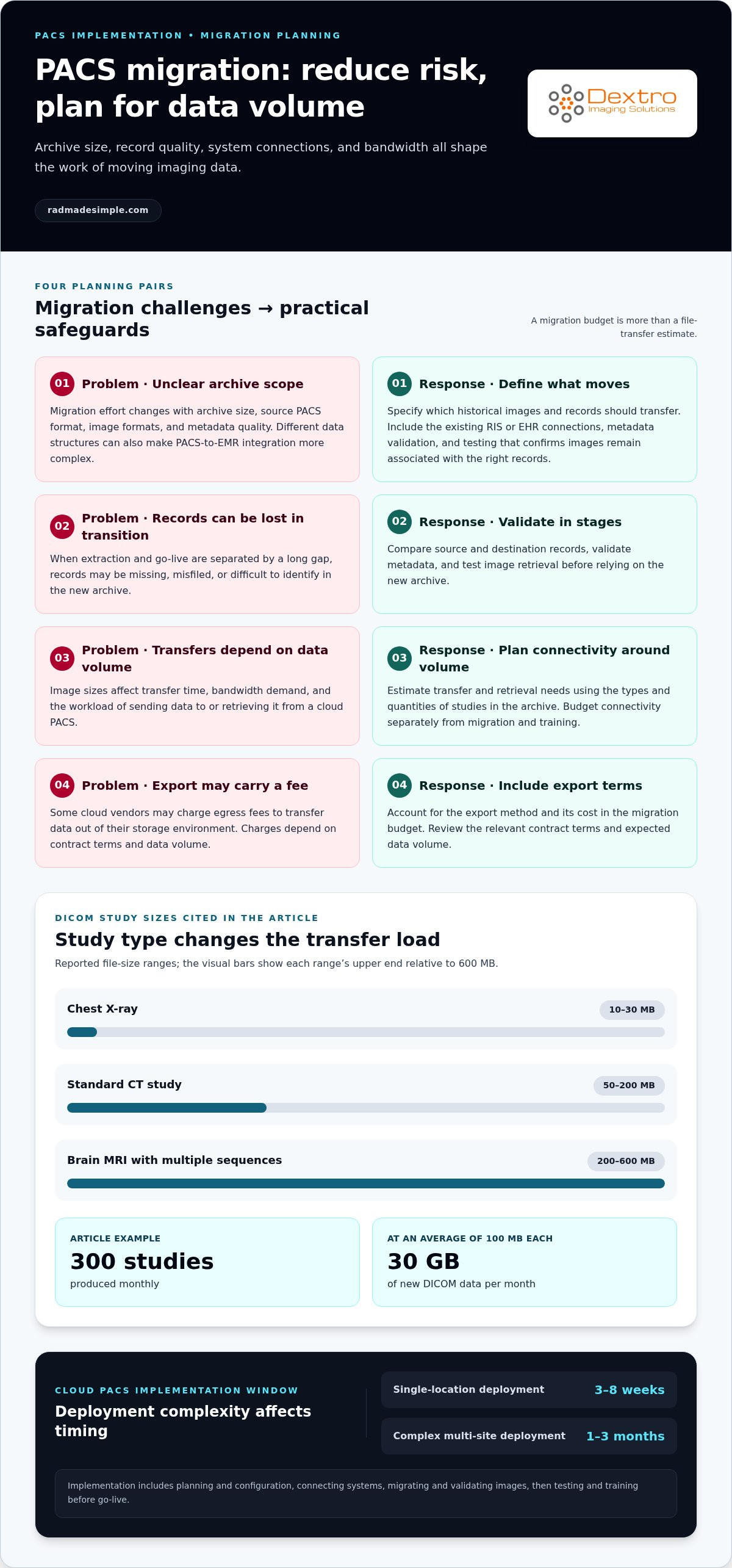
Implementation typically involves planning and configuration, connecting systems, migrating and validating images, then testing and training before go-live. A single-location cloud PACS typically takes 3-8 weeks; complex multi-site cloud deployments may take 1-3 months.
Legacy Infrastructure and Maintenance
Legacy infrastructure includes existing servers, storage, backup systems, and network capacity that continue supporting imaging before replacement. Its cost matters because an old PACS can require ongoing maintenance while the new system is being configured. On-premise servers typically need replacement every 4-6 years or 5 to 7 years, depending on the estimate, so timing affects whether another hardware cycle overlaps with implementation.
On-Premises Purchase and Upkeep
An on-premises PACS places server hardware and storage at the facility, with software licensed separately. Annual software maintenance typically adds 15-20% of the original license cost, making purchase price only one part of ownership.
PACS and Radiography Capital Costs
PACS and conventional radiography can have different upfront capital requirements because PACS needs digital systems, storage, and supporting infrastructure. One study found higher initial capital costs for PACS than conventional radiography for chest radiographs and CT and MRI brain scans. For a practice planning a purchase, this comparison highlights why initial capital alone may not reflect later operating costs or implications for imaging workflows.
Deployment Model Cost Differences
Cloud PACS shifts spending toward subscriptions and setup, while on-premise PACS requires more upfront spending on hardware, licenses, and maintenance. A hybrid approach can keep active imaging local while archiving to cloud storage, balancing local infrastructure with recurring storage costs.
Budget for overlap, too. A delayed go-live can leave a practice paying for its old PACS while configuring the new one. Include both systems’ running costs during the transition, along with migration and testing, so the estimate reflects the actual period of parallel operation.
Data migration, EHR integration, and bandwidth
Migration and integration costs depend on archive size, image formats, metadata quality, and connections to existing clinical systems. Bandwidth also affects how quickly a cloud PACS can receive and retrieve imaging data.
Legacy Data Migration and Integration
Legacy data migration transfers images and associated records from an existing archive to the new PACS while preserving their usability. Integration connects the new system with established tools such as an RIS or EHR, allowing imaging information to move through existing workflows.
Archive Migration and Vendor Fees
DICOM archive migration covers exporting, transferring, and importing image files and related data.
Some cloud vendors may also charge egress fees to transfer data out of their storage environment. These charges depend on contract terms and data volume, so include the export method and its cost in the migration budget. The size difference between a chest X-ray and an MRI archive can also affect transfer time and bandwidth demand.
Migration Risks and Implementation Costs
Migration risks include missing, misfiled, or confusing records when extraction and go-live are separated by a long gap. A staged process helps teams compare source and destination records, validate metadata, and test image retrieval before relying on the new archive.
For scale, a chest X-ray DICOM study is typically 10-30 MB, a standard CT study 50-200 MB, and a brain MRI with multiple sequences 200-600 MB. A practice producing 300 studies monthly at an average 100 MB generates 30 GB of new DICOM data monthly. These volumes affect bandwidth planning and cloud transfer workloads.
Budget separately for migration, connectivity, and training. Reviewing PACS implementation planning can help teams frame these workstreams clearly.
Total cost of ownership for cloud and on-premise PACS
Five-year total cost of ownership includes more than implementation: subscriptions or licenses, hardware, support, storage, staffing, and replacement cycles all affect the budget. Cloud and on-premise estimates can differ substantially because they allocate these responsibilities differently.
These figures are estimates, not universal prices. Their wide ranges show how staffing, infrastructure, and service assumptions can change a comparison.
On-premise ownership places more responsibility inside the facility. The practice funds and maintains servers, storage, backup infrastructure, and software, then plans for hardware replacement. On-premise PACS hardware generally requires replacement every 4-6 years, while an on-premises system typically has a maximum useful life of five to ten years. A five-year budget should therefore account for both ongoing operations and equipment timing.
Cloud PACS shifts much of the server and storage infrastructure from a facility-owned environment to a recurring service. The practice still needs suitable network access, imaging workstations, and staff workflows, while subscription charges depend on the service’s pricing structure and usage. Study volume and archive growth matter: a fixed monthly allowance can work differently from storage-based or per-study billing as imaging demand changes.
Across five years, one estimate says cloud-based PACS can reduce total cost of ownership by 30% to 50% compared with on-premise installations. The modeled 300-study example shows a larger gap, which reflects how assumptions and included costs vary between estimates. Compare like with like: include migration, integration, support, administration, storage, and replacement costs for each model.
Cloud doesn’t eliminate every local expense, and on-premise doesn’t make every future cost predictable. Build the budget around the facility’s responsibilities, expected studies, archive needs, and staffing model. A side-by-side five-year estimate clarifies the trade-off: upfront capital and internal maintenance on one side, recurring service costs and retained local requirements on the other. Just as healthcare facilities manage recurring IT fees alongside capital upgrades, clinic administrators often evaluate everyday operational expenses—such as working with Renegade Payments to streamline merchant processing and patient payment costs—to preserve working capital for core imaging infrastructure.
SaaS subscriptions versus one-time licenses
The choice changes how healthcare organizations budget for radiology software: a license concentrates more spending upfront, while SaaS spreads it across operating periods. Compare both models over the same term and against the same workflow needs.
Software Licensing and Maintenance
A one-time PACS license is an upfront payment for software use, while ongoing maintenance adds recurring costs. Annual on-premise software maintenance typically costs 15-20% of the original license cost, so include it in each operating year.
For example, a license-based budget should separate the initial software purchase, annual maintenance, and any implementation services. A SaaS budget should show the subscription period and any setup costs. This breakdown helps radiology teams compare the total commitment rather than judging the license price alone.
User and Concurrent-Access Licensing
User licensing determines how access is counted, either by named user or simultaneous session. A practice with 15 radiologists working different shifts might need five concurrent PACS licenses rather than 15 named-user licenses.
That difference can change the license requirement without changing the number of radiologists. Map shifts and shared workstations before estimating access needs. Also account for other roles involved in medical imaging, such as technologists or referring clinicians, whose workflows may require system access.
SaaS pricing can use a monthly subscription, a per-study rate, or storage-based billing. Small cloud PACS subscription tiers commonly cover 200-500 monthly studies, while mid-size tiers commonly cover 500-2,000 monthly studies. A practice should match the billing basis to its expected study volume and archive growth.
These models allocate costs differently: study-based charges track imaging activity, while storage charges reflect retained data.
Annual cloud commitments may be discounted by 5-15% compared with month-to-month billing. That can improve budget predictability, but compare the term against anticipated operating needs. Advanced cloud add-ons may increase monthly costs by 25-75%, depending on the vendor and feature set.
For a fair comparison, list software, maintenance, users or concurrent sessions, subscription term, study volume, storage, and add-ons. A medical imaging team can then see which license structure supports its workflow without paying for unused access or overlooking recurring charges.
Five-year cost comparison
A five-year comparison reveals costs an installation quote can miss. Include capital purchases, annual maintenance, subscriptions, staffing, storage, migration, and replacement timing. For example, a server bought near the start of the period may need replacement before the comparison ends, while cloud fees recur monthly or annually.
These figures represent modeled scenarios, not a universal price schedule. Different assumptions produce different totals.
Cloud license fees in one five-year calculation increase by 5% per year. That escalation makes the monthly starting charge an incomplete budget measure. Project each annual payment across the full term, then include data capacity, add-ons, migration, and any local hardware that remains part of the workflow.
An on-premise comparison requires the same discipline. Include server and storage capital, software maintenance, administration, and equipment replacement timing. A lower ongoing subscription does not by itself prove lower ownership cost, just as the purchase price of an existing server does not represent its full five-year expense.
Build two comparable columns, one for cloud and one for on-premise. For each, list initial capital, recurring annual costs, monthly charges, study capacity, storage growth, staffing, and transition expenses. Keep study volume consistent across both models, then test how a higher imaging workload changes the totals. This makes the budget useful for planning patient care operations, not just approving a purchase.
Use the five-year result to identify the cost drivers behind each deployment, rather than treating one headline total as decisive. Explore PACS solutions for your imaging workflow as you compare capacity, deployment, and ownership needs.
Dextro Imaging Solutions: Radcom Compact
Dextro Imaging Solutions offers Radcom Compact to consider when evaluating PACS needs alongside a five-year budget. If your comparison focuses on imaging workflow and platform choice, PACS Harmony and aycan PACS are also available. Dextro Reading Stations may also be relevant when assessing reading workflows.
Use study volume, storage needs, integration priorities, and preferred deployment model to frame the discussion. These requirements help clarify which solution aligns with your facility’s plans, without reducing the decision to an upfront quote.
Contact Dextro Imaging Solutions to discuss your PACS requirements, or visit radmadesimple.com.
Turn Your PACS Budget Into a Clear Plan
Estimating the cost of implementing a new PACS is a starting point, not the final decision. Next, align the system choice with your imaging priorities, operational workflows, and long-term technology plans. Shared requirements help clinical and IT teams evaluate options against the same goals.
Dextro Imaging Solutions offers Radcom Compact, Dextro Reading Stations, and advanced diagnostic displays. Consider these offerings as part of a broader imaging environment, alongside the PACS approach your organization is evaluating. Focus on how each option fits your requirements rather than treating the budget as an isolated purchasing exercise.
Bring your priorities and implementation considerations into a conversation with Dextro Imaging Solutions. Contact Dextro Imaging Solutions to discuss the right next step for your PACS planning. A clear plan can help your team move forward with confidence and keep the decision grounded in its real operational needs.
Frequently Asked Questions
What is the typical total cost to implement a new PACS in the United States?
These figures cover implementation, not necessarily the full cost of implementing a new PACS over its useful life. A complete budget also accounts for hardware or subscriptions, integration, migration, staffing, and support. A modeled five-year estimate for a practice performing 300 studies monthly varies substantially by deployment model.
How much do PACS hardware, storage, networking, and cloud hosting cost?
Network costs depend on image volume, bandwidth needs, and existing infrastructure, so assess transfer and retrieval demands using actual study types. Larger MRI files, for example, place different demands on networks than smaller X-ray files.
What ongoing PACS maintenance, support, and renewal fees should providers budget for?
For on-premise software, annual maintenance typically costs 15-20% of the original license cost. Budget separately for system administration, support agreements, backup operations, and future server replacement, since these can sit outside the software maintenance fee. Cloud subscriptions instead renew as recurring service charges; annual commitments may be discounted by 5-15% compared with month-to-month billing. Review renewal terms alongside storage, add-ons, and study-volume assumptions.
How does PACS pricing vary by facility size, imaging volume, and number of users?
Facility size affects the number of locations, integrations, users, and infrastructure components involved. Imaging volume can determine subscription tiers or per-study charges: small cloud tiers commonly cover 200-500 monthly studies, while mid-size tiers commonly cover 500-2,000. User licensing also matters. For example, 15 radiologists working different shifts might use five concurrent licenses instead of 15 named-user licenses. Map actual access patterns before comparing quotes.
How do cloud-based, on-premises, and hybrid PACS costs compare?
Cloud models shift more spending toward recurring fees, while on-premises models require greater investment in local equipment and ongoing upkeep. A hybrid model can retain local infrastructure while using cloud archiving, so its budget depends on which responsibilities and storage needs remain on-site.
What costs are involved in integrating PACS with RIS, EHR, and DICOM modalities?
DICOM modality connections require configuration and testing, with complexity shaped by device variation and workflow requirements. Include interface work and validation in project planning, especially when older systems exchange images or metadata differently from newer equipment.
What hidden costs and implementation risks can increase a PACS project budget?
Common budget pressures include archive migration, additional integration work, training, internal administration, and overlapping payments if the old system remains active during a delayed launch. A long gap between data extraction and go-live also raises the risk of confusing, missing, or misfiled images. Include migration validation and transition time in the project estimate.


