

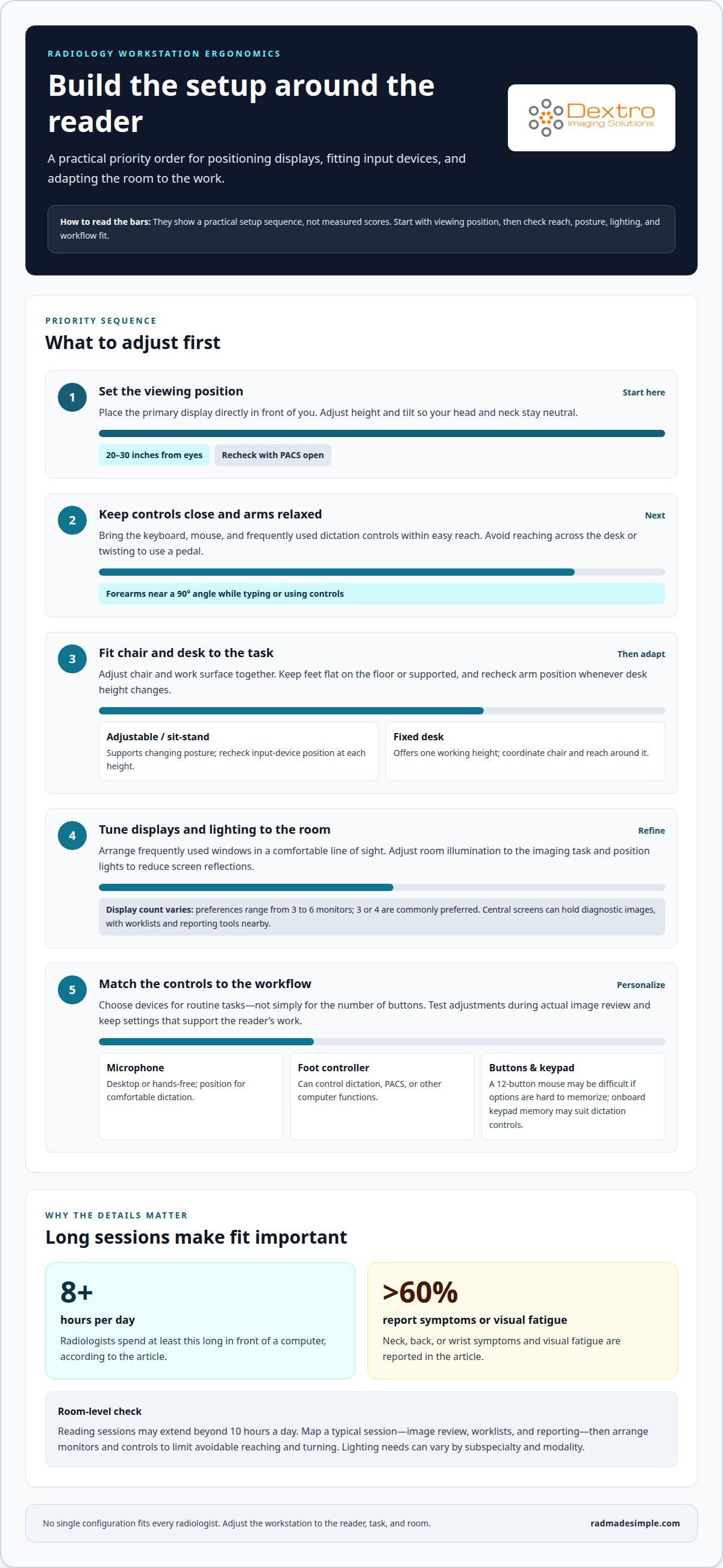
A well-designed reading room is more than a place to position diagnostic displays. An ergonomic radiology workstation brings monitor placement, desk height, and input devices together around the radiologist’s working posture. Position screens roughly 20-30 inches from the eyes, and arrange the desk so forearms rest at about a 90-degree angle when typing or using input devices.
Long image-review sessions place sustained demands on posture, vision, and repeated movements, so small setup choices can affect comfort throughout the day. There is no single ideal configuration for every radiologist. Aim for an adjustable setup that supports each reader’s work.
This guide covers monitor positioning, mouse and keyboard placement, dictation controls, and ways to adapt the workstation for comfort and workflow. It also considers the practical needs of reading rooms and imaging centers, helping you make useful adjustments without unnecessary complexity.
Key Takeaways
- Arrange displays to support a comfortable viewing angle, and make monitor positioning adaptable to the reader and task.
- Keep frequently used controls within easy reach, choosing input devices that fit dictation and PACS workflows.
- Coordinate chair, desk, and lighting adjustments to support movement and reduce avoidable strain during reading sessions.
- Plan workstation layouts around the demands of the reading room, including how equipment and workflow fit together.
1. Monitor height, depth, and viewing angle
Set the primary display directly in front of you, then adjust its height and tilt until your head and neck stay neutral. An ergonomic radiology workstation starts with a clear viewing position, not a fixed monitor-arm setting. Keep screens roughly 20-30 inches from your eyes, and adjust that distance as posture or reading tasks change. Open a study in PACS to assess the setup during actual image review.
Choose the number of monitors to suit the reading workflow. Radiologists’ preferences range from three to six displays, with three or four commonly preferred. For example, place diagnostic images on central screens and worklists or reporting tools nearby. Keep frequently used windows in a comfortable line of sight to limit repeated head turns during interpretation.
For an ergonomic radiology workstation, look for ways to adjust displays separately from computer equipment. Two independently adjustable tabletop surfaces let you change monitor height and equipment position separately, which can also help when switching between seated and standing work. Choose supports based on the display arrangement and readers’ adjustment needs, rather than adding features without a workflow purpose.
Room lighting affects how displays appear. Position lights to reduce screen reflections, then adjust ambient illumination for the reading task. Dimmable bias lighting behind a display can help manage contrast between the screen and its surroundings. Check the setup with PACS images open, when screen angles and reflections are easier to assess.
There is no single price range for desks, chairs, and monitor arms. Costs vary with adjustability, support needs, and configuration. Equipment pricing is provided after a quote request.
2. Mouse, keyboard, and dictaphone positioning
Keep the keyboard and mouse close enough to use without reaching across the desk. Position them so your forearms stay near a 90-degree angle while typing or using controls. Place frequently used items, including a dictation microphone, within easy reach. This arrangement reduces unnecessary arm movement during repeated PACS tasks and helps keep your shoulders relaxed.
Choose a microphone to suit the dictation workflow. A desktop microphone stays near the keyboard, while a hands-free model lets the radiologist dictate without holding a device. Position it comfortably, clear of anything that could interfere with speaking or typing. Adjust microphone placement and volume to suit the room and the user’s voice.
A foot controller can leave both hands free for image review and keyboard input. Depending on its configuration, it can control dictation, PACS, or other computer functions. Place the pedal so you can operate it without twisting your leg or shifting your seated posture. Assign commonly used actions to controls that are easy to use consistently.
Sit-stand desks allow work from a seated position through fully standing, while fixed desks offer one working height. For work areas and offices seeking height-adjustable desks and seating, ergonomic specialists such as ekobor.com.hk offer solutions designed to encourage regular posture changes. An adjustable desk makes it easier to change posture during a shift, but each position still needs a usable keyboard, mouse, and dictation setup. After changing desk height, recheck arm position to avoid creating reach or wrist strain.
Input-device design should match the tasks, not simply maximize button volume. A 12-button mouse can be difficult to use when its many thumb options are hard to memorize. A keypad with onboard memory may suit users who mainly need dictation controls. For a complete workflow, consider how radiology workstation options accommodate the keyboard, microphone, and foot controller together.
3. Comfort, efficiency, and image interpretation
The best chair and desk are the ones that adjust to the radiologist and the tasks at hand. A comfortable ergonomic radiology workstation supports posture and keeps essential controls accessible. For practices outfitting administrative or reading areas with supportive furniture, commercial suppliers like Smart Buy Office Furniture provide ergonomic seating and desk solutions. Adjust the chair and work surface together so you can use the keyboard without reaching. When seated, keep your feet flat on the floor or supported by a footrest.
Radiologists spend at least 8 hours per day in front of a computer, and more than 60% report neck, back, or wrist symptoms and visual fatigue. Poor ergonomics are associated with repetitive stress involving the neck, back, and wrists. Assess posture and reach during an actual diagnostic task, then make adjustments that avoid sustained awkward positions.
Lighting should suit the imaging task. Individually adjustable room lighting matters because appropriate illumination can vary by subspecialty and modality. Check whether the current light level supports image review without causing distracting screen reflections. Keep lighting controls within reach so readers can adjust them without interrupting their workflow.
ACR and AAPM are relevant radiology organizations, but this section does not set out a specific ergonomic requirements checklist from either. Apply practical setup principles: adjust seating and the work surface to support posture, keep commonly used controls within reach, and tailor room lighting to the task.
Efficiency also depends on how well the workstation supports routine software tasks. Review PACS and voice-recognition user guides for unused features that may simplify tasks such as navigating studies or dictating common phrases. Test changes during regular reading, and keep settings that support image interpretation without adding unnecessary steps. An ergonomic radiology workstation should also accommodate individual preferences and changing clinical scenarios.
4. Workstation use in reading rooms and imaging centers
Reading-room ergonomics must support the whole workflow, not just one monitor position. Radiologists may read files for more than 10 hours a day, so repeated movements between image review, worklists, and reporting deserve attention. Map the steps of a typical reading session, then arrange monitors and controls to reduce unnecessary reaching or turning.
Shared imaging-center workstations present another challenge: different readers may use the same station across shifts. Make adjustments easy to repeat by keeping controls accessible and recording preferred monitor and input-device positions. For example, readers who alternate between image comparison and reporting need a layout that keeps both tasks visible without frequent rearrangement.
PACS changed how radiologists work at the desk, and reports of ergonomics-related injuries increased after PACS workstations were introduced. This history makes workstation design an operational consideration, not a finishing touch. When changing a room, assess how the equipment fits the actual reading sequence, including where readers sit, how they access studies, and how often they switch applications.
Optimize a reading room by testing setups in context. Review a representative imaging case from opening the study through completing its report. Note whether readers repeatedly turn toward secondary monitors, reach for dictation controls, or interrupt image review to access another tool. Adjust the layout around those observed tasks, then review it with the people who use the room.
For a new reading room or a workstation refresh, plan around the clinical workflow, shared use, and the equipment each station must support. Plan a radiology workstation setup around the demands of your reading environment.
With imaging demand projected to rise by 17-27% by 2055, room planning should also account for future capacity. Flexible workstation layouts can help teams accommodate greater workloads while preserving task-focused arrangements and adjustment practices that support consistent use.
Dextro Imaging Solutions: Portable Radiology Workstations
Dextro Imaging Solutions offers Portable Radiology Workstations for teams planning a mobile or adaptable imaging setup. For reading rooms that need equipment aligned with their workflow, Dextro Reading Stations and specialized display options provide additional workstation configurations. Radcom Compact is another option for radiology environments.
Use these ergonomic principles to define what your setup needs: display positioning, input-device placement, and support for reading tasks. These priorities help guide equipment decisions for a reading room, imaging center, or portable workflow.
Contact Dextro Imaging Solutions to discuss radiology workstation options for your setting.
Make the next workstation decision with purpose
Start your next equipment decision with the work your reading room needs to support. Identify where readers lose time or adjust their posture, then use those observations to guide workstation changes. This keeps the focus on practical fit rather than features that do not address a real workflow need.
An ergonomic radiology workstation should be part of a coordinated imaging environment, with equipment suited to the people using it and the tasks they perform. As clinical workflows change, revisit how the setup supports those tasks and where adjustments could make daily work more manageable.
If you’re planning a new setup or refining an existing one, contact Dextro Imaging Solutions to discuss your radiology workstation needs. A clear picture of your workflow is a strong starting point for the next step.
Frequently Asked Questions
What are the recommended ergonomic monitor height, viewing distance, and angle for radiologists?
Position the primary display so you can view images with your head and neck in a neutral posture, and keep it roughly 20-30 inches from your eyes. Adjust screen tilt to limit reflections and maintain a clear view. For a practical check, open a study in PACS and confirm you can inspect images without repeatedly leaning closer or changing your head position.
How many monitors are recommended for a diagnostic radiology workstation?
Radiologists’ monitor preferences range from three to six displays, with three or four commonly preferred. The useful number depends on how the diagnostic workflow separates image review, worklists, and reporting. For example, a reader comparing studies while consulting a report may need a different layout from someone whose workflow keeps those tasks on fewer screens.
How should a radiology workstation be set up to reduce eye strain and musculoskeletal pain?
Set up the workstation so images, controls, and frequently used tools are accessible without repeated reaching or awkward head turns. Keep the primary display at a comfortable viewing distance, position the keyboard and mouse for relaxed arm movement, and adjust the chair to support the reader. Reassess the layout while using PACS, because active work reveals access problems an empty desktop cannot.
What lighting and room conditions are recommended for an ergonomic radiology reading room?
Use lighting that can be adjusted to the imaging task, since suitable illumination may vary by subspecialty and modality. Reduce reflections on diagnostic displays by considering where room lights fall, and use dimmable bias lighting behind a screen if it suits the room. Test the lighting with images open, then adjust it so ambient light supports review without distracting glare.
What are common ergonomic risks and injuries for radiologists, and how can they be prevented?
Common concerns include neck, back, and wrist symptoms, visual fatigue, and repetitive strain associated with poor workstation setups. Prevention starts by reducing repeated reaching, twisting, and awkward viewing positions. Keep controls accessible, adjust the chair and desk for comfortable posture, and alternate between seated and standing work when the setup allows. Revisit adjustments as reading tasks or workstation users change.


