

What if the biggest ergonomic problem in a radiology reading room isn’t the workstation, but the room around it? A useful ergonomics checklist for radiology reading room assessment starts by looking at both. Long reading sessions can make small issues with lighting, noise, temperature, or workstation fit more noticeable. General office advice may not account for the demands of diagnostic workflows.
You don’t need to begin with a major redesign. A structured review helps identify practical improvements, set priorities, and separate room-level conditions from individual workstation adjustments. This guide provides a room-level checklist for assessing the environment, seating, desk layout, displays, and daily work habits, with a focus on changes that support comfortable, efficient reading.
You’ll also learn how to make review an ongoing process, so teams can implement and revisit improvements without disrupting diagnostic work. When workstation or display choices are part of the assessment, Dextro Reading Stations and Jusha Diagnostic Monitors are options to consider within the broader ergonomics plan.
Key Takeaways
- Assess room conditions and workstation fit separately to identify where comfort and workflow can improve.
- Use the ergonomics checklist for radiology reading room assessments to record observations and prioritize practical changes.
- Review lighting, reflections, window exposure, and other visual conditions from normal reading positions.
- Compare layouts for privacy, movement, adjustability, and access without disrupting daily workflow.
- Use documented room needs to guide workstation and display choices, rather than expecting equipment alone to solve ergonomic concerns.
Why an ergonomics checklist for a radiology reading room needs a room-level view
A reading room can have well-chosen equipment and still be difficult to work in. Reflections may cross a display, a busy route may interrupt concentration, or noise in a shared room may make sustained reading harder. These are not isolated workstation issues. They can result from how the room, its equipment, and everyday work fit together.
Room-level ergonomics is the fit between a radiology room’s layout, environmental conditions, and work practices, assessed together to support comfortable, efficient work. This broader view complements general ergonomics principles by applying them to diagnostic reading, where visual conditions, room circulation, and shared workflows all matter.
A generic office checklist may focus on one person’s desk and chair. A radiology room also needs a review of the display environment and how people move, communicate, and share the space. The ergonomics checklist for radiology reading room assessment helps identify these connected factors. It is a practical review, not a clinical evaluation or regulatory certification. Its purpose is to guide comfort and workflow improvements, not to certify diagnostic practice or compliance.
What belongs on a radiology reading room ergonomics checklist?
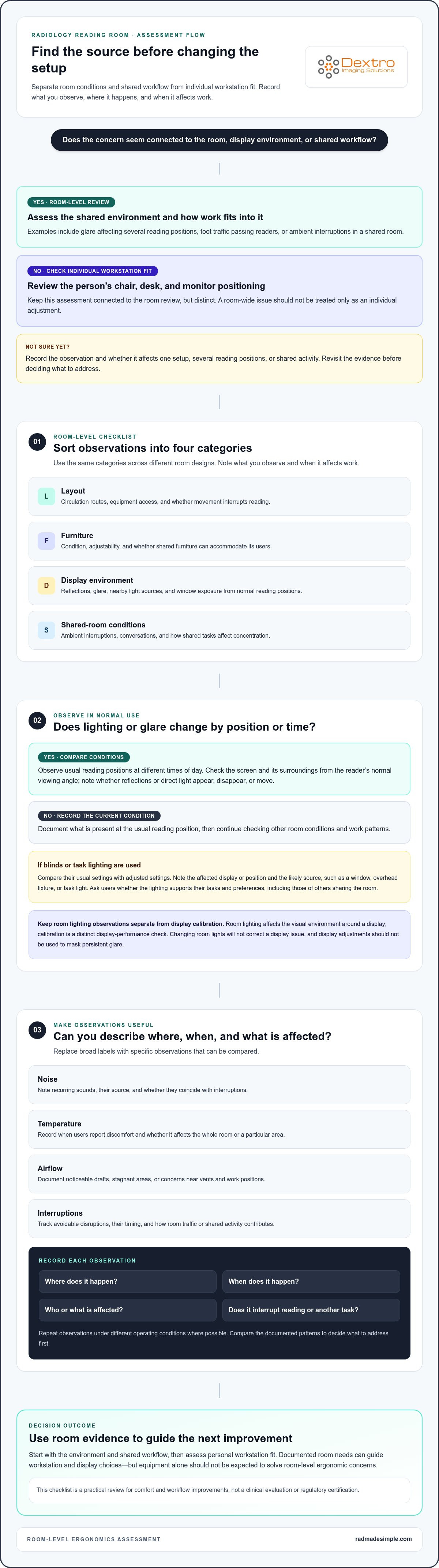
Use four categories to assess different room designs consistently, without assuming one specific layout. Record what you observe and when it affects work. This makes it easier to distinguish a room-wide concern from an issue tied to one person’s setup.
- Layout: Circulation routes, equipment access, and whether movement interrupts reading.
- Furniture: Condition, adjustability, and whether shared furniture can accommodate its users.
- Display environment: Reflections, glare, nearby light sources, and window exposure from normal reading positions.
- Shared-room conditions: Ambient interruptions, conversations, and how shared tasks affect concentration.
Room ergonomics versus workstation ergonomics
Keep the two assessments connected but distinct. Room-level examples include glare affecting several reading positions, a circulation route that brings foot traffic past readers, or ambient interruptions that disrupt the shared space. Workstation ergonomics focuses on an individual’s chair, desk, and monitor positioning. For that focused review, use this radiology reading workstation guide.
This distinction helps teams avoid trying to solve every discomfort by changing equipment or treating a room-wide issue as an individual adjustment. Start with the environment and shared workflow, then assess personal workstation fit. Dextro Reading Stations and Dextro Imaging Solutions equipment can be considered as part of the broader plan, alongside room conditions and layout.
Check lighting, visual comfort, and room conditions around diagnostic reading
Environmental conditions can change over a shift. Daylight may reach a display in the morning, a task light may create a reflection after dark, or nearby activity may become distracting during busy periods. Assess the room as it is actually used, not just during one walkthrough or from a general impression. The goal is to document patterns that can guide practical adjustments.
How to assess lighting and glare in the reading room
Observe each usual reading position at different times of day. Check the screen and its surroundings from the reader’s normal viewing angle. Note whether reflections or direct light appear, disappear, or move as daylight changes. If the room has blinds or task lighting, observe how adjusting them affects the reading area and nearby work surfaces.
- Record which display or reading position is affected and when.
- Note the source of glare, such as a window, overhead fixture, or task light.
- Compare conditions with blinds or task lighting in their usual settings and after adjustment.
- Ask users whether the lighting supports their tasks and preferences, including the needs of others sharing the room.
Keep these observations separate from diagnostic display calibration. Room lighting affects the visual environment around a display; calibration is a distinct display-performance check. Changing room lights won’t correct a display issue, and display adjustments shouldn’t be used to mask persistent glare. For additional reading room ergonomics tips, consider how lighting interacts with seating and monitor setup as part of a wider review.
Which environmental conditions should teams document?
Use specific observations rather than labels such as “too noisy” or “uncomfortable.” Record where and when a condition occurs, who or what it affects, and whether it interrupts reading or another task. This turns subjective feedback into a useful record for comparing conditions and deciding what to address first.
- Noise: Note recurring sounds, their source, and whether they coincide with interruptions.
- Temperature: Record when users report discomfort and whether it affects the whole room or a particular area.
- Airflow: Document noticeable drafts, stagnant areas, or concerns near vents and work positions.
- Interruptions: Track avoidable disruptions, their timing, and how room traffic or shared activity contributes.
Repeat observations under different operating conditions where possible. A quiet period may not reveal the same issues as a busy handoff, and daylight can change the visual environment over the course of a day. This keeps an ergonomics checklist for radiology reading room review grounded in actual use without relying on unsupported universal thresholds.
For display-specific considerations, consult the Jusha diagnostic monitor guide. If your room assessment points to workstation or display changes, explore radiology reading station and diagnostic monitor options as part of the broader improvement plan.
Compare room layouts and workstation arrangements without losing workflow
A room plan should support diagnostic tasks and the movement around them. A single-user room may offer more privacy and control, while a shared room can support collaboration and provide convenient access to shared resources. Neither arrangement is automatically more ergonomic. Compare the trade-offs against actual workflow, available space, and the needs of the people using the room.
How room layout affects circulation and concentration
Before moving furniture, sketch the current arrangement. Mark each workstation, doorway, walkway, storage area, shared equipment point, and place where people commonly stop or pass through. Then observe normal work and handoffs. Note whether someone walking to a printer or storage interrupts a reader, or whether a chair or equipment cart narrows a route.
Record constraints before proposing changes. Include fixed features, frequently used equipment, cable routes, and storage that can’t easily be relocated. This helps distinguish a movable obstacle from a genuine space limitation. It also helps prevent an improvement from solving one problem while creating another, such as moving a workstation into a high-traffic path.
Compare layouts by their trade-offs
Use a simple comparison to frame the discussion, then check it against the room’s specific tasks. A layout that improves privacy may reduce visibility of shared activity; one that keeps equipment close may increase foot traffic around readers.
| Layout consideration | Potential advantage | Trade-off to assess |
|---|---|---|
| Single-user room | Greater privacy and control over the immediate work area | Less flexibility for shared equipment or collaboration |
| Shared room | Convenient access to common resources and team communication | More competing activity and varied user preferences |
| Workstations facing a common direction | May simplify room organization and shared access | Could expose readers to passing traffic or interruptions |
| Workstations arranged for separate sightlines | May support focused individual work | Could make shared communication or equipment access less direct |
How shared rooms can accommodate different users
In shared spaces, check whether seats, desks, input devices, and display positions can be adjusted between users without a lengthy reset. Identify which settings need frequent changes and whether controls or accessories are easy to reach. Multi-monitor arrangements need a workflow check too. Consider whether screens support clear sightlines and task organization, or lead users to repeatedly turn or shift their attention. Keep these individual setup details distinct from room-wide decisions about circulation and workstation placement.
Document what works, what creates friction, and which changes are feasible before selecting equipment. Dextro Reading Stations and Jusha Diagnostic Monitors can be evaluated against those findings, rather than treated as substitutes for sound room planning. A room-level ergonomics checklist for radiology reading room review should help the team choose a workable arrangement, not impose one universal layout.
Use this step-by-step ergonomics checklist to assess and prioritize changes
A repeatable walkthrough turns individual comments into clear next steps. Follow the same sequence each time: observe the room in use, document specific findings, prioritize what to address, implement agreed changes, and review whether they helped. Keep the process practical. The purpose of an ergonomics checklist for radiology reading room assessment is to support informed improvements, not to generate an unsupported risk score.
How to complete a repeatable room ergonomics walkthrough
Observe the room during typical reading work rather than assessing it only when empty. Invite radiologists and staff to describe recurring discomfort and workflow friction. For each concern, record its location, the task underway, the time or operating condition, and the context. “Glare near the west workstation during morning reading” is more actionable than “lighting issue.”
Checklist: observe and document
Use the table to capture what you see and what users report. Add a location or task detail to each observation, and mark an item “not observed” rather than assuming it doesn’t apply.
| Room category | What to check | Observation or example |
|---|---|---|
| Layout and circulation | Walkways, doors, shared equipment access, cables, storage, and interruption points | ____________________________ |
| Furniture | Condition, access, and whether shared furniture can be adjusted between users | ____________________________ |
| Display environment | Reflections, direct light, window exposure, and visual conditions from reading positions | ____________________________ |
| Shared-room conditions | Recurring noise, temperature discomfort, airflow concerns, and avoidable interruptions | ____________________________ |
| Workstation arrangement | Monitor and input-device placement in relation to the user’s tasks and workflow | ____________________________ |
How to turn findings into a manageable action plan
Prioritize findings by their reported impact on comfort or workflow, how often they occur, and how feasible they are to address. For example, a recurring obstruction on a busy route may deserve attention before a rarely encountered inconvenience. Avoid assigning numerical risk scores unless your organization uses a defined, supported method.
Separate straightforward adjustments from changes that need facilities or IT coordination. Give each agreed action an owner, a next step, and a review date. This makes responsibility clear and gives the team a point to check whether the change resolved the concern or needs refinement.
- Observe: Walk through the room during representative work.
- Document: Capture location, task, timing, and user feedback.
- Prioritize: Compare impact, frequency, and feasibility.
- Implement: Assign an owner and coordinate the required change.
- Review: Revisit the observation and record the outcome.
For equipment-focused reviews that sit alongside an ergonomics assessment, use the radiology equipment compliance checklist. If your findings point to workstation or display needs, explore radiology workstation and monitor options as part of the broader action plan.
Match reading room improvements to diagnostic workstations and displays
Equipment decisions work best when they respond to a documented need. Use the room assessment to define what must change, then translate that finding into a functional requirement. This prevents a workstation or display purchase from becoming a substitute for addressing room layout, lighting, or shared workflow. An ergonomics checklist for radiology reading room review should inform equipment choices, not be replaced by them.
When workstation or display changes may address an identified issue
Match each finding to the type of adjustment it calls for. If a reader can’t position a display comfortably within the available space, assess workstation layout and display placement. If the concern involves diagnostic display performance, treat that separately from physical fit. A display’s position and technical performance are distinct considerations, even when both affect the reading experience.
| Assessment finding | Requirement to define | Keep in view |
|---|---|---|
| Display placement conflicts with the way the workstation is used | Suitable positioning within the room and working arrangement | Check how the arrangement fits the user’s tasks and surrounding space |
| Workstation arrangement creates workflow friction | Equipment and software integration that supports the established workflow | Consider how changes affect access and routine work |
| Users report a display-related concern | A display requirement based on the specific concern | Separate visual environment, physical placement, and display performance |
Be precise about the need before comparing options. “The monitor is uncomfortable” doesn’t identify whether the issue is placement, room reflections, or another factor. A clear finding gives the team a more useful basis for evaluating a change and checking its effect afterward.
How Dextro solutions fit into a broader room plan
Dextro Reading Stations and Jusha Diagnostic Monitors are options for organizations assessing reading station and diagnostic display needs. Consider them in the context of the room plan, documented requirements, and workflow. Equipment alone can’t resolve every ergonomic concern; circulation, environmental conditions, and how people share the space remain part of the assessment.
Dextro supports installation, maintenance, and software integration, helping organizations consider equipment within the operational context of a reading environment. Keep the decision sequence clear: identify the issue, define the needed function, evaluate how a workstation or display fits the wider setup, then review the change in use. This needs-led approach helps teams plan equipment changes without assuming that a new component will solve unrelated room conditions.
If your assessment points to changes in diagnostic reading equipment, explore radiology reading solutions as one part of a broader, needs-led room plan.
Make ergonomic review part of your room’s ongoing improvement
An ergonomic review is most useful when it leads to a next step, not a one-time checklist. Use your observations to set a practical review point, revisit unresolved concerns, and note whether changes still support the way the room is used. This creates a steady improvement cycle without turning every issue into a redesign project.
Keep the ergonomics checklist for radiology reading room assessment alongside future workstation or display planning. When a documented need points to equipment changes, evaluate them in the context of room conditions and workflow. Reading stations, diagnostic monitors, and the support required to integrate and maintain them can all be part of that larger plan.
Ready to explore options for your diagnostic reading environment? Explore radiology reading solutions and take the next step toward a room that works better for your team. Dextro Imaging Solutions offers diagnostic monitors, reading stations, and support for installation, maintenance, and software integration to help you plan around your documented needs.
Frequently Asked Questions
Is there one ideal lighting level for every radiology reading room?
No, one lighting level won’t suit every room, display setup, task, or user. Assess visual comfort under actual working conditions and use applicable local guidance or evidence when setting targets. For example, a room used for both image review and paperwork may need adjustable lighting rather than one fixed setting. Any numeric target should have a reliable source and a clear purpose.
Can a radiology reading room be ergonomic when multiple radiologists share it?
Yes. Shared use can work well if the room supports individual needs without making transitions cumbersome. Consider a simple handover routine for settings that change between users, such as chair position, input-device placement, or task-light direction. Shared-room etiquette can also reduce avoidable disruption, for example by agreeing where conversations and phone calls should take place. The right arrangement depends on the room’s workflow and the people using it.
How often should a radiology department review its reading room ergonomics?
There’s no single review interval that fits every department. Set a regular review point that suits local operations, and repeat the assessment after a meaningful change, such as a workstation move, equipment replacement, room renovation, or shift in how the room is shared. Also make it easy for staff to report a new concern between scheduled reviews. A recurring pattern may need attention before the next formal walkthrough.
What is RULA, and can it be used to assess a radiology reading room?
RULA, or Rapid Upper Limb Assessment, is a method for examining work-related posture, particularly involving the upper limbs, neck, and trunk. It can help assess a specific reading task or workstation posture, but it isn’t a complete room assessment. It won’t capture factors such as circulation, shared-room interruptions, or glare across multiple positions. Use it as one assessment input, not as certification of the whole environment.
Can ergonomic room changes affect diagnostic monitor calibration?
Room changes don’t automatically recalibrate a diagnostic monitor, but changes to lighting or display placement can alter the viewing environment and how images appear to the user. Keep environmental adjustments separate from display calibration and quality-control procedures. If a change involves the monitor or its operating setup, follow the department’s established process for checking display performance. Don’t treat room lighting adjustments as a substitute for calibration.
Should a radiology reading room use task lighting or overhead lighting?
Either may be appropriate, and some rooms use both. The practical choice depends on whether the lighting supports the task without causing reflections or distracting brightness at the display. For example, a task light positioned to illuminate notes may still create glare if it faces a screen. Test lighting from normal reading positions, including with the room’s usual window coverings and fixtures, before settling on an arrangement.
What should a team document during a reading room ergonomics assessment?
Record the concern, its location, the task underway, when it occurs, and any relevant room or workflow conditions. Include the staff member’s description, but distinguish reported discomfort from directly observed conditions. Note the agreed next action, its owner, and when the team will review the result. This gives the ergonomics checklist for radiology reading room assessment a usable record for tracking recurring issues and evaluating whether a change helped.


