What if a picture archiving and communication system did more than store medical images? In practice, PACS helps move imaging data through a clinical workflow, from capture and archiving to retrieval and review. Understanding that role is essential when you’re weighing how it should connect with your existing systems, workstations, and diagnostic displays.
It’s reasonable to have questions. PACS, a radiology information system (RIS), a vendor neutral archive (VNA), and an image viewer can all play different roles, and connecting them without interrupting clinical work takes careful planning. Storage capacity, image access, permissions, display workstations, and long-term support all shape whether a PACS environment fits your organization.
This guide explains the core components of PACS and follows imaging data through its lifecycle. You’ll learn how PACS relates to RIS, VNA, and viewing tools, which technical and operational requirements to assess, and how deployment choices can affect your workflows. It also outlines practical steps for planning a PACS project, so your team can evaluate solution options against real clinical and IT needs.
Key Takeaways
- See how a picture archiving and communication system supports image workflows, while leaving interpretation and clinical decisions to clinicians.
- Trace the imaging lifecycle from acquisition through transmission, archiving, retrieval, and review.
- Compare on-premises, cloud, and hybrid PACS models across control, infrastructure, access, resilience, and integration.
- Build a practical requirements checklist for modalities, users, connected systems, access controls, backups, and ongoing support.
- Plan implementation around clear phases and shared ownership across radiology, IT, operations, and compliance teams.
What Is a Picture Archiving and Communication System, and What Does It Do?
A picture archiving and communication system (PACS) stores, organizes, retrieves, and distributes medical imaging studies. It supports the movement of images through clinical workflows, helping authorized users find and review studies through connected systems. PACS does not interpret images, make diagnoses, or replace the judgment of radiologists and other clinicians.
Consider a patient having a CT scan. The scanner captures images and sends them to PACS, where the study is associated with identifying information and organized for later retrieval. An authorized clinician can then open it through a connected workstation or viewer, review the images, and use them as part of patient care. The exact path depends on how the imaging equipment, interfaces, PACS, and viewing tools are configured.
This is why PACS is more than a storage destination. Its value depends on how reliably images move between acquisition, archiving, and clinical access. When planning the full reading environment, consider both the archive and the equipment clinicians use to view studies. For a broad overview of the system’s components, uses, and history, see Picture Archiving and Communication System (PACS).
Which PACS components support imaging workflows?
A PACS environment brings together several functions. Imaging modalities, such as CT, MRI, and X-ray equipment, generate studies. Configured connections transmit them to the archive, which stores and organizes image data. Retrieval tools help users locate studies, while viewers display them for review on connected workstations or other authorized endpoints. When assessing a setup, list each modality, connection, archive, viewer, and workstation involved in the workflow.
DICOM, or Digital Imaging and Communications in Medicine, is the standard used to format medical imaging information and support its exchange between compatible systems. It helps imaging equipment and software communicate, but a successful workflow still depends on appropriate system configuration and interfaces.
- Acquisition: A modality creates the image study.
- Transmission and archiving: Configured connections send the study to PACS for organization and storage.
- Retrieval and viewing: An authorized user locates the study and opens it in a viewer.
How does PACS differ from RIS, VNA, and an image viewer?
PACS focuses on managing imaging studies and supporting access to them. A radiology information system (RIS) focuses on radiology operations, such as managing patient appointments, orders, and exam workflow. The systems may exchange information, but they serve distinct functions; their exact division of work depends on the organization’s configuration. During planning, document which system manages each step, such as scheduling, study routing, image storage, and review.
A vendor neutral archive (VNA) is an archive approach designed to store imaging data independently of a particular PACS. It may complement or overlap with PACS capabilities, depending on the systems in use. An image viewer, by contrast, is the tool that presents images on screen. PACS may include or connect to viewers while also handling broader archiving and workflow functions.
“Archive” can also mean something different outside clinical imaging. PubMed is a database for searching biomedical literature, while PubMed Central (PMC) is a digital archive of full-text biomedical and life sciences journal articles. Neither is a PACS: they organize research publications, not a healthcare organization’s medical imaging studies.
How a PACS Moves Medical Images from Acquisition to Clinical Review
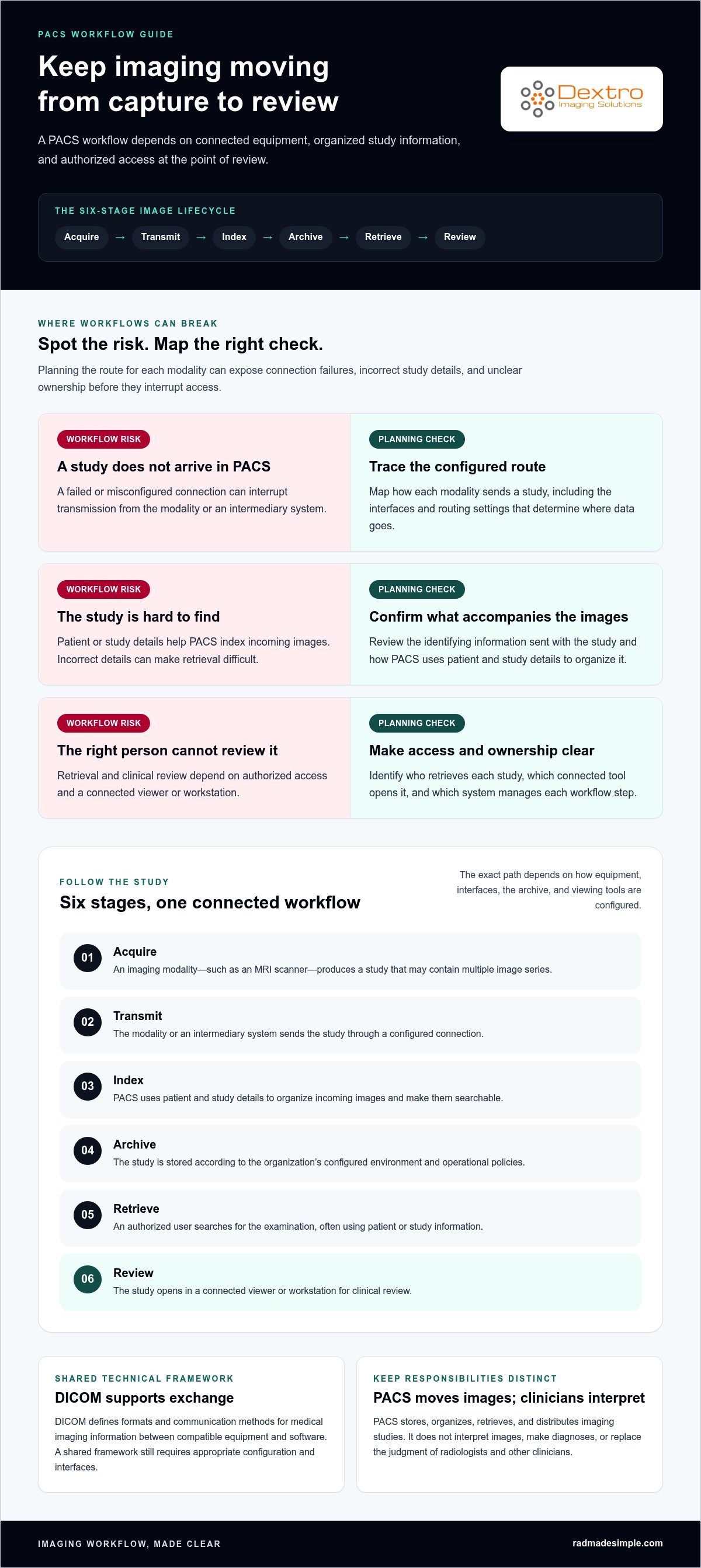
A picture archiving and communication system moves imaging studies through a sequence of connected steps. The route begins at a modality, such as an MRI scanner, and ends when an authorized clinician retrieves and reviews the study. The details depend on how the equipment, interfaces, archive, and viewing applications are configured. Mapping the route for each modality can reveal where a failed connection, incorrect study detail, or unclear responsibility could interrupt access.
PACS image lifecycle: acquire the study, transmit it to PACS, index it with identifying metadata, archive it, retrieve it for an authorized user, and review it in a connected viewer.
- Acquire: An imaging modality produces a study, which may contain multiple image series.
- Transmit: The modality or an intermediary system sends the study through a configured connection. Interface settings determine how data is routed and what information accompanies it.
- Index: PACS uses patient and study details to organize the incoming images, making them searchable within the system.
- Archive: The study is stored according to the organization’s configured environment and operational policies.
- Retrieve: An authorized user searches for the examination, often using patient or study information.
- Review: The study opens in a connected viewer or workstation for clinical review.
How do DICOM and metadata support image exchange?
DICOM defines formats and communication methods used to exchange medical imaging information between compatible equipment and software. It provides a shared technical framework, but interoperability still depends on how each system is configured, including supported workflows and interfaces. For each connection, identify what information is exchanged and test the actual workflow rather than relying on DICOM support alone.
Metadata helps distinguish one examination from another. Patient identifiers, study details, and series information let systems organize images and help users find the intended exam. Inconsistent or mismatched information can complicate routing and retrieval, so teams should test representative workflows and verify that identifiers remain associated with the correct images as data moves between systems.
How do clinicians retrieve and review archived studies?
A clinician may search from an authorized workstation or open a study through a connected viewer or clinical application. Search fields and workflow vary by deployment, but patient identity and examination details commonly help narrow results. Before review, users should confirm that the selected study corresponds to the intended patient and exam.
Access roles can help limit system functions and study access to appropriate users. Organizations can also define audit practices for recording and reviewing system activity. The available controls and audit details depend on the PACS and its configuration, so they should be included in implementation planning alongside account management and routine operational procedures. Retrieval time and availability also depend on the specific system, network, storage, and connection conditions.
Mapping these steps can help clarify which interfaces and user workflows your environment needs. For teams assessing connected imaging options, PACS software and integration options can be a useful next point of reference.
PACS Deployment Models: Compare On-Premises, Cloud, and Hybrid Approaches
Choosing an architecture for a picture archiving and communication system means deciding where its servers and storage will run, how users will connect, and who will manage each part of the environment. On-premises, cloud, and hybrid models offer different ways to arrange those responsibilities. None is automatically the most secure, resilient, or cost-effective; outcomes depend on design, configuration, connectivity, and contract terms.
| Consideration | On-premises | Cloud | Hybrid |
|---|---|---|---|
| Control | The organization manages local infrastructure and has direct control over its environment. | Infrastructure is hosted by a third party; responsibilities are divided according to the service agreement. | Control is shared across local and hosted components, depending on the design. |
| Infrastructure | Requires facility-based servers, storage, networking, and ongoing maintenance. | Core PACS infrastructure is hosted externally and accessed over network connections. | Combines local resources with hosted infrastructure, such as local access components and remote archiving. |
| Access | Access depends on the organization’s network and remote-access design. | Users connect to the hosted system over configured network connections. | Access may use local and remote components, depending on user location and workflow. |
| Resilience | The organization plans and manages redundancy, backup, and recovery for local systems. | Resilience responsibilities and provisions depend on the provider’s design and contract. | Recovery planning must account for both local and hosted components and their dependencies. |
| Integration | Interfaces connect PACS with local imaging equipment and other systems. | Connections must link hosted PACS with modalities, viewers, and organizational systems. | Integration must coordinate data and workflows across local and hosted components. |
What changes between on-premises, cloud, and hybrid PACS?
The main difference is where the system runs and how operational responsibilities are assigned. With on-premises PACS, the organization operates local servers and storage. Cloud PACS places core infrastructure with a third-party host. Hybrid PACS combines the two, which can support specific local and remote workflows but also adds components to coordinate. Maintenance, access, and recovery arrangements vary by design and agreement.
Which PACS architecture considerations shape a project?
Start with your current environment, not a preferred hosting label. Map imaging locations, user locations, network connectivity, existing equipment, and the systems PACS must connect with. Then review operational needs with IT and clinical stakeholders: expected data growth, backup and recovery planning, access continuity, and who will maintain each component. For example, if users need to access studies from multiple locations, include the relevant network connections and remote-access design in the comparison. These dependencies can change the practical fit of an architecture.
- Infrastructure: Identify existing servers, storage, network capacity, and technical ownership.
- Workflows: Document where images are acquired and where users need to access them.
- Dependencies: List required interfaces, connected systems, and recovery processes before comparing options.
Use these requirements to compare complete designs, including responsibilities and contract terms, rather than judging a model by its label alone. For a closer look at financial planning, consult the PACS total cost of ownership guide.
PACS Evaluation Checklist: Interoperability, Security, and Daily Operations
A useful PACS requirements checklist turns clinical and technical needs into clear, testable criteria for evaluating a system. Before comparing solutions, separate essential operational requirements from preferred features. Essentials are the capabilities and workflows your organization needs to function safely and reliably; desired features may add convenience but shouldn’t obscure gaps in the basics. Write requirements so a team can demonstrate or test each one, rather than relying on broad labels such as “easy to use” or “fully integrated.”
Build the checklist with radiology, IT, operations, and compliance stakeholders. Make it specific to how your picture archiving and communication system will be used, including:
- Modalities and connections: List imaging equipment and the systems that need to exchange data with PACS, such as RIS, reporting tools, and other clinical applications.
- Users and locations: Identify user groups, workstations, facilities, and remote access needs.
- Workflows: Map how studies are acquired, accessed, reviewed, and supported in routine operations.
- Security and access: Document identity management, user permissions, audit requirements, and data-handling expectations.
- Continuity and support: Specify backup and recovery needs, support ownership, maintenance responsibilities, and escalation paths.
How should teams assess interoperability and security requirements?
Map each connection and its purpose. For example, note which modalities send studies to PACS, how RIS information relates to imaging workflows, and which reporting or clinical tools need access. Record the relevant interfaces and workflows, then test representative exchanges during planning rather than treating compatibility as a checkbox. Include routine cases and exceptions, such as how the workflow handles incomplete or mismatched study details.
Define how users are identified, what permissions each role needs, and what system activity must be reviewed. Document data-handling expectations and involve qualified compliance staff to determine which standards and regulatory obligations apply to your organization. Requirements can vary by setting, system configuration, and applicable rules, so avoid treating a generic checklist as a substitute for that review.
How can PACS support dependable daily operations?
Operational readiness includes more than system features. Assign ownership for routine administration, maintenance, backups, recovery, and support requests. Establish maintenance windows and escalation paths, and define recovery expectations with the teams responsible for clinical operations and IT. The specific arrangements should reflect your deployment and internal capacity.
Test common tasks with radiologists, technologists, and IT stakeholders. Include study access from relevant locations, connected-system workflows, and recovery procedures. Capture issues, assign owners, and retest after configuration changes. This helps teams assess real use rather than relying only on technical specifications. For display and workstation factors that affect image review, consult the radiology reading workstation guide.
Once your requirements are prioritized, compare PACS options against the same checklist and identify any dependencies that need further planning. Explore PACS software and integration options for a connected imaging environment.
PACS Implementation: Plan Integration, Migration, and Long-Term Support
A successful picture archiving and communication system project needs more than a software installation. It must connect imaging equipment and clinical systems, account for existing data, and prepare people to use the new workflows. Assign clear ownership across radiology, IT, operations, and relevant compliance teams so decisions, testing, and approvals don’t fall between departments.
Use a phased plan, with responsibilities and acceptance criteria defined for each stage:
- Requirements: Inventory current archives, interfaces, user groups, locations, and essential clinical workflows. Separate must-have requirements from preferences.
- Interface planning: Map the systems that need to exchange data, identify technical dependencies, and assign owners to interface design and testing.
- Configuration: Set up the environment around agreed workflows, user access, and operational requirements.
- Migration: Define which studies and data will move, how they’ll be sequenced, and how teams will handle exceptions. Scope depends on the source archive and target environment.
- Validation: Check representative migrated studies, image associations, search and retrieval workflows, and system connections against agreed acceptance criteria.
- Training and transition: Prepare users for routine tasks and escalation processes, then coordinate go-live activities with clinical and technical teams.
What should a picture archiving and communication system implementation plan address?
Migration decisions should reflect the organization’s data, interfaces, and clinical priorities. Work with responsible technical teams to plan validation and downtime contingencies before moving data. Test representative studies and workflows, document issues, and resolve them before broader use. Include radiologists, technologists, and IT stakeholders in acceptance testing so the checks reflect real tasks, not only system-level completion. Schedule training around those same workflows.
After launch, maintain a clear record of system ownership, routine maintenance responsibilities, support routes, and recovery procedures. Review the plan as workflows or connected systems change. This helps the organization manage a picture archiving and communication system as an ongoing part of its imaging environment rather than a one-time deployment.
How can Dextro Imaging Solutions support picture archiving and communication system planning and integration?
Dextro Imaging Solutions offers picture archiving and communication system software and licensing, including PACS Harmony and aycan PACS. Its support spans setup and integration, along with technical support and maintenance. Dextro Imaging Solutions also offers diagnostic monitors and specialized reading workstations, which can be considered alongside a picture archiving and communication system when planning the connected image-review environment. Project planning should account for your documented systems, workflows, and migration scope.
If you’re assessing a picture archiving and communication system for your organization, explore Dextro Imaging Solutions as a next step in planning a connected imaging environment.
Set Your PACS Project in Motion
Turn your evaluation into a practical roadmap. Identify the operational outcome your team most needs from a picture archiving and communication system, assign an owner, and define how you’ll assess progress from planning through ongoing use. A focused starting point helps keep technical decisions connected to clinical priorities.
Dextro Imaging Solutions offers PACS software, including PACS Harmony and aycan PACS, alongside setup, integration, and ongoing technical support. Its diagnostic monitors and reading workstations can also form part of the imaging environment you plan around your team’s workflows and operational needs.
Explore Dextro’s PACS software, diagnostic monitors, and workstations to plan your connected imaging environment: Explore Dextro imaging solutions.
Frequently Asked Questions
Is PACS the same as a VNA?
No. PACS is designed to support imaging workflows, while a vendor neutral archive (VNA) is an approach to storing imaging data independently of a particular PACS. Their functions can overlap, depending on the products and architecture involved. For example, a health system may use a VNA to consolidate images from multiple departments while PACS applications support department-specific access and review. The distinction depends on system design, not just product labels.
Can a PACS connect to imaging equipment from different manufacturers?
Often, but compatibility depends on the modality, PACS configuration, and connection requirements. DICOM provides a common framework for exchanging medical imaging data, yet equipment can differ in supported functions and settings. A practical assessment inventories each scanner and tests representative workflows, including how studies and identifying details transfer. Include older equipment and any intermediary interfaces in the review, since they can affect whether a connection works as intended.
How much storage does a PACS need?
There’s no single storage figure that fits every organization. Estimate needs using current study volume and size, the mix of modalities, expected growth, retention policies, and whether existing archives will be migrated. For example, a service adding higher-volume imaging or another location should model that change rather than extrapolate from its current footprint alone. Include working storage, backup, and recovery requirements in capacity planning with the IT team.
What happens to imaging access if a PACS becomes unavailable?
Access depends on the system design and the organization’s downtime and recovery procedures. Staff may be unable to retrieve studies through normal workflows until service is restored, unless a configured alternative is available. Document who declares downtime, how clinical teams are informed, and what approved access procedures apply. Test recovery plans with technical and clinical stakeholders so teams understand roles and escalation steps before an interruption occurs.
Can a healthcare organization migrate studies from an existing PACS?
Yes, studies can be migrated, but the work needs a defined scope and validation plan. Teams should identify which historical studies and related information must move, assess the source archive, and plan sequencing around operational needs. After transfer, verify representative records for completeness, correct patient association, and retrieval in the new environment. Migration methods, timelines, and effort vary with data volume, source-system access, and the target configuration.
Does PACS store reports as well as medical images?
It can, depending on the PACS and the organization’s configuration, but reports may instead be managed in a reporting application or electronic health record. Clarify where final reports are created, stored, and accessed, and whether users need to open them alongside images. Testing the full workflow helps reveal gaps, such as a study appearing in PACS while its report remains in a separate system or is linked through another interface.
Is cloud PACS automatically more secure than on-premises PACS?
No. Cloud hosting alone doesn’t determine security. Protection depends on system configuration, access management, monitoring, maintenance, and the responsibilities assigned to the healthcare organization and hosting provider. On-premises environments also require disciplined safeguards and ongoing administration. Compare the specific controls, responsibilities, and incident procedures for each proposed design, and involve security and compliance staff in reviewing how data is protected throughout storage, access, and recovery.