Can aycan PACS support your imaging needs as your organization grows? The answer depends on more than available capacity. Study volume, image sizes, retention plans, and how teams access and distribute studies all shape the storage your workflow needs over time.
A new PACS can affect established DICOM workflows, so it helps to plan around workload, workflow, and growth before making storage decisions. On-site and cloud approaches have different implications for infrastructure, access, continuity, and operations. Assess each against your organization’s needs rather than comparing capacity alone.
This guide explains the storage and distribution role of aycan PACS, the factors to review as imaging volume increases, and how to plan deployment, integration, migration, and continuity. It also offers a framework for assessing storage options alongside your existing systems and daily operations. Dextro Imaging Solutions offers aycan PACS and supports installation, maintenance, and software integration, connecting storage planning to the wider imaging workflow.
Key Takeaways
- Estimate storage needs using study volume, data per study, modality mix, retention plans, access frequency, and expected growth.
- Plan aycan PACS storage around current imaging workflows and anticipated growth, not capacity alone.
- Compare on-site and cloud deployment by infrastructure ownership, access, operations, and planning responsibilities.
- Map modalities, DICOM nodes, RIS/HIS connections, viewers, and routing destinations before preparing a migration.
- Validate integrations and continuity plans before transition so image access stays aligned with daily workflows.
What aycan PACS Does for Imaging Storage and Distribution
A PACS does more than store images: it manages how imaging studies are received, retrieved, and distributed through a healthcare workflow. That distinction matters when planning storage. Archive capacity describes how much imaging data a system can hold. The wider PACS workflow also involves receiving studies, finding them, and making them available to authorized users and connected applications.
The Picture Archiving and Communication System (PACS) brings these functions together. When planning storage, consider not just how much data arrives, but how often teams retrieve studies, where images need to be available, and how long the organization retains them.
How PACS storage fits into the imaging workflow
For example, an X-ray modality creates images and sends the study using DICOM, a standard for exchanging medical imaging information. A PACS receives and archives the study, making it retrievable later. A clinician can then open it in a compatible viewer, while the system may distribute it to other connected destinations according to the organization’s workflow.
This process connects several components, not just storage:
- Creation: Imaging equipment produces a study, which may include multiple images or series.
- Archiving: The PACS stores the incoming study so it can be found again.
- Retrieval and viewing: A user accesses the relevant images through a connected viewer.
- Distribution: The study can be routed to other authorized users or systems as the workflow requires.
Each capability has different demands. An archive needs room for incoming studies and retained data. Viewing depends on how users retrieve and work with images, while distribution depends on connected systems and routing needs. A useful planning estimate accounts for study volume and size, access patterns, and retention needs, rather than treating total capacity as the only requirement.
What aycan PACS brings to a storage strategy
aycan product materials describe vendor-neutral DICOM storage and distribution, with on-site and optional cloud access. Vendor neutrality can matter in environments with imaging equipment from different manufacturers, since storage planning can account for the existing imaging workflow instead of treating PACS as a standalone hardware decision. Assess the specific deployment and connections against the facility’s systems and operating requirements.
Separate product capabilities from implementation support. aycan PACS provides imaging storage and distribution, while Dextro supports licensing, installation, maintenance, and software integration. Planning for both helps facilities define what the PACS must do and how it will fit into the wider environment. Start by mapping the studies, users, and systems that depend on image access. This gives storage planning a practical basis before you estimate future capacity.
How to Estimate PACS Storage Needs as Imaging Workloads Grow
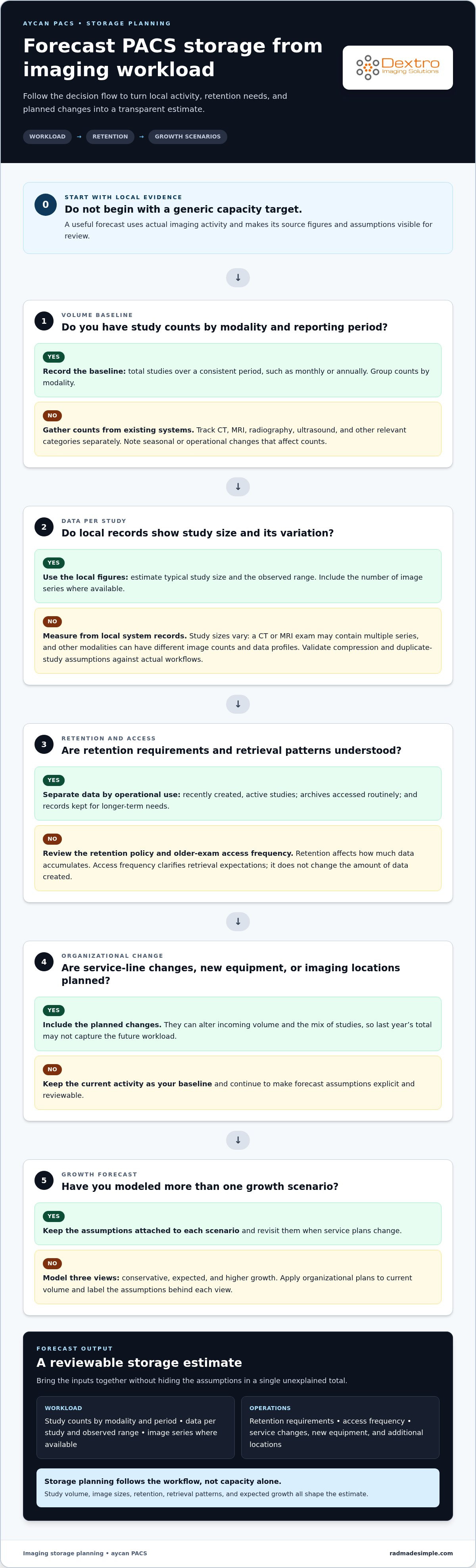
A useful forecast starts with actual imaging activity, not a generic capacity target. PACS storage needs depend on study volume, average data per study, modality mix, retention policy, access frequency, and expected growth. Collecting these inputs gives your team a transparent estimate to review and update as services change.
Which workload inputs should radiology teams collect?
Begin with study counts from existing systems, grouped by modality and reporting period. Use a consistent period, such as monthly or annually, and record CT, MRI, radiography, ultrasound, and other relevant categories separately. Study sizes can vary considerably: a CT or MRI exam may contain multiple series, while other modalities can have different image counts and data profiles.
Collect average study size and the range of observed sizes. Include annual volume, the number of image series where available, retention requirements, and how often teams retrieve older exams. Note planned service-line changes, new equipment, or additional imaging locations too. These can change incoming volume and the mix of studies, so a forecast based only on last year’s total may miss important shifts.
How to turn current volume into a growth forecast
Use a straightforward three-step framework. Keep source figures and assumptions visible so stakeholders can review the estimate instead of relying on an unexplained total.
- Measure study volume: Total studies by modality and reporting period. Note seasonal or operational changes that affect the count.
- Estimate data per study: Use local system records to calculate typical size and variation. Account for image series, and confirm that compression or duplicate-study assumptions reflect actual workflows.
- Forecast growth: Apply organizational plans to current volume, then model conservative, expected, and higher-growth scenarios. Label each assumption and revisit it when service plans change.
Next, distinguish data by operational use. Separate recently created, active studies from archives accessed routinely and records retained for longer-term needs. Access frequency doesn’t change the amount of data created, but it clarifies retrieval expectations and informs how storage should support daily work. Retention policy also affects how much data accumulates in the archive over time.
Don’t assume compression will reduce every study by a predictable amount or that duplicate studies can simply be excluded. Validate both assumptions against local acquisition, routing, and retention practices before using them in a capacity estimate. For an aycan PACS deployment, this workload-led forecast gives your team a practical basis for discussing storage needs without relying on one-size-fits-all figures. Dextro can connect that planning to aycan PACS licensing and software integration support. Teams refining their imaging workflow can also explore PACS planning resources.
On-Site or Cloud PACS Storage: Compare the Operational Trade-Offs
Choosing where PACS storage runs is an operational decision, not a simple ranking of technologies. Existing infrastructure, network connectivity, governance requirements, and internal IT capacity all affect which deployment model fits. aycan materials describe on-site storage and optional cloud access. Compare the responsibilities of each approach before deciding how it should support image access and daily work.
| Consideration | On-site PACS | Cloud PACS |
|---|---|---|
| Infrastructure ownership | The organization plans and maintains local storage infrastructure. | Storage infrastructure is hosted off-site; clarify the division of responsibilities within the service arrangement. |
| Access | Access depends on local network design and any configured remote access. | Access depends on connectivity between users and the hosted environment. |
| Operations | Internal teams manage local systems and coordinate maintenance. | Operational tasks may be shared; document who handles each one. |
| Planning responsibilities | Plan capacity, network performance, backup, and continuity locally. | Plan connectivity, governance, access, and continuity responsibilities across the organization and service arrangement. |
When on-site PACS storage may fit an organization
An on-site model may suit a facility with existing infrastructure, local administration, and the internal capacity to manage storage operations. Evaluate how modalities and viewers connect across the network, and how study access will work for users in different locations. Include backup and continuity planning in the design. Local control doesn’t automatically provide security or protect access during an outage; those outcomes depend on the environment’s configuration and operating procedures.
What to assess in a cloud PACS deployment
For cloud access, assess whether connectivity supports the organization’s access patterns, including where users work and how they retrieve studies. Document governance requirements and clarify operational ownership for user access, maintenance coordination, and continuity planning. aycan materials describe optional cloud access, but evaluate deployment details in the context of the organization’s workflow and responsibilities rather than assuming they follow automatically from the word “cloud.”
Use the comparison to identify the work your team owns, the dependencies it must manage, and the decisions that require coordination. For example, a facility with established local infrastructure may weigh internal administration differently from a multi-location organization whose users depend on network access to shared studies. Neither model is right for every imaging environment. The best fit is the one whose responsibilities and access conditions align with your operations.
Keep deployment and financial analysis distinct. For a separate view of cost factors, consult the PACS total cost of ownership guide. Dextro supports aycan PACS licensing, installation, maintenance, and software integration, helping connect deployment planning with the wider imaging environment.
Plan PACS Migration, Integration, and Storage Continuity
A PACS transition affects more than the image archive. Modalities, clinical systems, viewers, routing rules, and staff workflows all depend on reliable connections. A phased plan helps teams identify dependencies early, test how studies move, and prepare a controlled transition. For wider interoperability context, see this unified PACS integration guide.
Prepare existing imaging data and interfaces
Start with a system inventory. Record current archives, data formats, modalities, DICOM nodes, RIS/HIS connections, viewers, and routing destinations. Note which systems send studies, which receive them, and how users retrieve prior exams. Flag legacy studies, metadata concerns, and workflow dependencies that could affect search, display, or distribution after migration.
Then coordinate responsibilities across radiology, IT, and implementation stakeholders. Radiology can identify representative workflows and user needs; IT can document network paths, endpoints, and connected systems. Together, the team can clarify which data will move, how it will be reconciled, and who will review exceptions. This discovery work turns integration requirements into a practical migration sequence.
Validate access and continuity before transition
Prepare the migration in stages rather than treating cutover as a single technical event. Use this sequence to make ownership and readiness visible:
- Inventory: Document archives, modalities, DICOM nodes, RIS/HIS links, viewers, and destinations.
- Map interfaces: Trace study flows and identify dependencies, routing rules, and workflow handoffs.
- Prepare migration: Define data scope, metadata checks, reconciliation steps, and stakeholder responsibilities.
- Validate: Test representative studies, retrieval, routing, and user access. Reconcile expected and migrated records, then complete user acceptance with staff who perform the workflows.
- Transition: Set a cutover plan, issue-monitoring process, escalation path, and documented fallback approach.
Choose test studies that reflect different modalities, series, and common retrieval scenarios. Confirm users can locate the expected exams, routing reaches the intended destinations, and connected systems behave as planned. Record test outcomes and unresolved issues. User acceptance should include the people who rely on these workflows, not only the technical team.
Continuity planning needs clear ownership. Document who monitors issues during transition, how teams escalate problems, and what conditions trigger the fallback approach. Assign responsibility for backup and recovery planning too; don’t assume these protections are automatic or included in a particular deployment. Dextro supports aycan PACS installation and software integration, helping coordinate implementation with the facility’s existing imaging environment. Plan your PACS integration with Dextro.
Evaluate aycan PACS with Dextro for Your Imaging Environment
A useful evaluation starts with your facility’s workflow, not a generic storage target. Bring together the workload forecast, deployment considerations, current interfaces, migration scope, and continuity requirements. This gives radiology and IT a shared basis for assessing whether aycan PACS fits the environment and what implementation planning needs to address.
Build a PACS evaluation brief for your team
Prepare a concise brief describing how imaging operates today and what may change. Include study volume by modality, growth scenarios, and retention policies. Describe who needs access to studies, how often they retrieve them, and which systems must exchange imaging data. Record deployment preferences alongside migration and continuity priorities.
- Workload: Current study counts, modality mix, typical study sizes, and anticipated service or location changes.
- Workflow and interfaces: Required modalities, DICOM connections, RIS/HIS links, viewers, routing destinations, and user groups.
- Operations: Access patterns, governance considerations, IT capacity, and responsibilities for ongoing maintenance and continuity.
- Transition: Migration scope, legacy data considerations, validation needs, and fallback planning.
Keep assumptions visible. For example, distinguish existing volume from planned growth and identify retention or access needs that require stakeholder agreement. This makes it easier to discuss operational fit alongside storage requirements instead of treating capacity as an isolated specification. Radiology can describe how staff use studies; IT can document system dependencies and technical constraints.
Move from assessment to implementation planning
Once the brief is ready, align radiology, IT, and implementation stakeholders on priorities, decision owners, and project responsibilities. Review interface requirements and migration steps together, then define how the team will validate expected workflows and manage continuity through transition. Clear ownership surfaces dependencies early and keeps technical decisions connected to daily imaging operations.
Dextro offers aycan PACS licensing and supports installation, maintenance, and software integration for healthcare facilities. This support connects product evaluation to the wider imaging environment, including existing equipment and connected systems. The assessment brief gives the project team a practical starting point for discussing workflow fit and implementation requirements, rather than relying on a one-size-fits-all capacity goal.
Bring your workload assumptions, integration priorities, and transition requirements into the conversation to discuss aycan PACS for your imaging workflow.
Make Your Next PACS Decision With Confidence
Turn your assessment into a practical project brief before committing to a storage direction. Bring together the people who understand day-to-day imaging work and the teams responsible for connected systems. Agree on what successful access looks like, which workflow dependencies matter most, and how you’ll review the plan as services and imaging demand evolve.
This shared perspective keeps aycan PACS planning grounded in your facility’s needs rather than a capacity target in isolation. Dextro offers aycan PACS licenses and supports implementation through installation, maintenance, and software integration, connecting the PACS decision to the surrounding imaging environment.
With priorities and responsibilities aligned, your team can move from uncertainty to a clearer evaluation and implementation path. Discuss aycan PACS for your imaging workflow and take the next step with a plan shaped around your organization.
Frequently Asked Questions
What is aycan PACS?
aycan PACS is a medical imaging system for archiving and distributing DICOM studies. Its product materials describe solutions for imaging centers, hospitals, and teleradiology workflows. Look beyond the archive itself: consider how studies reach the system, how users find them, and which connected viewers or clinical applications support each role. The appropriate setup depends on the facility’s workload and technical environment.
Can aycan PACS scale as imaging volume grows?
aycan describes its PACS solutions as scalable and upgradeable, but an organization should assess its own workload rather than rely on a general capacity claim. Study size and retrieval demand can shift after a scanner upgrade, changes to acquisition protocols, or the launch of a new service. Review those changes alongside archive use, and validate assumptions about compression and storage lifecycle against current technical documentation and organizational policies.
Does aycan PACS offer cloud storage?
aycan product materials describe on-site access and optional cloud access for PACS solutions. To evaluate cloud use, consider how staff access studies from each location and what happens if connectivity is interrupted. Clarify how access management, maintenance coordination, and continuity planning are divided among the organization and service teams. Deployment configurations and service terms can differ, so base planning on the specific arrangement being evaluated.
How do imaging centers prepare for a PACS data migration?
Begin by identifying what must be transferred and how the team will confirm it arrived correctly. Alongside archives and DICOM endpoints, review metadata staff use to search for prior exams, such as patient and study identifiers. Agree on a reconciliation process for missing, duplicated, or mismatched records. A representative test can reveal search or display issues before users depend on migrated studies in routine work.
Can aycan PACS integrate with existing imaging systems?
aycan product information describes vendor-neutral DICOM capabilities for imaging environments. Integration planning should define what a successful exchange looks like for each interface, not just whether systems connect. For example, test that a study sent from a modality can be found using the expected patient and exam details, then opened in the intended viewer. Include relevant RIS/HIS connections and routing destinations in the review.
What should a PACS storage forecast include?
A useful forecast draws on local study data and the organization’s imaging plans. Include volumes by modality, study-size variation, retention rules, and how patterns may change with new equipment or locations. Revisit the estimate when acquisition protocols or service lines change, since these can affect data created per exam. Keep assumptions about compression and duplicate records explicit so reviewers can test them against actual workflows.
How can Dextro Imaging Solutions help with aycan PACS?
Dextro Imaging Solutions offers aycan PACS licensing and supports installation, maintenance, and software integration. For an evaluation, bring a clear picture of the current imaging environment, including connected systems, workflow priorities, and project responsibilities. Radiology and IT stakeholders can use that information to align technical requirements with daily operations and prepare an informed implementation discussion.