

A monitor can support DICOM and still be unready for diagnostic reading. Radiology monitor compliance depends on how the complete display system performs over time, not just on a specification sheet or one-time setup. DICOM defines standards for medical image exchange and grayscale display, but conformance alone doesn’t confirm that a workstation is calibrated, performing consistently, or suitable for a particular clinical workflow.
A diagnostic monitor’s stated capabilities are a useful starting point. The practical challenge is confirming that those capabilities remain dependable across workstations and during everyday use. Calibration, routine quality checks, and clear records each have a distinct role.
This guide explains what radiology monitor compliance means, how DICOM PS3.14 relates to display performance, and how to assess a diagnostic display without treating specifications as proof of ongoing quality. You’ll also learn how to build a repeatable, documented quality-assurance process and match monitor and workstation capabilities to actual reading needs. A structured approach makes display checks easier to manage and keeps equipment decisions grounded in clinical requirements.
Key Takeaways
- Radiology monitor compliance is an ongoing process that connects display performance, calibration, quality assurance, and documented responsibilities.
- DICOM GSDF conformance supports consistent grayscale presentation, but doesn’t prove that a monitor is suitable for every diagnostic task.
- Use a repeatable workflow to assess intended use, accept displays, schedule performance checks, and keep records that make issues easier to track.
- Set clinical and local QA requirements before comparing equipment. Consider the monitor alongside the reading station, graphics configuration, software, and support plan.
- Clarify how radiology, medical physics, biomedical engineering, and IT share ownership so checks and follow-up don’t fall between teams.
What Radiology Monitor Compliance Means for Diagnostic Reading
Radiology monitor compliance is the documented process of ensuring a display performs appropriately for its intended clinical use, not simply a claim that a monitor meets a specification. It brings together four related but distinct activities: checking display conformance to a technical target, calibrating the display toward that target, using quality assurance (QA) to monitor performance over time, and managing organizational compliance through defined responsibilities, procedures, and records.
Consistent grayscale presentation helps radiologists assess subtle differences in image brightness and contrast. If grayscale steps appear uneven or change over time, image features may be harder to compare across displays. Requirements depend on the task, facility protocols, and applicable professional guidance. A display used for primary interpretation may need different controls from one used for clinical review.
DICOM GSDF and the diagnostic display
DICOM PS3.14 defines the Grayscale Standard Display Function (GSDF), a model for presenting grayscale steps with a consistent perceptual response. It’s part of the broader Digital Imaging and Communications in Medicine (DICOM) standard, which supports the exchange and use of medical imaging information. GSDF conformance describes how a display’s response compares with a technical target. It isn’t a blanket certification of a monitor or proof that the full workstation is ready for every diagnostic task.
Luminance affects how visible grayscale differences appear. Measuring a display’s response against the selected GSDF target helps teams assess whether grayscale steps are presented with the intended consistency. DICOM specifies a display function; facility protocols and current professional guidance help determine how to apply it. Professional guidance informs quality controls, but shouldn’t be confused with law.
Compliance, calibration, and quality assurance are different
Calibration adjusts a display’s output toward a selected target response. Acceptance testing establishes a performance baseline when a display enters service or undergoes a relevant change. QA uses repeatable checks to assess whether performance remains within the facility’s defined criteria. If a check identifies a deviation, teams can investigate, document corrective action, and determine whether the display remains appropriate for its intended use.
Documentation connects test results to organizational oversight. Records can identify the workstation and display, the test performed, the result, the date, the responsible role, and any follow-up. This creates a traceable view of performance across reading locations and supports consistent local processes. The ACR-AAPM-SIIM Technical Standard for Electronic Practice of Medical Imaging provides professional guidance on equipment and quality control. Apply current guidance alongside facility policies and the display’s clinical purpose.
How DICOM Calibration and Display QA Work Together
Calibration sets a display toward a defined performance target. Quality assurance checks whether it continues to perform as expected. Calibration establishes the target response; recurring QA shows whether the display still meets it. Both are essential to radiology monitor compliance, but they answer different questions.
During a performance check, a team measures the display’s output and compares it with the facility’s selected target. Results can reveal whether grayscale response or luminance has shifted. Staff can then decide whether to recalibrate, investigate the setup, or take another action under local procedures. A pass at installation is a starting point, not evidence of sustained performance.
What a display performance check can assess
Checks may use standardized test patterns to assess grayscale response and a suitable measurement instrument to record luminance. Repeatability matters: use consistent patterns, measurement positions, instrument setup, and viewing conditions so results can be compared meaningfully over time. The AAPM Report No. 270 offers detailed guidance for display quality assurance. Set test criteria and intervals using current applicable guidance and facility policy, and verify thresholds before adopting them.
Why the whole reading setup matters
A monitor is one part of a reading system. Graphics hardware, display drivers, operating-system and viewing-software settings, and room lighting can all affect what appears on screen. Reflections or changes in ambient light may alter perceived contrast even when a monitor’s measured output hasn’t changed. Keep the workstation configuration and viewing conditions consistent with the facility’s test procedure.
Changes to components or settings can affect system performance. A graphics card replacement, software update, or adjustment to display configuration may warrant review under local procedures. Record what changed, assess whether testing is needed, and document the outcome. For a closer look at calibration concepts, explore a medical display calibration guide.
When planning a reading setup, assess diagnostic monitors and reading stations as a connected configuration, then align them with documented clinical requirements and QA processes. Explore diagnostic display and workstation options as part of that system-level evaluation.
Does DICOM Compliance Alone Make a Radiology Monitor Diagnostic-Ready?
No. DICOM GSDF conformance alone doesn’t establish that a monitor is suitable for every diagnostic task. It describes how a display’s grayscale response compares with a defined function. By itself, it doesn’t prove that the monitor is performing correctly today, that the complete workstation is configured appropriately, or that the setup meets facility requirements for a particular clinical workflow.
A specification describes a product or its capabilities under stated conditions. Testing assesses a specific display and configuration. Documented quality assurance helps show whether that performance continues over time. For radiology monitor compliance, consider all three alongside intended use, local policy, and applicable professional guidance.
What DICOM conformance tells you, and what it does not
GSDF conformance relates to grayscale presentation. It isn’t a universal compliance certificate and doesn’t establish every aspect of image display, workstation performance, or clinical readiness. Published monitor specifications can help teams shortlist equipment, but they can’t demonstrate the current in-use performance of a particular unit. That requires an appropriate evaluation of the display in its actual configuration.
Separate requirements may apply according to modality, clinical task, jurisdiction, or accreditation program. Don’t treat one technical measure as proof that every requirement has been met. The ACR-AAPM-SIIM Technical Standard for Electronic Practice of Medical Imaging provides professional guidance across imaging equipment and quality control. Use current applicable guidance and facility policy when defining local criteria. ACR’s display guidance is a useful reference for understanding the broader context.
How intended use shapes display evaluation
Primary diagnostic interpretation places different demands on a display than image review for referral, education, or other workflows. The task, room lighting, viewing conditions, workstation configuration, and facility protocols all influence how a setup should be assessed. A display appropriate for one use isn’t automatically suitable for another.
Don’t judge consumer displays by category alone. Suitability depends on intended use and whether the specific display and setup can meet the facility’s defined criteria. When comparing display types, assess the documented performance of each specific setup against current guidance and local policy.
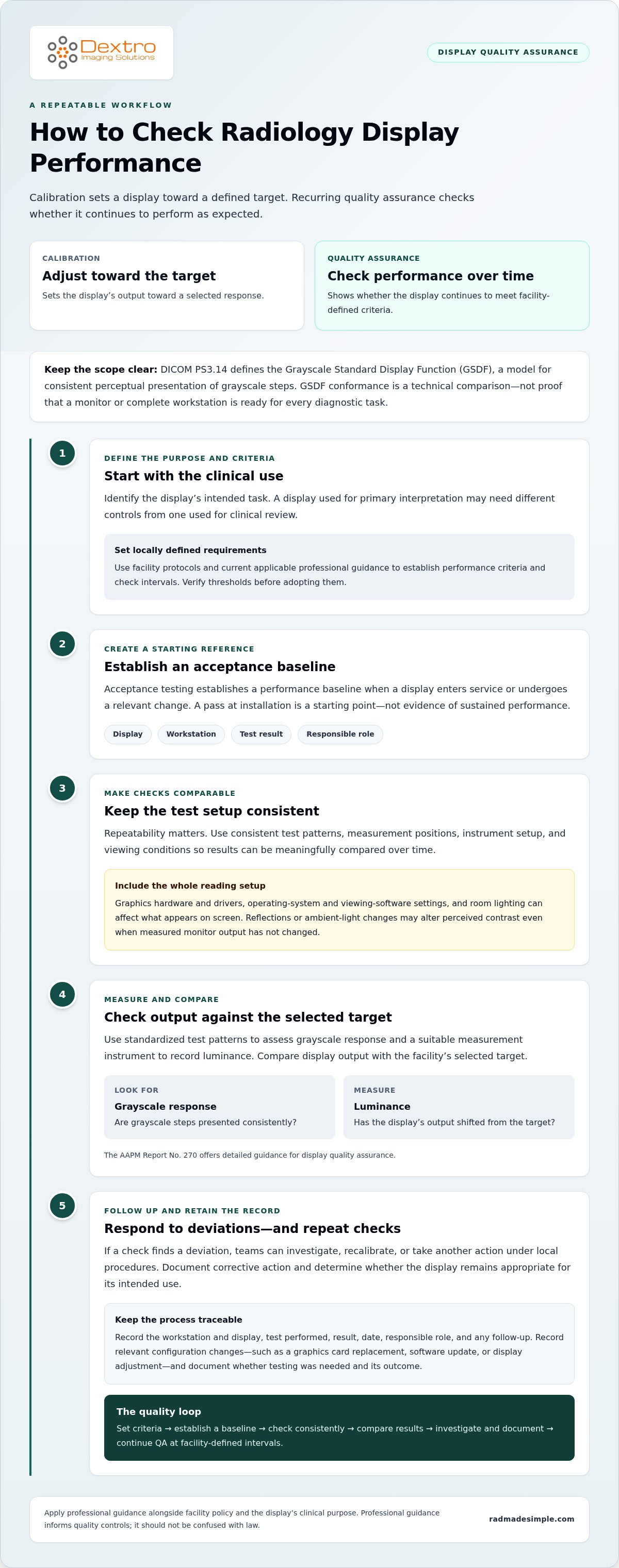
A Practical Radiology Monitor Compliance Checklist for Imaging Teams
A repeatable workflow makes radiology monitor compliance easier to manage across reading rooms and workstations. Assign responsibilities locally: radiology can define clinical use, medical physics can advise on testing criteria, biomedical engineering can coordinate equipment status, and IT can track workstation configuration. Give a person or team ownership of keeping records complete and accessible.
- Inventory displays. Record each display’s model, identifier, location, and intended use, such as primary interpretation or another review workflow.
- Define local criteria. Document the applicable guidance, facility policy, pass criteria, and testing intervals for each use. Verify these against current standards rather than relying on an assumed default.
- Establish a baseline. At acceptance, record the display and workstation configuration, calibration status, test method, results, test date, and responsible role.
- Schedule recurring checks. Use a consistent procedure and retain results so teams can compare performance with the baseline and local criteria.
- Review records and follow up. Identify overdue tests, out-of-criteria results, unresolved corrective actions, and displays whose status or intended use has changed.
Build a baseline and record display status
A useful record connects each result to the specific display and setup tested. Include model and location, assigned clinical use, relevant workstation configuration, calibration status, test method, measured results, date, and responsible role. This makes it easier to trace changes and see which workstations have current evidence. Keep equipment-planning references alongside the facility’s own requirements and procedures.
Maintain QA when equipment or workflows change
If a check falls outside local criteria, document the finding, notify the designated owner, record the investigation and corrective action, and note the outcome of any follow-up assessment. Facility procedures should also define whether repairs, replacements, software updates, or configuration changes trigger a review or additional testing. Keep evidence organized for internal review, and tailor the record format to your governance process rather than assuming one template fits every site.
Clear criteria, assigned ownership, and traceable records turn display checks into a manageable team process. Explore diagnostic monitors and reading stations as part of planning a display workflow around documented clinical requirements.
Selecting and Supporting a Compliant Radiology Display System
Start with clinical and operational requirements, not a product specification sheet. Define the intended reading tasks, local quality-assurance criteria, workstation configuration, and support needs first. Then compare display capabilities against those requirements. This makes radiology monitor compliance part of a system-level decision, rather than a feature assumed to come with a particular monitor.
Match equipment evaluation to documented requirements
Evaluate the monitor and reading station together. Consider how the display will connect to graphics hardware and viewing software, and how the complete setup fits the reading workflow. High-performance diagnostic displays and Dextro Reading Stations are options to assess against documented clinical needs. No single model should be assumed to suit every use case. Review vendor reference documentation for additional specifications and configuration details.
Operational readiness also depends on how equipment is installed, maintained, and integrated with the imaging environment. Include those factors in planning so configuration, support responsibilities, and QA procedures align with the facility’s workflow. Product specifications can inform selection, but acceptance testing and ongoing checks remain part of the facility’s own process.
Connect compliant displays with an efficient workflow
A reading station provides the workstation context around a diagnostic display, while PACS supports access to imaging studies within the broader workflow. Assess how these components work together, including software settings and the configuration used for interpretation. A change to one component may affect the overall setup, so define how relevant changes are reviewed under local procedures.
Purchasing a monitor or workstation doesn’t, by itself, establish compliance or ongoing performance. Match equipment to intended use, then maintain the facility’s documented acceptance and QA process for the full configuration. This connects selection decisions to the checks that demonstrate how equipment performs in practice.
Next step: Explore Dextro Imaging Solutions' equipment, including advanced diagnostic monitors and Dextro Reading Stations, alongside installation, maintenance, and software integration support to plan a display workflow around your documented requirements.
Make Display Quality Part of Your Ongoing Workflow
Reliable radiology monitor compliance depends on more than a display specification. DICOM GSDF conformance helps define grayscale presentation, while evaluation for intended clinical use and recurring, documented quality assurance show how the complete setup performs over time.
A clear process brings together assigned responsibilities, consistent checks, and records that support follow-up across workstations. Equipment selection should also account for the reading station, software, configuration, and the imaging team’s workflow. This keeps monitor decisions aligned with clinical requirements and the facility’s ongoing QA process.
Dextro Imaging Solutions offers diagnostic monitors and specialized radiology reading stations, with installation, maintenance, and software integration support. Explore Dextro Imaging Solutions to plan a connected display workflow. With clear requirements and a repeatable process, your team can build a stronger foundation for consistent image review.
Frequently Asked Questions
What is radiology monitor compliance?
Radiology monitor compliance is the process of ensuring diagnostic displays meet technical and operational criteria for their intended use, then maintaining and documenting that status. DICOM GSDF conformance may form part of the evaluation, but it isn’t a universal certification of clinical suitability. Facilities should define their approach using current professional guidance, local protocols, and documented quality-assurance procedures. This connects display testing with clear responsibilities and ongoing review.
Does DICOM compliance mean a monitor is ready for diagnostic interpretation?
No. DICOM GSDF addresses grayscale display behavior, but diagnostic readiness also depends on intended clinical use, the display’s current configuration, viewing conditions, and the facility’s quality-assurance process. A product label or specification alone can’t show how a particular monitor is performing in use. Evaluate the configured workstation against applicable current guidance and local policies, then document the results and any necessary follow-up.
How often should a radiology monitor be calibrated?
There isn’t one interval that applies to every display, workflow, and facility. Set the calibration schedule using current professional guidance, manufacturer instructions, local protocols, and the selected testing method. Establish a documented baseline and record the planned review interval. Reassess after relevant repairs or configuration changes according to facility procedures. Keep calibration records distinct from recurring QA results, since adjustment and continued-performance checks serve different purposes.
What does DICOM GSDF measure on a radiology monitor?
DICOM GSDF describes a grayscale display function intended to make changes in displayed luminance perceptually consistent. It provides a technical framework for evaluating grayscale presentation, but it isn’t a complete assessment of every aspect of diagnostic display performance or clinical suitability. Base measurement criteria and procedures on current technical guidance and facility policy. Verify specific thresholds before using them in testing or compliance documentation.
Can a consumer monitor be used for radiology?
It depends on the clinical task, the specific display’s documented performance, applicable guidance, and facility policy. Don’t assume every consumer display is suitable, or that every display in that category is automatically unsuitable. Assess the complete setup against the criteria for its intended use, including its configuration and viewing environment. Document the decision, supporting evidence, and quality-assurance approach so the facility can review the display’s status over time.
What should a radiology monitor compliance log include?
A useful log identifies the display and location, intended use, relevant configuration, test method, results, review date, and responsible role. It should also record corrective actions and their outcomes. Adapt the record format to facility policy and applicable guidance rather than relying on a universal template. Good documentation shows what was tested, when it was tested, whether criteria were met, and how exceptions were addressed.
What should imaging teams review when replacing a diagnostic monitor?
Review intended clinical use, documented display capabilities, workstation compatibility, software configuration, installation needs, and the facility’s QA process. Treat replacement as a change to the reading system, not just a screen swap. Record acceptance checks, update the equipment inventory, and revise local records or procedures as needed. Verify testing thresholds and intervals against current guidance and facility policy before bringing the new setup into its intended workflow.


