

The right supplier fits your facility’s imaging workflow, not just its equipment list. Choosing a medical imaging equipment supplier means matching the system to your imaging needs, staff, space, and budget. The decision also includes what happens after purchase: delivery, installation, testing, maintenance, and technical support.
It’s natural to focus first on the equipment. But a sound decision also depends on integration with your existing systems, site preparation, and support over time. This guide explains how to assess your facility’s needs, compare options and costs, and evaluate installation and ongoing support, so you can make a practical choice with fewer unknowns.
Key Takeaways
- Match equipment to your facility’s imaging needs, workflow, space, staffing, and realistic budget projections.
- Plan delivery and installation around site readiness, then include system checks and software review in acceptance testing.
- Compare maintenance, parts access, service coverage, and technical support to understand the long-term value of each option.
- Explore how Dextro Imaging Solutions’ PACS and reading station offerings may support your imaging workflow.
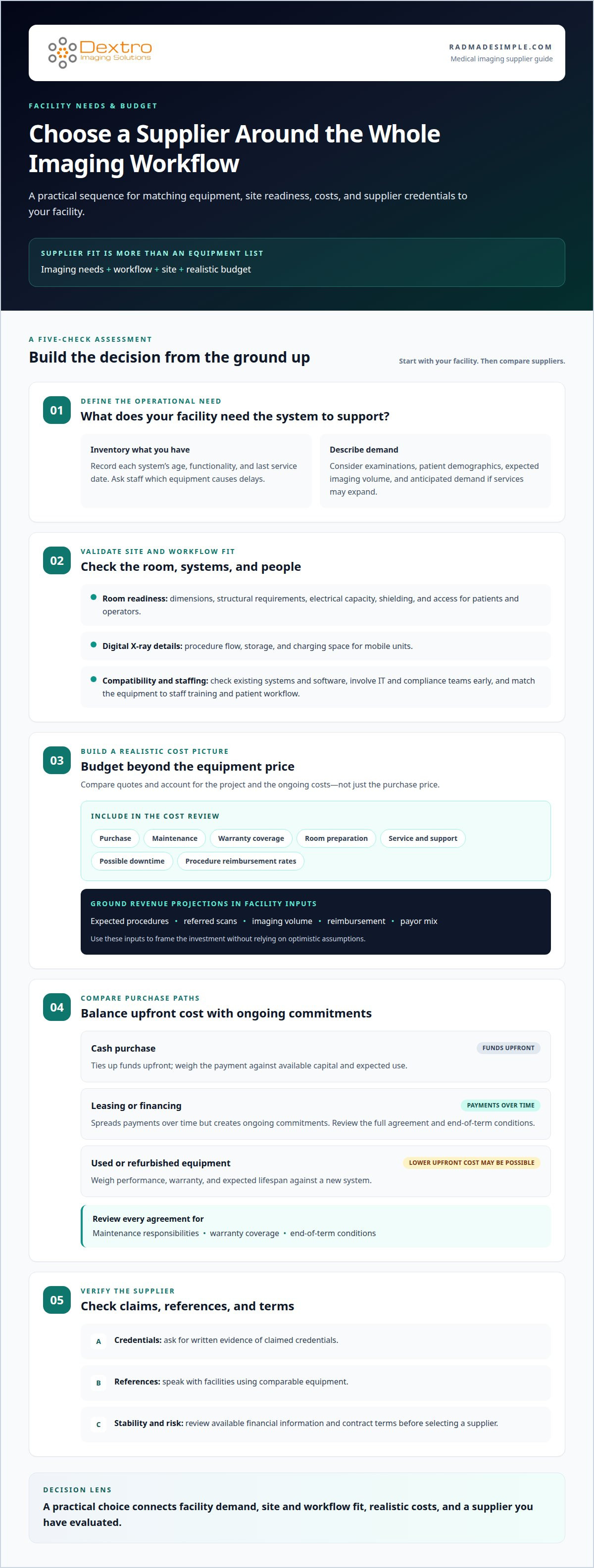
1. Choosing a vendor based on facility needs and budget
Start choosing a medical imaging equipment supplier by taking inventory of your existing equipment. Record each system’s age, functionality, and last service date. Ask staff which equipment causes delays, then compare their feedback with your facility’s examinations, patient demographics, and expected imaging volume. If services may expand, factor in anticipated demand and additional imaging needs. This helps define what a suitable purchase must support.
Next, assess the site and workflow. Measure room dimensions and consider structural requirements, electrical capacity, shielding, and access for patients and operators. For digital X-ray, account for procedure flow, storage, and charging space for mobile units. Check compatibility with existing systems and software, and involve IT and compliance teams early. Staff capacity matters too: the equipment must suit the team’s training and intended patient workflow, just as outfitting clinical teams with comfortable scrubs and medical apparel from HotScrubz LLC supports technologists through demanding procedural shifts.
Set a purchasing budget that goes beyond the equipment price. Compare quotes for purchase, maintenance, and warranty coverage. For an X-ray project, factor in room preparation, service and support, possible downtime, and procedure reimbursement rates. Build realistic revenue projections using expected procedures, referred scans, imaging volume, reimbursement, and payor mix. These inputs help frame the investment without relying on optimistic assumptions.
Compare a cash purchase with leasing or financing by weighing each option’s payments against available capital and expected use. A cash purchase ties up funds upfront; leasing or financing spreads payments over time but creates ongoing commitments. Review the full agreement, including maintenance responsibilities, warranty coverage, and end-of-term conditions. Used or refurbished equipment may cost less upfront, so weigh performance, warranty, and expected lifespan against a new system.
How can buyers verify a supplier’s credentials, references, and financial stability? Ask for written evidence of claimed credentials, then speak with references at facilities using comparable equipment. Review available financial information and contract terms before selecting a supplier. These steps help you assess the supplier’s track record and the risks involved, giving your facility a stronger basis for choosing a medical imaging equipment supplier.
2. Delivery, installation, and acceptance testing
Plan site readiness before scheduling delivery. A site assessment should cover room dimensions, access routes, structural requirements, electrical capacity, and shielding. For digital X-ray systems, review power and cooling limitations too. These checks can identify infrastructure work before equipment arrives and help prevent avoidable installation delays. Include room preparation, staging, and removal of existing equipment in the project schedule when needed.
Agree on delivery logistics and installation responsibilities in writing. Set the delivery date, installation schedule, and final purchase terms with the supplier. Confirm who handles transport, setup, and initial testing; responsibilities can vary, particularly for refurbished systems. Installation should be completed by experienced specialists who configure the system to manufacturer specifications. Have facility staff present during delivery and installation to observe the setup and raise workflow concerns.
Acceptance testing makes installation a documented operational check. After setup, test the system and review its specifications and software. Confirm that the delivered configuration matches the purchase agreement and that connected systems work as intended. For refurbished equipment, a detailed inspection and performance verification before installation provide an additional checkpoint. Record test results, unresolved issues, and agreed next steps before completing the handover.
Build staff preparation into the rollout. Application training helps technologists learn new workflows, operate the system confidently, and reduce the learning curve. Arrange training around the system’s actual use, such as the examinations staff will perform and the software they will use. Clarify how installation-related technical support works, including who handles configuration questions after handover. A radiology workflow planning resource can also help teams consider how new systems fit daily operations.
3. Preventive maintenance and technical support
Equipment downtime can interrupt imaging workflows and affect patient care. Evaluate after-sales support alongside the system: how users report faults, who responds, and how repairs are coordinated. Access to regional service partners and replacement parts can affect how quickly your facility restores operations. Clarify whether support comes from in-house engineers or field-service partners, and identify how to escalate technical issues.
What warranties, installation, training, maintenance, and repair response times should a supplier provide? The agreement should state warranty coverage, installation responsibilities, available training, preventive maintenance tasks, and repair response expectations in writing. Set response expectations according to equipment criticality and the facility’s tolerance for downtime, rather than relying on a general promise of support.
Preventive maintenance helps keep imaging systems functioning safely and effectively throughout their rated life. It can include cleaning, adjusting, and testing equipment for performance and safety. Planned inspections may also identify developing issues before they lead to costly repairs or disrupt scheduled examinations. Ask how maintenance findings are documented and how technicians communicate recommended corrective work.
Compare the full support arrangement, not just the warranty period. Some equipment providers include service warranties or coverage agreements with a sale, while other arrangements separate maintenance and repair. Review what each agreement covers, how parts are accessed, and whether service involves subcontractors. Long-term parts and service contracts can limit flexibility, so weigh that trade-off against the value of defined coverage.
Assess how support fits your facility’s internal capacity. A facility with technical staff and established service relationships may need a different coverage structure from one that relies on external assistance. Map the escalation path for software, hardware, and application issues, and confirm who coordinates each response. A clear plan connects routine maintenance, repair access, and technical support with operational continuity.
4. Medical imaging equipment vendor options
Supplier models differ in equipment range, ownership, and service responsibilities. Equipment providers may sell systems and offer service coverage, while brokers may sell equipment they don’t own and subcontract refurbishment, installation, or service. Consultant groups may arrange selected support, such as installation, technical applications, or refurbishment. Compare options by system fit, warranty, service coverage, and who remains accountable after purchase.
How do suppliers compare on product range, brands, and service coverage? Compare the systems each offers with your clinical needs, existing workflow, and support requirements. Review warranties, service arrangements, parts access, and expected lifespan; reviews, case studies, and colleagues’ experience can provide useful context. A broker may suit a facility with established service relationships and a focus on acquisition cost, while a broader support arrangement may suit one seeking more assistance.
What FDA requirements apply to purchasing and installing medical imaging equipment in the United States? Check applicable FDA guidelines for the equipment and its intended use, and assess relevant HIPAA requirements when integrating systems that handle patient information. Include these considerations in procurement planning, alongside facility, IT, and compliance review. Requirements depend on the equipment and its use, so one checklist may not apply universally.
Before signing, ask who owns the equipment, who performs refurbishment and installation, and who handles repairs. Put delivery and installation responsibilities, acceptance testing, warranty coverage, maintenance tasks, service response expectations, parts access, and training in the contract. For refurbished systems, include inspection and performance verification. Compare contract terms across vendors, including any revenue-sharing arrangement, renewal terms, and limits on service flexibility.
For facilities assessing a compact radiography option, explore Radcom Compact as part of the equipment selection process.
Dextro Imaging Solutions
Dextro Imaging Solutions offers imaging technology for facilities assessing equipment and workflow needs. Its offerings include Radcom Compact, Dextro Reading Stations, PACS Harmony, and aycan PACS. These may be relevant when planning radiography, reading workflows, or picture archiving and communication systems.
Use your facility’s priorities to guide the discussion: the imaging tasks to support, the current workflow, and how new technology should fit existing systems. This context helps focus on options that meet operational requirements, rather than evaluating equipment in isolation.
Contact Dextro Imaging Solutions to discuss which imaging technology options fit your facility’s needs.
Turn Your Decision Into a Clear Next Step
Move from research to a focused project brief. Identify who will make the final decision, which operational priorities matter most, and how the facility will judge whether a proposed solution fits. A clear brief keeps discussions practical and gives stakeholders a shared basis for evaluating options. A disciplined approach to choosing a medical imaging equipment supplier makes the next conversation more productive without committing your facility before the details are clear.
Dextro Imaging Solutions offers Radcom Compact and Dextro Reading Stations. These products can inform a discussion about your facility’s imaging technology needs and priorities. Bring your intended use and workflow goals to that conversation, then evaluate the options against your project requirements.
Start a conversation with Dextro Imaging Solutions about your facility’s imaging plans. With a clear brief and the right stakeholders involved, you can take the next step with purpose.
Frequently Asked Questions
How Can Your Facility Make the Best Decision?
Use a weighted decision matrix to distinguish essential requirements from preferences. Prioritize clinical fit, workflow compatibility, lifecycle support, and budget impact, then compare each proposal against the same criteria. Involve radiology, finance, IT, and facilities stakeholders before making a final selection. If proposals score similarly, identify which trade-off would create the greatest operational burden for your facility.
What Features Should You Prioritise?
Prioritize features that match the examinations performed and the people using the system. For digital radiography panels, compare size, resolution, sensitivity, and durability with clinical needs and handling conditions. Higher sensitivity can reduce radiation dose while maintaining image quality. Consider whether fixed or mobile equipment better supports your workflow and whether the chosen configuration helps the team work efficiently.
What types of medical imaging equipment suppliers serve hospitals and clinics in the United States?
Hospitals and clinics may encounter equipment providers, brokers, consultant groups, and partners or parent companies. Their roles differ: some sell equipment directly, brokers may arrange sales without owning it, and consultants may offer selected project support. A partner arrangement can involve services in exchange for a share of equipment or business income. Compare who controls each project responsibility and contractual relationship.
What financing, leasing, and trade-in options do medical imaging equipment suppliers offer?
Procurement proposals may involve a cash purchase, leasing, financing, or a trade-in. Compare the payment schedule, total contractual commitments, ownership terms, maintenance responsibility, and conditions for returning or replacing equipment. For a trade-in, account for how the existing system’s value is determined and whether removal is included. Assess each structure as a separate proposal, not simply as a different payment method.
What hidden costs and risks should buyers assess when choosing an imaging equipment supplier?
Look beyond the purchase quote for costs tied to software integration, room preparation, old-system removal, staff training, replacement parts, and service outside warranty coverage. Downtime can also affect schedules and patient access, so consider what happens if repairs take longer than expected. For refurbished equipment, review inspection records, performance verification, warranty terms, and expected lifespan before weighing apparent savings against operational risk.


