

A failed quality-assurance check doesn’t automatically mean it’s time to replace a diagnostic monitor. The better question is when to upgrade diagnostic monitors based on documented performance risk, not age or a single test result. A clear decision helps protect image-reading quality while avoiding premature purchases and unnecessary workflow disruption.
It’s reasonable to feel uncertain when QA findings point to a problem but don’t make the next step obvious. A luminance or calibration issue may call for repair, closer monitoring, or replacement, depending on whether the display can still meet the requirements of its clinical use. The ACR-AAPM-SIIM technical standard for electronic practice of medical imaging provides a useful framework for assessing equipment and quality control.
This guide explains how to turn test results into measurable upgrade triggers and compare continued monitoring, corrective action, repair, and replacement consistently. It also shows how to weigh performance trends, maintenance needs, reading workflows, and compatibility with the wider diagnostic workstation. The result is a practical, evidence-led rationale to share with decision-makers before committing to a change.
Key Takeaways
- Decide when to upgrade diagnostic monitors by weighing documented performance risk against the cost and operational impact of maintaining current displays.
- Group review signals across image presentation, QA results, hardware reliability, and workflow disruption to identify patterns that merit action.
- Compare continued monitoring, corrective action, repair, and replacement against the same clinical, service, downtime, and ownership considerations.
- Build a reviewable upgrade case from an inventory of display roles, locations, QA history, and service records.
- Translate approved needs into requirements for the display, reading station, PACS integration, and reading environment.
When to Upgrade Diagnostic Monitors: Start With Evidence, Not Age
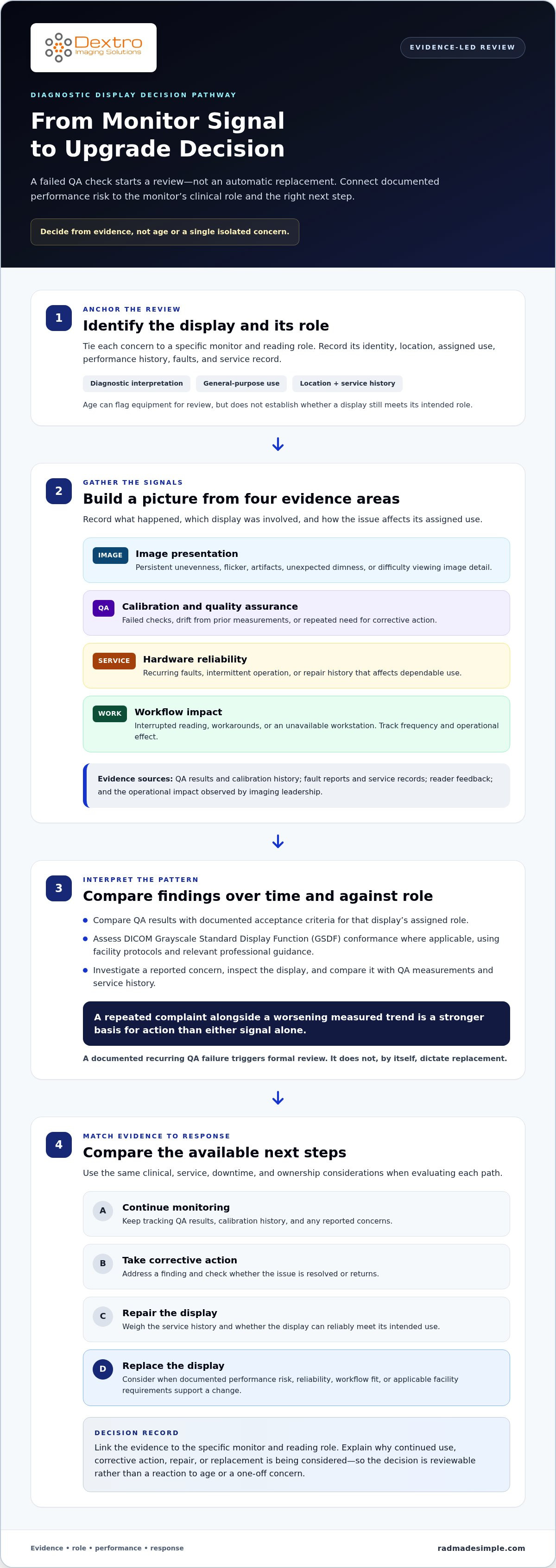
An upgrade decision should be a documented response to evidence that a display’s performance, reliability, workflow fit, or applicable facility requirements need attention. Link the evidence to a specific monitor and reading role, and explain why continued use, corrective action, repair, or replacement is being considered. This makes the decision reviewable rather than a reaction to age or a one-off concern.
Upgrade decisions should combine quality, service, and operational evidence, not rely on a single age threshold or isolated complaint.
What counts as evidence that a monitor needs attention?
Build a record from several sources. QA results and calibration history show how measured performance changes over time. Fault reports and service records document recurring failures, corrective work, and whether issues return. Reader feedback can identify visible concerns or workflow friction that measurements alone may not capture.
- QA and calibration: Imaging physics or the designated QA lead can interpret test results against the facility’s protocols and the display’s assigned role.
- Faults and service: IT or biomedical support can track failures, repairs, and recurring technical problems.
- User-reported issues: Radiologists can describe when and how image presentation interferes with reading, while imaging leadership can help assess operational impact.
A single report deserves investigation, but it isn’t automatically proof that a monitor needs replacement. Record the circumstances, inspect the display, and compare the concern with QA measurements and service history. A repeated complaint alongside a worsening measured trend presents a stronger basis for action than either signal alone. The broader principle of observing information over time is reflected in Medical Monitoring Principles, though monitor decisions should rely on relevant display testing and facility procedures.
Why is an age-based replacement rule not enough?
Two displays installed at the same time may have different reading roles, usage, maintenance histories, operating conditions, and QA results. A monitor used for diagnostic interpretation may face different requirements from a screen used for scheduling, image review outside interpretation, or administrative tasks. Age can help flag equipment for review, but it doesn’t establish that either display has failed its intended role.
Separate diagnostic displays from general-purpose screens in the inventory. For each monitor, document its identity, location, assigned use, performance history, faults, and service record. Then assess the evidence against the clinical role and facility protocols. Don’t assume a monitor is suitable for diagnostic interpretation simply because it displays medical images, or unsuitable solely because it has been in service for a long time.
Selection context matters once the need is established. Requirements for a diagnostic display depend on its intended use and reading environment, so compare options against documented needs rather than choosing by age or headline specifications alone. Facilities evaluating display solutions through Dextro Imaging Solutions can use the same role-based approach to connect display selection with reading-station and imaging-workflow requirements.
Which Diagnostic Monitor Performance Signals Should Trigger Review?
A useful review looks for patterns across four areas: image presentation, calibration and QA, hardware reliability, and workflow impact. One finding may have a simple explanation; a persistent or worsening pattern is harder to dismiss. The question of when to upgrade diagnostic monitors should begin with what the records show, not with an isolated symptom.
- Image presentation: Readers report persistent unevenness, flicker, artifacts, unexpected dimness, or difficulty viewing image detail. Record the display, task, and conditions, then investigate whether the concern follows that monitor.
- Calibration and QA: Results show a failed check, drift from prior measurements, or repeated need for corrective action. Assess DICOM Grayscale Standard Display Function (GSDF) conformance where applicable, using facility protocols and relevant professional guidance rather than assuming one threshold applies everywhere.
- Hardware reliability: The display has recurring faults, intermittent operation, or a repair history that affects its dependable use.
- Workflow impact: Monitor problems interrupt reading, require workarounds, or make a workstation unavailable. Track how often this happens and the operational effect.
A documented recurring QA failure should trigger formal review, not automatic replacement. The review determines whether correction resolves the issue or whether the evidence supports a larger equipment decision.
What do calibration and quality-assurance records reveal?
Compare results over time with documented acceptance criteria for the display’s assigned role. The ACR and AAPM technical guidance addresses quality management and display QA and QC. Apply it alongside facility protocols, not as a substitute for them. For each test, record the method, date, display identity, result, corrective action, and retest outcome. This helps distinguish a one-time deviation from a trend that persists after intervention.
A failed result followed by a successful retest may call for continued observation under the facility’s process. Repeated failures, worsening measurements, or unsuccessful corrective actions warrant closer assessment by the responsible imaging-physics and clinical stakeholders. IT or biomedical support can contribute service and fault history. The ACR and AAPM Display Performance Standards provide a reference for organizing that assessment.
When do faults and workflow problems become upgrade evidence?
Look for recurrence and impact. A single outage that is resolved may not indicate a need to replace the display. Repeated disruptions, growing repair needs, unavailable parts, or lost reading availability can change the operational case. Log dates, duration, symptoms, action taken, and whether the fault returned. Capture user concerns with specific examples rather than general impressions.
Then isolate the source. Compare the issue across displays or workstations, and assess potential contributors such as the workstation, PACS, network, or ambient lighting. Clinical readers can describe image and workflow effects; imaging physics can assess display performance; IT can investigate connected systems and service events. For teams reviewing the wider reading workflow, diagnostic imaging workflow resources can offer relevant context.
Repair, Monitor, or Replace: How to Compare the Options
Once a monitor’s findings are documented, compare possible responses using the same decision factors. This keeps a quick repair from seeming preferable simply because it avoids an immediate purchase, and prevents a failed test from making replacement seem automatic. Consider clinical requirements, QA status, serviceability, downtime, workflow impact, and facility-specific ownership estimates for every option.
Use one consistent set of questions:
- Continue use: Does current performance meet the facility’s criteria for the display’s clinical role, and can the issue be monitored under existing procedures?
- Correct or repair: Is there an identified, addressable cause, and can the display be tested again after intervention?
- Replace: Do persistent performance or reliability problems remain, and would a new display better support documented clinical and workflow requirements?
Record the evidence behind each option, including QA findings, service history, expected downtime, and the effect on reading availability. Use quotes, maintenance records, and local operational information for facility-specific cost estimates. Avoid generic cost ranges because they can’t represent a site’s actual service needs, workflow, or ownership considerations. A radiology equipment compliance checklist can also help organize related equipment-planning considerations alongside the monitor-specific assessment.
When can calibration, repair, or workflow changes address the issue?
Remediation makes sense when an investigation identifies a correctable cause and follow-up testing shows the display meets applicable facility criteria. The cause may involve calibration, configuration, software, workstation behavior, or the reading environment rather than a failing display panel. Document the intervention, test result, and a reassessment point set under facility policy. If the finding returns or remains unresolved, reopen the comparison instead of treating the initial fix as conclusive.
When does replacement become the more defensible option?
Replacement becomes easier to justify when problems persist despite appropriate corrective action, particularly when QA findings coincide with recurring faults, repeated downtime, limited serviceability, or disruption to reading. Assess the evidence together. A repairable fault with stable follow-up results may support continued use; recurring failures and ongoing operational burden may shift the balance. These are facility-specific decisions, not universal clinical or regulatory rules.
To keep the decision fair, document why each alternative was accepted or ruled out. For example, continued monitoring may be reasonable when results remain within documented criteria and service records show no recurring failure. Repair may be preferred when a specific fault can be corrected and subsequent testing supports its effectiveness. Replacement may be the stronger case when corrective actions don’t restore dependable performance or the monitor no longer fits its assigned use. This evidence-based comparison clarifies when to upgrade diagnostic monitors without treating age or purchase cost as the deciding factor.
How to Build an Evidence-Based Diagnostic Monitor Upgrade Case
A strong proposal makes the path from finding to decision easy to follow. It identifies which display is affected, what the evidence shows, which alternatives were considered, and how the recommended action supports clinical work. A consistent inventory and QA record turn equipment planning from a collection of anecdotes into a reviewable process. They also help clarify when to upgrade diagnostic monitors and where an intervention should take priority.
- Build a baseline inventory. Assign each display a unique identity and record its location, clinical or operational role, QA history, calibration records, and service history. Include displays across reading locations so decision-makers can compare like with like.
- Assemble the evidence file. Gather dated test results, repair events, downtime records, and user feedback validated through follow-up. Note the test method, applicable facility criteria, clinical use, and the reviewers responsible for interpreting the findings.
- Describe the problem and objective. Link each proposed replacement to a documented issue. State a measurable operational objective, such as reducing display-related interruptions or restoring performance against the facility’s documented acceptance criteria. Define how progress will be assessed using facility-selected measures.
- Compare the alternatives. Include continued use, corrective action, repair, and replacement. Summarize the evidence each option addresses, serviceability, expected downtime, workflow dependencies, and facility-specific ownership estimates. Explain why the recommended choice best fits the documented need.
- Set priorities and implementation steps. Rank displays by documented risk, clinical role, service continuity, and dependencies. For phased work, identify reading coverage, configuration, validation, and staff-readiness needs before setting the sequence.
What should the upgrade evidence file contain?
Keep the proposal traceable with dated QA and calibration records, repair and downtime logs, relevant user examples, applicable facility standards, the display’s role, and reviewer input. Include retest outcomes after corrective work. Record alternatives considered and the reason for the recommendation so reviewers can distinguish evidence from assumptions and understand how the selected action addresses the issue.
How can a facility prioritize upgrades without disrupting workflow?
Prioritize displays based on evidence and reading function, then map dependencies across the workstation and imaging workflow. A radiology reading workstation assessment can surface configuration and integration needs that affect deployment. Plan phases around reading coverage, validation, and staff readiness. Confirm each stage meets facility criteria before moving on. This connects the proposal to service continuity, not just procurement timing.
Consistent inventory and QA records strengthen equipment planning by showing what needs attention, why it matters, and how the proposed action will be assessed. Once requirements are clear, explore diagnostic monitor and workstation solutions that align with the documented reading environment and workflow.
Plan the Next Step: Match Diagnostic Monitors to Your Reading Environment
Once an upgrade is approved, turn the evidence into a practical implementation plan. Specify the display’s clinical role, reading environment, workstation requirements, and connections to PACS and related software. Tie each selection criterion to documented facility needs rather than choosing equipment by age or specifications that don’t support the intended workflow. The decision about when to upgrade diagnostic monitors should lead to a solution that fits the reading environment as well as the display’s role.
Map the approved scope before deployment. For each location, document:
- The display’s assigned clinical use and applicable facility requirements.
- Workstation, software, and PACS integration dependencies.
- Installation, configuration, and any facility-required validation steps.
- Transition arrangements, accountable project owners, and post-deployment QA and support responsibilities.
A phased plan can help maintain reading operations while equipment is installed and assessed. Coordinate timing with reading coverage, assign owners for technical and clinical tasks, and define how results will be documented after deployment. Keep the project plan aligned with the criteria used to approve the upgrade so the team can evaluate whether the new configuration meets its intended requirements.
What should the implementation plan address?
Coordinate installation with workstation configuration, software integration, and any validation required by facility policy. Assign an owner for each activity, including transition planning and post-deployment QA documentation. Set out how support requests and maintenance records will be handled after rollout. These steps clarify responsibilities and help teams manage dependencies without assuming that a display operates independently of the reading system around it.
How can Dextro Imaging Solutions support an evidence-led equipment plan?
Dextro Imaging Solutions offers Jusha Diagnostic Monitors, Dextro Imaging Solutions Reading Stations, and PACS solutions, supported by installation, maintenance, technical support, and software integration. These products and services can help facilities plan an upgrade across the monitor and its broader imaging workflow. With clinical roles and technical requirements established, explore Dextro Imaging Solutions diagnostic monitor and workstation solutions to align equipment planning with the documented needs of your reading environment.
Turn Your Evidence Into a Confident Next Step
A monitor decision doesn’t end when a proposal is approved. Carry its evidence into implementation, then keep the decision useful by documenting how the equipment performs in its intended reading environment. That feedback can inform future planning and help teams respond earlier when needs change.
Use documented clinical roles and workflow requirements to guide the discussion, rather than letting procurement timelines or technology trends set priorities on their own. This keeps when to upgrade diagnostic monitors grounded in your facility’s needs and gives decision-makers a clear basis for action.
Dextro Imaging Solutions brings diagnostic monitors and reading stations together with installation, maintenance, technical support, and software integration. Explore options that align with your approved requirements and broader imaging workflow: Explore Dextro diagnostic monitor and workstation solutions.
A clear evidence trail makes the next decision easier to explain and act on. With a defined plan, your team can move forward with confidence.
Frequently Asked Questions
Is there a standard age when diagnostic monitors should be replaced?
There’s no single replacement age that applies to every diagnostic monitor. Time in service can prompt closer review, but it doesn’t establish that performance is unsuitable. Consider the display’s assigned role, history, and facility criteria. For example, a monitor with stable documented performance may warrant a different decision from one with recurring problems, even if both were installed in the same year.
How often should diagnostic monitors undergo quality-assurance testing?
Use the testing schedule established by your facility’s QA program and applicable professional guidance. The right interval can depend on the display’s role, local requirements, and the procedures used to assess it. A change in performance, repair, or relocation may also call for additional assessment under facility policy. Record the schedule and rationale so staff can tell when the next check is due and why.
Can a diagnostic monitor be recalibrated instead of replaced?
Yes, recalibration may be appropriate if the issue is correctable and the display meets applicable criteria after the intervention. For example, a calibration adjustment could address a measured deviation, while a recurring hardware fault may need a different response. Document the change and follow-up result. If the monitor still fails acceptance criteria or the problem returns, reassess whether calibration alone is sufficient.
What happens if a diagnostic monitor fails a quality-assurance test?
Follow the facility’s QA escalation procedure and document the failure, affected display, and any immediate steps taken. The responsible team should investigate the result, determine whether a retest or corrective action is appropriate, and record the outcome. Facility policy and clinical leadership guide whether the display can remain in diagnostic use while the issue is assessed. A failed test calls for a managed response, not an automatic replacement.
Can a radiology department replace diagnostic monitors in phases?
Yes, phased replacement can help coordinate equipment changes with reading coverage and technical readiness. A department might begin with locations where evidence and operational impact support the highest priority, then proceed as each phase is configured and assessed. Before rollout, define how staff will access reading work during transitions and who approves each phase. Keep the sequence tied to documented needs, not simply to room layout or purchase timing.
Do all radiology reading tasks require the same type of diagnostic monitor?
No. Requirements depend on the task, clinical role, and facility criteria. A display used for diagnostic interpretation may have different requirements from one used for image review, administrative work, or other non-diagnostic tasks. Document each monitor’s intended use before selecting equipment. This helps prevent a general-purpose screen from being treated as interchangeable with a display intended for diagnostic reading.
How should a facility document evidence for a diagnostic monitor upgrade?
Start with a dated record for each display, including its identity, location, clinical role, QA results, calibration history, service events, and relevant user observations. Add the facility criteria used to assess findings, the reviewers involved, and the corrective actions or alternatives considered. To support a defensible decision about when to upgrade diagnostic monitors, connect the requested action to a measurable operational objective and explain how the facility will assess the result.


