

Could a display have a DICOM conformance statement and still fall short of your diagnostic workflow’s needs? Yes. A DICOM conformance statement for displays describes a product’s declared DICOM capabilities and implementation. It is not a certification of diagnostic image quality or a guarantee that every part of your setup will work as intended.
That distinction matters when technical statements use different formats and terminology. It’s easy to compare features as if they were quality ratings, or to assume a conformance claim confirms a display is ready for diagnostic use. The document is a useful starting point, but it answers only part of the evaluation question.
This guide explains what a display conformance statement does, how to interpret its technical details, and where its limits are. You’ll learn how to compare statements consistently without treating them as certifications, and what evidence to assess next, including calibration and verification, the workstation, PACS integration, and your image-viewing workflow.
Use this framework to evaluate a monitor as part of an imaging setup, rather than relying on one document to make the decision.
Key Takeaways
- Use the DICOM conformance statement for displays to identify declared capabilities, then compare them with your imaging and software requirements.
- Start with the document’s manufacturer, model, version, date, and scope before interpreting technical details.
- Separate implementation details from display specifications, calibration records, and quality-assurance evidence when evaluating equipment.
- Follow an ordered review: verify the document, identify capabilities and limitations, then map them to the intended workflow.
- Assess monitors, reading stations, and PACS as parts of one imaging setup. Dextro Imaging Solutions' diagnostic monitors and workstations can support that broader planning.
What a DICOM Conformance Statement for Displays Actually Tells You
A DICOM conformance statement for displays documents a product’s claimed implementation of relevant DICOM requirements and the behavior it supports. It helps teams identify declared capabilities and assess how a product may fit into an imaging environment. It does not independently certify the display or rate its overall quality.
What does DICOM conformance mean for an imaging display?
Digital Imaging and Communications in Medicine (DICOM) is a standard for medical imaging information and related system behavior. Its specifications support consistent exchange and handling of imaging data between systems. Part 2 of the DICOM Standard describes the structure of conformance statements.
The manufacturer prepares the statement for a particular product, system, or software version. It declares which DICOM capabilities and behaviors are supported, and may describe how a system participates in an exchange. For a display setup, the relevant documentation may cover an associated workstation or software as well as the monitor. Check the document’s scope before assuming it addresses every component.
Read the statement as an implementation map, not a general promise of compatibility. Use its details to compare declared capabilities with the systems and functions your workflow uses.
What a conformance statement cannot prove
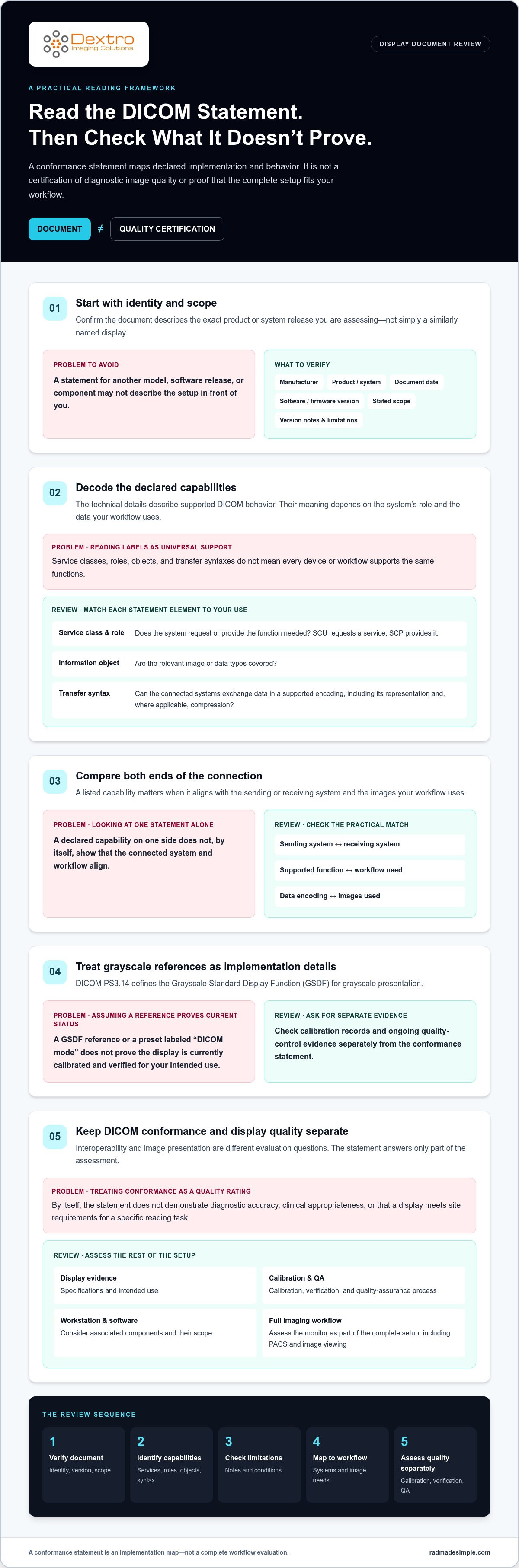
A conformance statement describes DICOM implementation; it is not a display quality certification. By itself, it does not demonstrate diagnostic accuracy, clinical appropriateness, or that a display meets your site’s requirements for a specific reading task.
Interoperability and image presentation are separate evaluation questions. A statement may describe supported DICOM behavior, but it does not establish the display’s current calibration status or replace evidence of ongoing quality assurance. A preset labelled “DICOM mode,” for example, should not be treated as proof that the display has been calibrated and verified for your intended use.
Assess display specifications, intended use, calibration and verification records, and your organization’s quality-assurance process separately. Then consider how the monitor performs as part of the full setup, including its workstation, viewing software, and imaging workflow. When reviewing options provided by Dextro Imaging Solutions, evaluate product documentation and workflow fit rather than treating a DICOM claim as proof of diagnostic performance.
How to Read a Display DICOM Conformance Statement Section by Section
Start with the document identity, not the technical tables. Confirm the manufacturer, exact product or system name, document date, software or firmware version, and stated scope. A statement may describe a workstation or software component rather than the display alone. Check version notes and limitations, too. A document for a different model or release may not describe the setup you’re evaluating.
Which DICOM implementation details should readers locate first?
Next, identify the declared services, roles, data objects, and transfer syntaxes. In DICOM PS3.2, a conformance statement describes an implementation’s supported behavior. Service classes group related functions. Roles indicate how a system participates, such as a Service Class User (SCU) requesting a service or a Service Class Provider (SCP) providing it. These labels describe declared capabilities, not universal support across every device or workflow.
Information objects identify the types of imaging information involved. Transfer syntaxes specify how DICOM data is encoded, including its representation and, where applicable, compression. Compare both ends of the connection: a capability matters only if it aligns with the sending or receiving system and the images your workflow uses.
| Statement element | Practical question |
|---|---|
| Product, version, date, and scope | Does this document match the exact system and release being assessed? |
| Service class and role | Does the system request or provide the function our workflow needs? |
| Information object | Are the relevant image or data types covered? |
| Transfer syntax | Can the connected systems exchange data in a supported encoding? |
| Limitations and notes | Are there exclusions or conditions that affect our intended use? |
How should teams interpret grayscale and presentation information?
Look for references to DICOM PS3.14, which defines the Grayscale Standard Display Function (GSDF) for grayscale presentation. A GSDF reference can help explain the intended grayscale behavior, but it does not show that a particular display is currently calibrated or verified. Treat calibration records and ongoing quality-control evidence as separate items in your review.
For broader equipment and quality-control considerations, consult the ACR-AAPM-SIIM Technical Standard for Electronic Practice of Medical Imaging. Then map the documented capabilities to your workstation, software, and imaging requirements. Assessing diagnostic monitors and reading stations as parts of the same workflow can help keep the evaluation focused on the complete setup.
DICOM Conformance vs. Display Quality: Compare the Evidence Separately
A display can support declared DICOM behavior and still require separate evaluation for diagnostic use. A DICOM conformance statement for displays does not prove that every diagnostic requirement is met. It addresses implementation, while image presentation, calibration, and ongoing performance call for different evidence.
Keep the evidence categories distinct. Each answers a different question:
| Evidence category | What it helps establish | What to review |
|---|---|---|
| DICOM implementation | Which DICOM behaviors and capabilities the system declares | Conformance statement, product scope, supported roles, services, and data handling |
| Display specifications | Whether the display’s documented characteristics align with the intended task | Manufacturer specifications, intended use, and product documentation |
| Calibration | Whether the display has been adjusted and measured for its operating conditions | Calibration and verification records for the specific display |
| Quality assurance | How display performance is monitored over time | Local quality-control procedures, results, and follow-up records |
What evidence belongs beside a DICOM conformance statement?
Read the manufacturer’s specifications and intended-use information alongside the conformance document. These sources clarify the display’s stated characteristics and context of use, but they do not replace local assessment. Calibration records show what was measured and when. Quality-assurance records help teams understand how performance is checked over time. Keep the evidence tied to the actual display and its operating configuration.
The AAPM Task Group 18 (TG18) report provides technical methods for evaluating medical displays. It can help teams understand the types of measurements and patterns used in display assessment. Apply relevant guidance through your organization’s established quality-control process, rather than assuming that a DICOM statement contains those results.
Why do display and workflow context change the assessment?
A display does not operate in isolation. The image source, workstation, viewing software, display settings, and local workflow all influence how imaging data reaches the reader. A configuration suited to one task may not provide the evidence needed for another. Define the intended clinical use first, then identify the specifications, verification records, and workflow checks relevant to that use.
This system-level view helps teams assess integration as well as the monitor itself. Include equipment documentation, display evidence, and workflow requirements in the same review.
A Practical Checklist for Reviewing Display Conformance Documentation
Turn the document review into a repeatable record. A consistent process helps imaging IT and radiology teams spot mismatches early, assign follow-up, and retain the evidence behind an equipment decision. Don’t treat a conformance statement as a pass-or-fail rating. Use it to guide targeted checks against your actual configuration.
What should an imaging IT review record include?
Start by documenting the manufacturer, model, statement date, software or firmware version, and intended configuration. Confirm the document scope, then record the capabilities and any stated exclusions that matter to your workflow. For a DICOM conformance statement for displays, capture relevant services, supported data, and transfer details when they affect connected systems.
Use this ordered review:
- Verify identity and version. Match the document to the exact product and release under review.
- Confirm scope. Note which components the statement covers and which are outside its stated scope.
- Map capabilities. Compare declared DICOM services, roles, and data support with your image sources, workstation, and software.
- Flag limitations. Record exclusions, assumptions, and compatibility questions that need follow-up.
- Assign next steps. Name the reviewer responsible, the evidence still needed, and the action or decision date.
Keep the statement with procurement and configuration records, related product documentation, and verification evidence. This gives the team a useful reference when the system changes or the original evaluation is revisited.
How should teams verify the display in its intended setup?
Review the deployed configuration, not just the document. Check that the workstation, image-management software, image sources, and display match the assumptions made during review. If the configuration differs, document the difference and assess whether it affects the intended use. Avoid applying a universal acceptance threshold unless current authoritative guidance or your organization’s approved criteria support it.
Bring radiology, imaging IT, and quality-assurance stakeholders into the review. Each can identify different gaps: clinical task fit, technical compatibility, or the evidence needed to assess and monitor display performance. Include workstation performance and compliance in the same workflow review.
Dextro reading stations and diagnostic monitor solutions can be considered as part of planning a complete imaging workflow.
Choose a Diagnostic Display With Documentation That Fits the Workflow
A sound display decision brings four considerations together: clear documentation, technical fit, intended use, and workflow integration. No single standards reference answers all four. Use the same documented criteria for each candidate configuration so your team can compare evidence consistently instead of relying on a broad compliance label or a feature list.
What should radiology teams align before selecting a display?
Start with the clinical task and the environment where the display will be used. Define how images arrive, which workstation and viewing software are involved, and what the local workflow requires. Then compare product-specific documentation with those needs. The DICOM conformance statement can inform the interoperability review, while separate product and quality records address other parts of the evaluation.
Keep the comparison practical and consistent. For each candidate configuration, record:
- Documentation clarity: Does the material identify the product, version, scope, capabilities, and limitations?
- Technical fit: Do the documented capabilities align with the image sources, workstation, and software in use?
- Intended use: Does the available product evidence support evaluation for the team’s specific clinical task?
- Workflow integration: How will the display fit into the complete reading environment and its quality processes?
This approach makes differences between configurations easier to explain and gives technical and clinical reviewers a shared basis for discussion. It also avoids treating one standard reference as proof that every requirement is satisfied.
How can Dextro support an imaging-equipment decision?
Display planning is part of broader imaging-workflow planning. Dextro Imaging Solutions offers Jusha diagnostic monitors, specialized Dextro Reading Stations, portable workstations, and PACS solutions. Teams can consider these equipment categories together when assessing how images are accessed, reviewed, and managed across their environment.
Dextro also supports installation, maintenance, and software integration. This support can help teams address equipment setup and software connections as part of workflow planning. Product-specific documentation and the site’s own evaluation criteria remain central to selecting a configuration suited to the intended use.
To apply this framework to your imaging environment, review Dextro imaging solutions and equipment options for your workflow.
Make Your Display Decision Part of a Stronger Workflow
A DICOM conformance statement for displays is a guide to declared implementation, not proof of diagnostic quality or suitability. Read it alongside product documentation, calibration and quality-assurance evidence, then compare those details with the intended clinical use and the full imaging setup.
A consistent review process helps your team confirm document scope, identify relevant capabilities and limitations, and record questions for follow-up. Just as important, it connects the display to the workstation, image sources, software, and local workflow. That broader view supports a more informed equipment decision.
Dextro offers Jusha diagnostic monitors and specialized radiology reading stations, with installation, maintenance, and software integration support to address practical workflow needs. Explore Dextro’s diagnostic imaging solutions to discuss equipment options for your environment. With clear criteria and the right evidence, your team can move forward with greater confidence.
Frequently Asked Questions
What is a DICOM conformance statement for a display?
A DICOM conformance statement for a display is manufacturer documentation describing a product’s declared DICOM implementation and supported behavior. It identifies the product and version, then outlines applicable capabilities, such as services, roles, and supported data handling. Use it to understand what the documented system claims to do and compare that with your imaging setup. Check the statement’s scope: it may cover associated software or a workstation, not only the monitor.
Does a DICOM conformance statement certify a medical display?
No. A conformance statement documents a manufacturer’s declared implementation; it is not, by itself, an independent certification of diagnostic image quality. It also does not establish that a display is appropriate for every clinical task or meets your organization’s requirements. Review product specifications and intended use separately, along with calibration records, verification results, and your site’s quality-assurance process. These sources address different aspects of an equipment evaluation.
What is the difference between DICOM conformance and DICOM GSDF?
DICOM conformance describes an implementation’s declared support for relevant DICOM requirements and behavior. The Grayscale Standard Display Function (GSDF), defined in DICOM PS3.14, provides a standard approach to grayscale presentation. A statement may reference GSDF, but that reference alone does not show that a particular display is currently calibrated or verified to follow the function. Assess calibration and quality-control evidence separately for the display in its operating configuration.
How do I compare DICOM conformance statements from different display manufacturers?
Compare like with like. Confirm each statement’s manufacturer, exact product, version, date, and scope, then review relevant services, roles, supported information objects, transfer syntaxes, and stated limitations. Map those details against the same workstation, software, and imaging requirements for each candidate. The phrase DICOM conformance statement for displays describes a useful document to compare, not a quality score. Keep interoperability claims separate from display specifications and performance evidence.
Can a DICOM-conformant display still need calibration?
Yes. DICOM conformance and calibration address separate questions. A conformance statement describes declared DICOM implementation; calibration adjusts display behavior, while verification assesses how it performs under specified conditions. A factory preset or GSDF reference does not prove the display is currently calibrated for your setup. Follow your organization’s quality-control process and retain relevant calibration and verification records for the specific display and configuration being used.
What happens if a display’s conformance statement does not list a capability?
Treat the capability as undocumented in that statement, rather than assuming it is supported or unsupported. First confirm that the document matches the exact product, software or firmware version, and system scope. Review related product documentation and identify the capability your workflow requires. Record the open question, then resolve it through appropriate technical documentation or integration testing before relying on that behavior in the deployed setup.


