

The lowest upfront price can lead to a costly mismatch if a monitor doesn’t fit clinical needs or existing workflows. Buying medical grade diagnostic monitors takes more than comparing specifications: budget, implementation, and ongoing support all shape the decision.
Choosing equipment can feel complicated when feature lists compete for attention and the purchase must fit a budget. This guide offers a practical way to compare options: define the clinical use, assess the full cost of ownership, review acquisition terms, and plan installation and integration before approval.
You’ll find a framework for matching monitor requirements to your imaging environment, comparing payment structures, and planning procurement through implementation. Dextro Imaging Solutions offers advanced diagnostic monitors and supports installation, maintenance, and software integration, connecting equipment decisions to the systems and workflows around them.
Key Takeaways
- Match monitor requirements to clinical use rather than relying on a medical-grade label alone.
- Build a cost worksheet that includes acquisition, setup, support, and replacement planning over the same evaluation period.
- Compare cash purchase, third-party financing, and leasing by cash-flow timing, ownership, contract obligations, and end-of-term responsibilities.
- When buying medical grade diagnostic monitors, assign clinical, IT, procurement, and finance teams clear roles in the review and approval process.
- Use a defined decision sequence to connect clinical fit and acquisition choices with implementation, including Jusha diagnostic monitors in Dextro’s imaging portfolio.
Buying Medical-Grade Diagnostic Monitors: Start With the Clinical Need
Budget matters, but a display also affects how clinicians review images and move through daily reading tasks. The goal is to manage procurement costs while meeting the needs of the diagnostic workflow. Define the intended use first, then assess equipment against it.
A “medical-grade” label alone doesn’t establish that a monitor is appropriate for every diagnostic task. Suitability depends on intended use, the images being reviewed, the clinical environment, and applicable requirements. Before comparing product descriptions or feature lists, document the use case and the criteria the display must meet.
Match the monitor to the diagnostic task
List the imaging modalities and reading tasks the display must support. A radiologist reviewing cross-sectional images may have different display needs from a clinician reviewing color images or a team working across several image types. The required combination of resolution, luminance, grayscale performance, and color reproduction depends on those tasks, not on a universal specification.
Document local protocols and current clinical requirements with the appropriate clinical lead. Don’t choose a resolution or brightness threshold simply because it appears prominently in a product description. A Jusha medical monitor reference guide can help frame product research, while clinical requirements should guide the final specification.
Build a requirements brief before reviewing products
A concise requirements brief gives clinical, IT, procurement, and finance teams a shared basis for review. Record who will use the display, where it will be installed, and how it fits into the workstation setup. Include expected workload and room conditions that could affect placement or use.
- Clinical use: Record modalities, image types, reading tasks, and applicable local protocols.
- Users and environment: Identify user roles, room conditions, workstation location, and expected workload.
- Systems: Document the computer configuration, operating environment, imaging software, and PACS connections for technical review.
- Implementation: Note installation needs, support expectations, and workflow changes required for deployment.
These details help the technical team assess compatibility before a purchase decision. They also make product comparisons more useful because each option is measured against the same practical requirements.
Verify technical and regulatory fit
Before approval, have the relevant clinical and technical stakeholders verify that the proposed configuration fits its intended use. Review documentation for the exact model and configuration, and confirm which technical or regulatory requirements apply to the clinical task and setting. Requirements vary by use case, so a general product label or sales summary isn’t enough evidence by itself.
Record which requirements apply, what documentation supports the decision, and who completed the review. This creates a clear basis for comparing products and helps protect the diagnostic workflow and procurement process.
Calculate Diagnostic Monitor Ownership Costs Beyond the Purchase
A monitor’s purchase price is only one part of the budget. Setup, compatibility work, support, and staff time can also affect the cost of putting a display into clinical use. A consistent total-cost estimate helps teams compare what each option requires over time, not just the initial quote.
Use this diagnostic monitor pricing guide alongside your organization’s quotes and assumptions. Keep product pricing separate from the broader ownership worksheet so procurement can see how implementation and ongoing obligations affect the total.
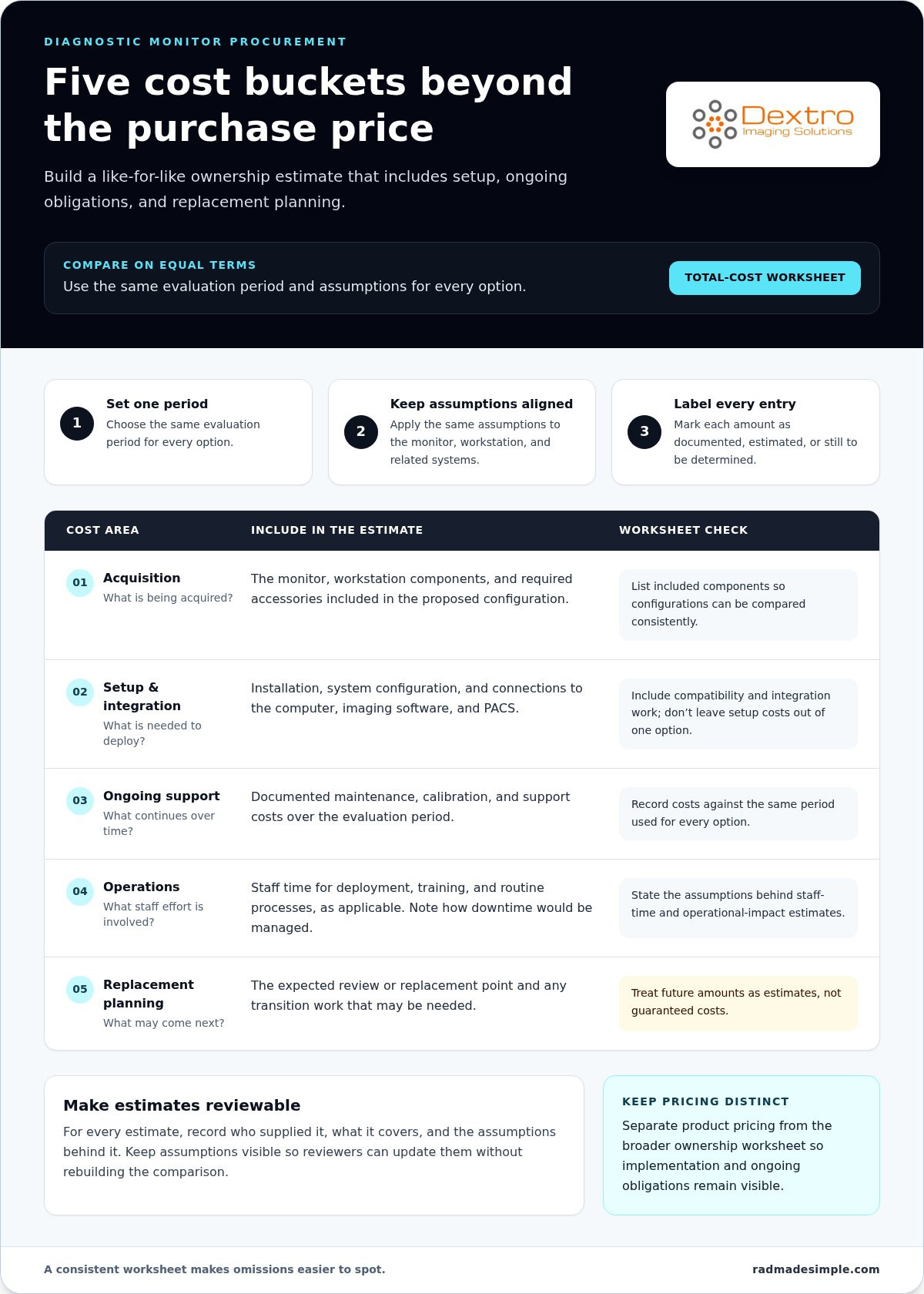
Build a total-cost worksheet
Choose one evaluation period for every option, then record each cost once. Apply the same assumptions to the monitor, workstation, and related systems being compared. Mark each entry as a documented amount, an estimate, or a cost still to be determined. For estimates, record who supplied them, what they cover, and the assumptions behind them.
- Acquisition: Record the monitor, workstation components, and required accessories included in the proposed configuration.
- Setup and integration: Include installation, system configuration, and connections to the computer, imaging software, and PACS.
- Ongoing support: Account for documented maintenance, calibration, and support costs over the evaluation period.
- Operations: Estimate staff time for deployment, training, and routine processes, as applicable. Note how downtime would be managed and what operational impact the estimate assumes.
- Replacement planning: Document the expected review or replacement point and any transition work that may be needed. Treat future amounts as estimates, not guaranteed costs.
The worksheet makes omissions easier to spot. For example, don’t compare a configuration that requires additional workstation components or integration work with an alternative whose setup costs have been left out. Keep assumptions visible so reviewers can update them without rebuilding the comparison.
Compare payment structures on equal terms
An upfront purchase is a budget-allocation choice, not automatically the lowest-cost option. Compare its initial cash requirement and planned ongoing expenses with any third-party financing or lease terms under consideration. Use the actual agreement to record payment amounts, term length, fees, ownership conditions, and end-of-term responsibilities. A monthly figure alone doesn’t show the full cost or commitment.
Calculate the total for each route over the same evaluation period and identify which costs fall inside or outside that term. If an agreement ends before the evaluation period, show remaining obligations or transition assumptions separately rather than treating them as zero. Qualified organizational advisers can review tax and accounting treatment, which depends on the specific arrangement and the organization’s circumstances.
When buying medical grade diagnostic monitors, this comparison connects budget decisions to implementation needs. Dextro’s Jusha diagnostic monitors and related imaging solutions can be considered as part of a broader equipment and workflow plan. Explore Dextro’s medical imaging solutions as you map monitor, workstation, and PACS requirements.
Compare Ways to Buy Medical-Grade Diagnostic Monitors
The right acquisition route depends on more than the monitor’s price. Available capital, internal purchasing rules, ownership preferences, and replacement plans all shape the decision. Compare each route using the same clinical configuration and evaluation period, then review the actual terms. Financing and lease conditions vary by provider and contract; they aren’t automatic features of a monitor purchase.
| Acquisition path | Cash-flow timing | Ownership | Term obligations | End-of-term responsibilities |
|---|---|---|---|---|
| Cash purchase | Most of the equipment cost is allocated upfront. | The organization owns the equipment under the purchase terms. | Payment follows the purchase arrangement; support and maintenance are separate items to assess. | The organization plans for continued use, replacement, or disposal. |
| Third-party financing | Payments are spread over a contract-defined period. | Ownership depends on the agreement. | Review payment schedule, term, fees, approval conditions, and other contractual obligations. | Follow the agreement’s ownership and payoff terms. |
| Lease | Payments are scheduled according to the lease agreement. | The lessor may retain ownership during the term; the contract determines the arrangement. | Review payment commitments, included services if any, and conditions for use or changes. | Options may include return, renewal, or purchase, depending on the contract. |
When an upfront purchase may fit
A cash purchase may suit an organization with available capital and purchasing policies that favor direct ownership. It can make budgeting straightforward, but it doesn’t automatically lower the total cost or make the option preferable. Consider how the initial allocation affects other planned investments and whether the organization expects to retain the display through its useful service period. Assess installation, software integration, maintenance, and support separately.
When financing or leasing merits comparison
Third-party financing can spread payments under contract-specific terms and approval requirements. Leasing can also distribute payments, but agreements differ in ownership, included services, and what happens when the term ends. Compare total payments and obligations, not just the monthly amount. Include fees, term length, ownership provisions, and end-of-term costs only when documented in the agreement.
For example, an organization planning a coordinated workstation refresh may compare a direct purchase with scheduled contractual payments. A team expecting to replace equipment on a different cycle may focus on lease-end options. These are planning considerations, not universal recommendations. Qualified financial, tax, and accounting advisers can review the organization-specific implications before approval.
Monitor decisions can also affect the wider imaging budget. If procurement is part of a broader PACS investment, the radiology PACS total cost guide can help frame that planning discussion. Dextro offers Jusha diagnostic monitors as part of its medical-imaging portfolio, with installation and software integration support. Explore Dextro’s medical imaging solutions as you align equipment choices with your organization’s purchasing plan.
Use a Procurement Checklist to Reduce Buying Risk
A structured review turns monitor selection into a coordinated procurement decision. It helps clinical, IT, procurement, and finance teams resolve requirements before approval, rather than discovering a compatibility issue or unplanned implementation task after equipment arrives. When buying medical grade diagnostic monitors, document who reviews each decision and what evidence is needed to move to the next stage.
Use this sequence to keep the process clear:
- Define clinical requirements. The clinical lead records the intended diagnostic tasks, relevant modalities, local protocols, and acceptance criteria for use.
- Complete technical review. IT reviews the proposed monitor and workstation configuration, operating-system requirements, software, and PACS compatibility. Record dependencies and integration work.
- Review compliance considerations. Identify institutional and applicable technical requirements related to the intended use. The radiology equipment compliance checklist can support this review.
- Approve the budget and acquisition route. Procurement documents the proposed configuration and purchasing terms; finance reviews budget timing, approval thresholds, and the funding structure.
- Plan implementation and acceptance. Assign installation, integration, onboarding, operational continuity, and sign-off responsibilities before placing the order.
Complete clinical and IT reviews
Make clinical approval specific enough to test. Define what the display must support in the intended reading workflow and who will determine whether the installed configuration meets those needs. IT should document the workstation, operating-system, imaging software, and PACS environment, then identify compatibility dependencies. Assign responsibility for calibration, quality assurance, and maintenance within the organization’s operating environment, including how completion will be recorded.
Set acceptance criteria in advance. For example, specify that assigned reviewers will verify the approved configuration, confirm access to the required imaging workflow, and document issues before operational sign-off. Criteria should reflect the clinical task and institutional requirements, not a generic checklist copied from another environment.
Prepare the budget and implementation plan
Procurement and finance should map the proposed acquisition structure to the organization’s budget cycle and approval process. Keep the decision record clear: approved configuration, funding route, responsible approvers, and any conditions to resolve before purchase. Track implementation tasks alongside budget approval.
- Deployment: Schedule installation and software integration, and identify dependencies that could affect readiness.
- Staff onboarding: Identify users who need orientation and who will coordinate it.
- Continuity: Plan how reading workflows will continue during installation or transition.
- Ongoing oversight: Name the owner for maintenance coordination, support escalation, and equipment records.
Dextro supports monitor implementation through installation, maintenance, and software integration, alongside its Jusha diagnostic monitors. Plan your diagnostic monitor procurement with Dextro and connect equipment selection to the practical steps required for deployment.
Move From Monitor Evaluation to a Dextro Imaging Solutions
A sound procurement decision follows a clear sequence: establish clinical fit, estimate ownership costs, select an acquisition route, secure the required approvals, and plan implementation. Keeping those decisions connected helps prevent a technically suitable display from becoming a poor fit for the broader imaging environment. It also gives stakeholders a practical basis for moving from evaluation to purchase.
Dextro Imaging Solutions offers Jusha diagnostic monitors within a medical-imaging portfolio that also includes workstations and PACS solutions. The right configuration depends on your clinical tasks and existing systems. Consider how the display will work within the reading environment and what support will be needed to put it into use, rather than treating it as an isolated purchase.
Connect display decisions to the reading environment
Workstation and PACS compatibility should shape monitor selection when the display will be part of an existing reading setup or a broader system refresh. Consider how the computer, imaging software, and PACS connect, and whether the planned configuration fits the intended workflow. If workstation configuration is central to the project, the radiology reading workstation buying guide can help frame those system-level considerations.
This coordination step doesn’t require reopening every specification decision. Use the clinical and technical requirements already established to identify dependencies, integration tasks, and gaps to resolve before purchase approval. That keeps the selection focused on system fit and day-to-day use.
Define the next step for your organization
Prepare a concise project brief before advancing procurement. Include the approved clinical use, relevant system requirements, cost assumptions, preferred acquisition route, stakeholder approvals, and implementation needs. Record open questions so clinical, IT, procurement, and finance teams can resolve them while keeping the decision sequence on track.
- Clinical: Summarize intended use and the criteria for operational acceptance.
- IT: Outline workstation, software, and PACS dependencies.
- Procurement and finance: Document the proposed configuration, budget assumptions, acquisition route, and required approvals.
- Implementation owners: Identify installation, integration, maintenance, and support responsibilities.
Dextro supports customers with installation, maintenance, and software integration. Include these needs in the buying conversation early so equipment selection and implementation planning move forward together. For organizations buying medical grade diagnostic monitors, that connection helps turn a product decision into a workable procurement plan.
Explore Dextro’s diagnostic monitor and imaging solutions and discuss your project requirements as you plan the next steps.
Make Your Monitor Decision Ready for the Next Step
A strong procurement decision should do more than support an immediate purchase. Keep the rationale, assumptions, and approval record together so your team can revisit them when workflows, systems, or replacement priorities change. A clear record makes future planning more consistent and helps new stakeholders understand why the chosen configuration fits the organization.
Use the same discipline when buying medical grade diagnostic monitors: connect the decision to clinical use, document responsibilities for implementation, and keep the next action clear. A well-prepared project brief gives your team a practical starting point for evaluating equipment within its broader imaging environment.
Dextro Imaging Solutions brings Jusha diagnostic monitors and specialized medical imaging workstations together with installation, maintenance, and software integration support. Explore the options that fit your project and move your plan forward.
Explore Dextro’s diagnostic monitor and imaging solutions to discuss your project requirements and take the next step.
Frequently Asked Questions
What makes a monitor medical-grade for diagnostic imaging?
Medical-grade suitability depends on whether a display meets the needs of its intended clinical use and applicable technical and regulatory requirements, not on a marketing label alone. Requirements can vary by modality and task, such as reviewing grayscale cross-sectional studies versus color images. Before procurement, have clinical and technical leads verify proposed specifications against current applicable standards and institutional protocols. No single display specification fits every diagnostic workflow.
Can a standard office monitor be used to interpret medical images?
An office monitor may be suitable for general image viewing, but that doesn’t automatically make it appropriate for diagnostic interpretation. Suitability depends on intended use, image requirements, applicable regulations, and facility protocols. Image review for a team discussion, for example, may have different requirements from a diagnostic read. Document who will interpret the images, which modalities are involved, and the relevant technical criteria before selecting equipment.
Is financing medical imaging equipment different from leasing it?
Yes. Financing and leasing can differ in ownership, payment structure, contract duration, and end-of-term obligations. Details depend on the provider and agreement. Compare total payments, ownership rights, any included services, and what happens if the organization needs to end or change the arrangement early. Before signing, have qualified tax and accounting advisers assess how the specific agreement applies to your organization.
How should a small imaging center plan a diagnostic monitor budget?
Start by connecting clinical requirements to available capital, purchasing approvals, implementation needs, and ongoing support expectations. Identify which budget cycle can accommodate the project and who must approve the purchase. Include installation and system integration in the plan, not just the display. Payment choices depend on the organization’s budget and documented contract terms, so build the comparison from actual figures rather than unverified price ranges.
What costs should a medical monitor budget include beyond the display?
Depending on the setup, account for workstation components, installation, software integration, calibration, maintenance, support, and eventual replacement planning. A facility adding a display to an existing workstation may have different requirements from one refreshing a complete reading station. Note which items apply, who provided each estimate, and what it assumes. Compare options over the same planning period, and consult a diagnostic monitor pricing guide for monitor-specific cost discussion.
Should a diagnostic monitor purchase include a workstation and PACS review?
Yes, review the surrounding systems to identify dependencies before procurement. A monitor’s usability in a clinical workflow can depend on the workstation, imaging software, and PACS environment. IT can assess whether the proposed configuration fits the facility’s existing setup and flag installation or integration tasks. This review doesn’t mean every monitor purchase requires a workstation replacement or PACS change; it clarifies what the specific project needs.


